Module 0
IT and security foundations for people starting from scratch
Purpose
After this module, you should be able to read basic exam scenarios without getting lost in technical terminology. It's not about advanced system administration, but about building a foundation without which later topics - such as firewalls, logs, vulnerabilities, authentication, segmentation and incident response - will be difficult to understand.
After the module you should be able to:
- explain what an IP address, port, protocol and service are
- recognize what is happening in a simple flow user → application → network → server
- distinguish user from account, account from permission, and permission from role
- explain the difference between log, event, alert and incident
- distinguish between resource, threat, vulnerability, risk and security control
- prepare for further Security+ modules.
Introduction
Cybersecurity doesn't start with tools like Security Information and Event Management (SIEM), Endpoint Detection and Response (EDR) or a firewall. It starts with understanding what we are protecting, what we are protecting against, where error can occur and how systems communicate with each other.
Imagine a simple situation: an employee logs in to the company application via a browser. There are many elements running in the background: the user's computer, account, password or second login component, network, server, application, database, logs, permissions and access control mechanisms. If you don't understand these elements, it will be difficult to determine later whether the problem is an attack, misconfiguration, failure, lack of updates, incorrect permissions or simple user error.
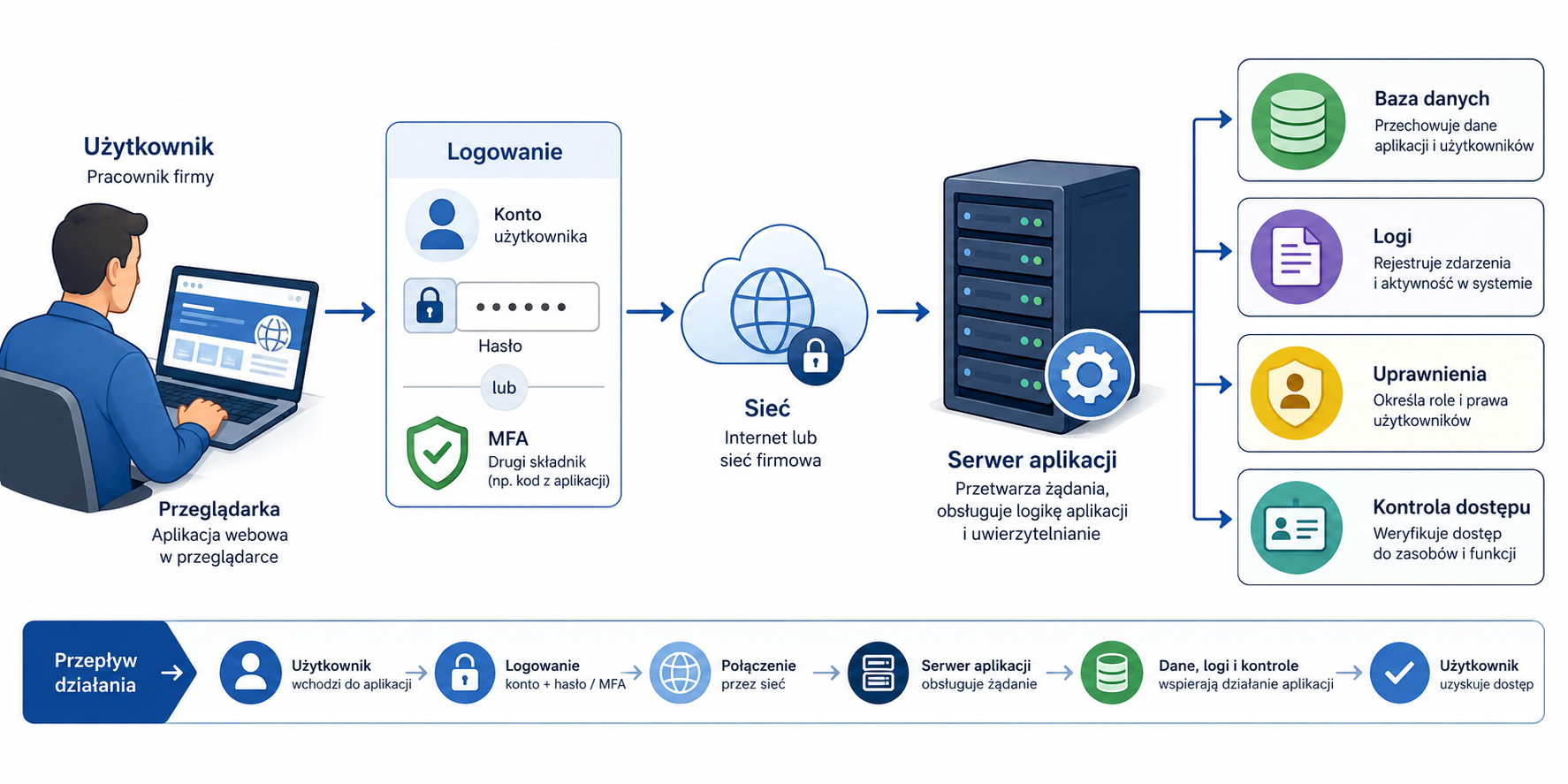
Module 0 is intended to give you the language and concept map. This is not yet the full SY0-701 exam domain, but without this foundation it will be more difficult to master the official exam domains.
1. IP address, port, protocol and service
Problem
In cybersecurity, you often analyze communication: who connects to whom, through what port, with what protocol and to what service. Without understanding these concepts, it is difficult to assess whether network traffic is normal, suspicious, or misconfigured.
Example: in the logs you see a connection from the employee's computer to the server on port 443. Is this something bad? Not necessarily. Port 443 is usually associated with Hypertext Transfer Protocol Secure (HTTPS) traffic, i.e. secure communication with a web application. But if you don't know what ports and protocols mean, you may mistake normal traffic as an incident or ignore something suspicious.
Explanation from scratch
An IP address is the logical address of a device on the network. It can be compared to the address of a building. If a computer wants to send data to a server, it must know its IP address or name, which will later be translated by the Domain Name System (DNS).
The port indicates the specific service running on the device. If an IP address is like the address of a building, a port is like the door number to a specific room. One server can handle many services simultaneously: a website, e-mail, remote login, database or administrative application.
A protocol is a set of communication rules. Determines how data is sent, received, acknowledged and interpreted. Transmission Control Protocol (TCP) ensures connection reliability, and User Datagram Protocol (UDP) is simpler and faster, but does not provide the same delivery control.
A service is a program or function that listens on a specific port and performs a specific task. An example of a service might be a web server, a DNS server, a mail server, or a remote access service.
How it works step by step
Let's assume that a user enters the address of a company's website in the browser.
The user's computer checks which IP address corresponds to the website name.
For this, it uses DNS, a system for translating names into IP addresses.
Once it knows the server's IP address, it connects to it.
If the website uses HTTPS, communication usually goes to port 443.
The server receives a connection on this port.
The web service processes the request.
The server sends the response to the user's browser.
Systems along the way can save logs: who connected, when, from what address and to what service.
Practical example
The administrator sees that the employee's computer is connecting to the server's IP address on port 22. Port 22 is often used by Secure Shell (SSH), a remote administration protocol. If the employee is a Linux systems administrator, this may be normal. If they are an HR employee who should not be using SSH, this may need to be checked.
The same technical fact - connection to port 22 - can have different meanings depending on the context. In Security+, context often determines the best answer.
Exam example
Scenario
An analyst notices multiple outgoing connections from an employee's computer to an unknown IP address on an unusual port. What should he check first?
Best approach
Determine what service or application is using this port, whether the traffic is expected, what process is generating it, and whether the destination address is known to the organization.
It's not enough to say, "An unusual port means an attack." An unusual port could indicate an attack, but it could also indicate a non-standard business application.
Not to be confused with this
Concept Not to be confused with Difference
IP Address An IP port indicates a device or interface on a network, a port indicates a specific service.
Port Protocol Port is a logical number, protocol is communication rules.
Service User Application The service can run in the background without the application window visible.
DNS HTTPS DNS translates names into IP addresses; HTTPS is used for secure web communication.
Common mistakes
The most common mistake is learning ports by heart without understanding why they exist. During the exam, it is more important to understand the script than to memorize the number mechanically. The second mistake is to assume that a port always uniquely identifies an application. In practice, applications may use non-standard ports, and malware may try to hide in what appears to be normal traffic.
A definition to remember
An IP address indicates a device on the network, a port indicates a service on that device, a protocol specifies communication rules, and a service performs a specific task.
2. Client-server model
Problem
Most security scenarios involve communication between systems. The user opens the website, the application connects to the database, the phone synchronizes e-mail, the server sends logs to the monitoring system. You need to understand who is initiating the call, who is responding, and where security controls can be applied.
Explanation from scratch
The client is the system that sends the request. It can be a browser, a mobile application, an email client or a script.
A server is a system that receives a request and responds. It can host a website, database, files, login service, or business application.
The client-server model does not mean that the client is less important than the server. From a security perspective, both elements can be attacked. The user's computer may be infected with malware and the server may have a vulnerable application.
How it works step by step
The client needs a resource, e.g. a page, file or data.
The client determines the server address.
The client sends a request to the appropriate service.
The server checks whether it can handle the request.
The server may require authentication.
The server processes the request.
The server sends back the response.
Both sites or intermediate devices can save logs.
Practical example
The employee logs in to the HR system. Its browser is the client. The application server accepts the login request. The database stores information about employees. The Identity and Access Management (IAM) system can verify a user's identity. A firewall can restrict access to the server only from specific networks.
If a user can't log in, the problem may be in many places: the user's computer, the network, DNS, the application, the database, the password, permissions, or the multi-factor authentication mechanism.
Exam example
Scenario
Users can open the login page, but after entering their details, they receive an application error. What does this suggest?
Possible interpretation:
The network and web service are probably functional enough for the login page to load. The problem may be with the application backend, database, identity service, or permissions.
Not to be confused with this
Don't confuse customer with user. The user is the person and the client is the software or device making the request. Also, don't confuse a physical server with a server service. One physical or virtual server can run multiple services.
Common mistakes
A common mistake is diagnosing problems too quickly. If the application does not work, it does not automatically mean that the "network is down". If a user can't log in, it doesn't automatically mean the "account has been hacked." In Security+ you have to read the script and distinguish symptoms from causes.
A definition to remember
In the client-server model, the client sends a request, the server handles it, and security depends on the correct protection of both sides and communication between them.
3. Operating system, process, service and configuration
Problem
Attacks, crashes and security errors often affect operating systems. Malware runs a process, a service runs with excessive privileges, the configuration allows weak passwords, and a lack of updates leaves you vulnerable. Without understanding the basics of the system, it is difficult to analyze incidents.
Explanation from scratch
The operating system manages hardware, users, files, memory, processes, networking, and permissions. Examples include Windows, Linux, macOS, mobile systems, and network device systems.
A process is a running program. When you open the browser, the system starts the browser process. Malware can also run as a process.
A service is a program that usually runs in the background and is often started automatically. It can support logging, updates, network connections, printing, monitoring or a server application.
Configuration is a set of settings that determine how a system or application works. From a security point of view, configuration is critical because even a good tool can be dangerous if set incorrectly.
How it works step by step
The operating system starts.
Loads the configuration.
Starts the required services.
The user logs in to the account.
The user runs applications that become processes.
Processes and services perform actions within their authority.
The system saves selected events in logs.
An administrator or security tool can analyze processes, services, configurations and logs.
Practical example
A web service runs on the server. An administrator accidentally configured it to run with administrator privileges. If an application has a vulnerability and an attacker exploits it, they can gain much more access than they should. Therefore, the principle of least privilege applies not only to people, but also to services and processes.
Exam example
Scenario
After updating the application, the server begins to accept connections from all over the Internet, even though access was previously limited to the corporate network. What is the most likely problem?
Best answer
Misconfiguration or change in access control settings after update.
Not to be confused with this
Concept Not to be confused with Difference
Process Program file The file is on disk; a process is a running instance of a program.
Service Manually opened application The service often runs in the background and may start automatically.
Configuration Application code The code defines the program logic, the configuration defines the operation settings.
Hardening Update The update removes bugs or vulnerabilities; hardening limits the attack surface through safe settings.
Common mistakes
A common mistake is to think that the security of the system depends only on the installed antivirus. In practice, what matters are updates, configuration, permissions, running services, monitoring and the change management process. The second mistake is leaving the default settings without checking whether they fit the environment.
A definition to remember
The operating system manages resources and permissions, a process is a running program, a service usually runs in the background, and the configuration determines how the system or application behaves in practice.
4. Account, user, group, role and permission
Problem
Many security incidents result from improper access. Someone has too high privileges, the old account hasn't been disabled, the administrator account is used for everyday work, or the group gives access to data that the user shouldn't see.
Explanation from scratch
User is a person or entity using the system.
An account is the technical representation of a user in the system. A person can have multiple accounts, such as a regular employee account and a separate administrative account.
A group is a collection of accounts. Instead of granting permissions to each user individually, the administrator assigns users to groups.
A role describes a function or set of responsibilities, e.g. "system administrator", "accounting", "auditor", "helpdesk operator".
Permission determines what the account can do: read a file, change configuration, delete a record, restart a service, add a user, or approve a payment.
How it works step by step
The organization creates an account for the employee.
The account is assigned to a group or role.
A group or role has specific permissions.
The user logs in to the system.
The system checks who the user is.
The system checks what the user can do.
User actions may be recorded in logs.
When a user changes positions or leaves, access should be changed or revoked.
Practical example
A new employee in the finance department needs access to the accounting system. Instead of manually granting him access to each folder and application, the administrator adds him to the "Finance-Users" group. The group has previously defined permissions. This makes management easier, but carries a risk: if the group has too broad access, each new member will inherit excessive privileges.
Exam example
Scenario
The employee was transferred from the IT department to the sales department, but still has administrative access to the servers. Which rule was violated?
Best answer
The principle of least privilege and the appropriate process for modifying access after changing positions.
Not to be confused with this
Don't confuse authentication with authorization. Authentication answers the question: "Who are you?" Authorization answers the question: "What are you allowed to do?" A user may log in successfully but still not have access to a specific file or feature.
Don't confuse a personal account with a service account. A personal account is assigned to a person. A service account serves an application, process, or service.
Common mistakes
The most common mistake is granting permissions "in advance". It is convenient to provide broad access to avoid helpdesk calls, but from a security point of view this increases the consequences of a mistake, infection or account takeover. The second error is the failure to revoke access after an employee leaves or changes position.
A definition to remember
An account represents a user or service in the system, and permissions determine what the account can do. Secure access management involves granting only access that is needed to complete the task.
5. Log, event, alert and incident
Problem
Scenarios related to monitoring and log analysis appear very often in Security+. It is important to understand that not every event is an alert and not every alert is an incident. Wrong distinctions lead to poor operational decisions.
Explanation from scratch
A log is a record of information about what happened in a system, application, network device or service. The log may contain time, username, IP address, operation result and technical details.
An event is a single fact recorded by the system, e.g. a failed login, process launch, configuration change, or network connection failure.
An alert is a signal generated by a monitoring system when an event or set of events meets certain conditions. The alert says "this may require attention."
An incident is a confirmed or sufficiently probable security breach that requires a response according to the incident response process.
How it works step by step
The system records many events in logs.
The monitoring tool analyzes logs.
The rule detects a suspicious pattern, e.g. 20 failed logins in a short period of time.
The system generates an alert.
The analyst checks the context.
If an alert indicates a real breach or high risk, it is classified as an incident.
The team responds: analyzes, limits the effects, removes the cause and documents the actions.
Practical example
One failed employee login in the morning may be a simple mistake. One hundred failed logins from different countries within a few minutes may indicate password spraying or brute force. An alert is only created when the system has a rule that considers such a pattern suspicious.
Exam example
Scenario
The SIEM system generated a login alert from two remote locations in quick succession. What should an analyst do?
Best answer
Verify context such as user, IP addresses, VPN usage, login history, and other related events. Only then should the case be classified as an incident.
Not to be confused with this
Concept Meaning What not to assume
Log Recording of activity data The log itself does not indicate a problem.
Event Something that happened The event does not have to be suspicious.
Alert A signal requiring attention An alert is not always a real incident.
Incident Situation requiring a security response The incident should be confirmed or sufficiently probable.
Common mistakes
The first mistake is to treat every alert as a certain intrusion. This leads to chaos and alert fatigue. The second mistake is ignoring alerts without analysis. The third mistake is removing evidence too early, e.g. deleting files or restarting the system before securing the information needed for analysis.
A definition to remember
A log is a record of activity, an event is a single fact, an alert is a warning signal, and an incident is a security situation that requires a response.
6. Resource, threat, vulnerability, risk and security control
Problem
This is one of the most important distinctions in all of cybersecurity. If you confuse threat with vulnerability, or risk with incident, it will be more difficult to solve exam questions and make good decisions in practice.
Explanation from scratch
A resource is something that has value and should be protected. It may be a server, laptop, administrator account, database, application, documentation, company reputation or customer data.
A hazard is a potential cause of harm. It could be a cybercriminal, a malicious insider, employee error, hardware failure, fire, ransomware or phishing.
Vulnerability is a weakness that can be exploited. This could be a lack of updates, a weak password, a misconfiguration, an open port, a lack of encryption, or excessive permissions.
Risk is the possibility that a threat will exploit a vulnerability and impact an asset. Risk combines probability and impact.
A security control is a mechanism, process, setting, or action that reduces risk. The control may be a firewall, training, encryption, backup, monitoring, change approval procedure or multi-factor authentication.
How it works step by step
You identify a resource, e.g. a customer database.
You identify threats, e.g. an attacker trying to steal data.
You are looking for vulnerabilities, e.g. lack of updates to the web application.
You assess the risk: whether the vulnerability can be exploited and what the impact will be.
You select controls, e.g. patching, Web Application Firewall (WAF), monitoring, access restrictions, security tests.
You check whether the control actually reduced the risk.
You monitor the environment because the risk changes over time.
Practical example
The company has a public web application. The resource is customer data. The threat is a cybercriminal. The vulnerability may be lack of input data validation. The risk is theft or modification of data by attacking the application. Controls may include code improvement, input validation, WAF, security testing and log monitoring.
Exam example
Scenario
The company discovered that an Internet-accessible server had an unpatched critical vulnerability. Which statement is most accurate?
Best answer
Vulnerability increases risk, especially because the asset is exposed to the Internet and can be exploited by an external threat. Appropriate mitigation should be selected, e.g., updating, access restriction, or other compensatory control.
Not to be confused with this
Concept Example Not to be confused with
Resource Customer Database Threat
Threat Attacker, ransomware, fire Vulnerability
Vulnerability Weak password, no update Active attack
Risk Possibility of data loss by exploiting a vulnerability. The vulnerability itself
MFA control, firewall, backup, procedure Guarantee of complete security
Common mistakes
A common mistake is to say "we have risk because we have vulnerability." Vulnerability alone does not always mean high risk. Risk depends on context: asset value, exposure, likelihood of use, existing controls, and business impact. The second mistake is to assume that one control completely removes the risk. Often, control only reduces them.
A definition to remember
Risk arises when a threat can exploit a vulnerability and negatively impact an asset; security checks are intended to reduce this risk.
Key concepts
Concept Meaning
IP address The logical address of a device or interface on a network.
Port A logical number that indicates the service on the device.
Protocol Principles of communication between systems.
Service A program or function that receives requests, often running in the background.
DNS A system that translates domain names into IP addresses.
Client A system that sends a request to a server.
Server A system that handles client requests.
Operating System Software that manages hardware, processes, users and permissions.
Process A running instance of the program.
Account The technical representation of a user or service in the system.
Permission Specifies what the account can do.
Log A record of system, application or device activity.
Alert A warning generated based on a rule or detected pattern.
Incident A security situation requiring response.
Resource Something of value that needs to be protected.
Danger Potential cause of damage.
Vulnerability A weakness that can be exploited.
Risk The possibility that a threat will exploit a vulnerability and cause harm.
Safety control A mechanism, process or action that reduces risk.
Examples
Example 1: Login to the company application
The employee opens the HR application. His laptop acts as a client. The browser sends a request to the application server. DNS helps find the IP address of the server. Communication takes place via HTTPS. The user enters his login and password and the system checks his identity. Then the system checks whether the account has permissions to the HR module.
The logs may contain information about the login time, IP address, login result and authentication mechanism used. If the user enters a wrong password, this will be an event. If there are a lot of such events, the system may generate an alert. If the analysis confirms an account takeover attempt, the case may be classified as an incident.
Example 2: Public server with an unpatched vulnerability
The company has a web server accessible from the Internet. The server is a resource. The attacker is a threat. An unpatched vulnerability in an application is a vulnerability. The risk is that an attacker could exploit the vulnerability and gain access to data. Controls may include application updates, access restrictions, log monitoring, WAF, and post-patch security testing.
Example 3: Employee with excessive privileges
The sales department employee has access to the folder with financial data. The access itself may result from incorrect group assignment. The vulnerability is over-entitlement. The threat could be accidental data disclosure, a malicious insider, or malware running on a user's account. The controls will include a review of privileges, the principle of least privilege and the process of revoking access following a job change.
Practical applications
Analysis of simple security scenarios: "what is a resource, what is a vulnerability, what is a threat?"
Initial reading of system and application logs.
Identify whether the problem is network, account, application, service, or configuration related.
Preparation for later topics: IAM, hardening, monitoring, incident response, vulnerability management.
Better solving of given-a-scenario exam questions.
Common mistakes
Wrong Why is it wrong Correct understanding
| "IP address and port are the same thing." | IP indicates the device, port indicates the service. | IP answers the question "where?", port "to which service?". |
|---|---|---|
| “Every alert is an incident.” | The alert may be false or require context. | The alert must be verified before being classified as an incident. |
| “Vulnerability is attack.” | Vulnerability is a weakness, not the action of the attacker itself. | The attack could exploit the vulnerability. |
| "The logged in user has the right to everything." | Logging in confirms your identity, but not all your permissions. | After authentication, authorization occurs. |
| “Backup solves every security problem.” | Backup helps with recovery, but does not prevent all attacks. | Backup is just one control, not a complete security program. |
| "An unusual port always means malware." | Business applications can use non-standard ports. | The importance of a port must be assessed in the context of the process, host, and purpose of the connection. |
Common mistakes
Learning shortcuts without an action mechanism
Just remembering DNS, TCP, UDP, IAM or SIEM is not enough. On an exam, a question usually describes a situation rather than just asking for a definition.
Confusing the symptom with the cause
Login error is a symptom. This could be due to a bad password, a locked account, an IAM service failure, no network, a DNS issue, or a security incident.
Ignoring the business context
The same network traffic may be normal for an administrator and suspicious for an office user.
Over-reliance on one control
Firewall, MFA, backup and antivirus are important, but no single control provides complete security.
No distinction between prevention, detection and response
Some checks prevent, some detect, and some help you get back to normal.
What you need to know for the exam
At this stage you are not yet learning the full official domain, but you are building a foundation for the entire SY0-701. It is especially important to be able to:
- read technical scenarios and distinguish system elements
- recognize the difference between user, account and permission
- distinguish an event, alert and incident
- indicate the resource, threat, vulnerability, risk and control
- understand basic network communication: IP, port, protocol, DNS
- Don't jump to conclusions without context.
Checklist
User should be able to:
- Explain the difference between IP address, port, protocol and service.
- Describe a simple flow of client → DNS → server → service → logs.
- Explain the difference between user, account, group, role and permission.
- Distinguish between authentication and authorization.
- Distinguish log, event, alert and incident.
- Identify the resource, threat, vulnerability, risk and control in a short scenario.
- Explain why a single alert does not always mean a confirmed incident.
- Point out typical mistakes made by beginners when analyzing security scenarios.
- Review questions
- What is the difference between an IP address and a port?
- Why is DNS important in network communication?
- What does it mean that an application works in a client-server model?
- What is the difference between a process and a service?
- What is the difference between a user and an account?
- What is the difference between authentication and authorization?
- Why is an alert not always an incident?
- Give an example of a resource, threat, vulnerability, risk, and control.
- Why is excessive privilege a vulnerability?
- What should an analyst do before declaring an alert an incident?
- Answers with explanations
- The IP address indicates a device or interface on the network, and the port indicates a specific service on that device.
- The IP tells you where to send the data, and the port helps determine which application or service should handle it.
- DNS translates domain names into IP addresses.
- This allows the user to enter the name of the website and the computer can find the correct server.
- The client-server model means that the client sends a request and the server handles it.
- An example of a client is a browser, and an example of a server is a system that provides a web application.
- A process is a running program, and a service is a program that usually runs in the background and performs a specific function.
- The service can run without active user action.
- A user is a person or entity using the system, and an account is the technical representation of that user in the system.
- One person can have more than one account.
- Authentication confirms identity, and authorization determines what you can do.
- You may log in correctly but still not be able to access a specific resource.
- The alert is a warning signal but requires verification.
- It may be a false positive or it may be the result of normal activity that looks unusual.
- Example:
- Resource: customer database.
- Threat: Cybercriminal.
- Vulnerability: lack of application updates.
- Risk: data theft by exploiting vulnerabilities.
- Control: update, WAF, monitoring and access restriction.
- Excessive permissions increase the impact of a bug, infection, or account takeover.
- If a regular user has administrative access, an attacker can also gain broad access after taking over the account.
- The analyst should check the context.
- He should review the related logs, user, connection source, time, device, activity history, and possible legal explanations.
- Practical tasks
- Laboratory 1: Recognition of elements of a security scenario
Purpose:
Learn to distinguish between resource, threat, vulnerability, risk and control.
Context:
The company has a web application available from the Internet. The application stores customer data. The administrator noticed that the application had not been updated for six months. The logs included login attempts from many countries. The company has implemented MFA for administrators, but not for regular users.
Requirements:
- A piece of paper, notebook or text document.
- No need to use other systems.
Steps:
- List all resources mentioned in the scenario.
- List possible threats.
- Indicate vulnerabilities.
- Describe the risks.
- Offer a minimum of three security checks.
- Indicate which inspections are preventive, which are detective and which are corrective.
Expected result:
A short table showing the relationship: resource → threat → vulnerability → risk → control.
Pass criteria:
- Customer data has been correctly identified as a resource.
- Lack of update was correctly identified as a vulnerability.
- The risk of account takeover or data breach has been correctly described.
- Sensible controls were proposed, e.g. updating, MFA for users, monitoring, logging restrictions, alerts, log review.
Only perform this exercise in a legal, controlled laboratory environment. Don't use it on other people's systems, networks or accounts.
Laboratory 2: Analysis of simple logs
Purpose:
Distinguish between an event, an alert and a possible incident.
Context:
You have the following entries:
- Time User Event Source
- 08:01 anna.k Login successful Warsaw
- 08:03 piotr.n Login failed Warsaw
- 08:04 piotr.n Login failed Warsaw
- 08:05 piotr.n Login successful Warsaw
- 02:13 Marek.z Login failed Unknown country
- 02:13 Marek.z Login failed Unknown country
- 02:14 marca.z Login failed Unknown country
- 02:14 marca.z Login failed Unknown country
- 02:15 marca.z Login failed Unknown country
Steps:
- Indicate which entries are normal events.
- Indicate which entries may warrant an alert.
- Indicate whether the incident can now be confirmed based on data alone.
- Write what additional information is worth checking.
Expected result:
- Recognize that a single failed login does not have to be an incident.
- Recognizing that multiple failed logins from an unusual location may require alerting and analysis.
Pass criteria:
- We did not automatically classify every incorrect login as an incident.
- The need to verify the context was indicated.
- It was suggested to check MFA, VPN, login history, device and account status.
Only perform this exercise in a legal, controlled laboratory environment. Don't use it on other people's systems, networks or accounts.
Mini-test
Question 1
What best describes a port in network communication?
A. The physical address of the network card
B. A logical number that indicates the service on the device
C. Server domain name
D. Encrypted tunnel between client and server
Correct answer:
B
Explanation:
The port indicates a service running on the device, such as a web service, DNS or SSH.
Why the other answers are worse:
- A: This describes the hardware address rather than the port.
- C: The domain name is translated by DNS.
- D: This describes a VPN or encrypted communication rather than a port.
- Question 2
The user has logged in successfully, but cannot open the financial report. Which area is most likely to need to be checked?
A. Authorization
B. DNS
C. Physical power to the server
D. HTTPS port number
Correct answer:
A
Explanation:
Since the user logged in, authentication probably worked. The problem is whether it has the right to the resource, i.e. authorization.
Why the other answers are worse:
- B: DNS would likely be an issue before reaching the application.
- C: The server is probably running since the user has logged in.
- D: The HTTPS port does not explain the lack of access to a particular report.
- Question 3
Which statement best describes vulnerability?
A. Confirmed security breach
B. A weakness that can be exploited
C. Person attacking the system
D. Network traffic blocking tool
Correct answer:
B
Explanation:
A vulnerability is a weakness in a system, process, configuration or application.
Why the other answers are worse:
- A: This is closer to the incident.
- C: This is a threat or threat actor.
- D: It could be a security check.
- Question 4
- The monitoring system generated an alert after five failed logins. What is the best next step?
A. Delete your user account immediately
B. Ignore the alert because incorrect passwords are normal
C. Verify the context and associated logs
D. Disable all system logins
Correct answer:
C
Explanation:
The alert requires analysis. It may be a simple mistake, brute force attempt, password spraying or some other problem.
Why the other answers are worse:
- A: That's too aggressive without verification.
- B: Ignoring the alert is risky.
- D: This is excessive and potentially disruptive to business.
- Question 5
Which set best shows the security relationship?
A. Port → DNS → password → monitor
B. Resource → threat → vulnerability → risk → control
C. Client → user → printer → folder
D. Alert → cable → processor → application
Correct answer:
B
Explanation:
This is a basic way of thinking about security: we protect an asset from a threat that can exploit a vulnerability, causing risk; the control is intended to reduce this risk.
Why the other answers are worse:
- A, C and D: Contain technical concepts but do not show a logical risk model.
- Question 6
What best describes DNS?
A. Mechanism of translating domain names into IP addresses
B. Disk encryption system
C. Backup Tool
D. The process of granting administrator privileges
Correct answer:
A
Explanation:
DNS allows you to use names instead of manually entering IP addresses.
Why the other answers are worse:
- B: This is about encryption.
- C: This is about backup.
- D: This is about access management.
- Question 7
The employee left the company, but his account still works. What is the main problem?
A. No DNS
B. Excessive or outdated permissions
C. Invalid port
D. Too many logs
Correct answer:
B
Explanation:
A former employee's active account is a risk because it could be used unauthorized.
Why the other answers are worse:
- A: DNS is not the core of the problem.
- C: Port is not about the account lifecycle itself.
- D: The number of logs is not the main problem.
- Question 8
Which sentence is correct?
A. Each vulnerability is an active attack.
B. Each alert is a confirmed incident.
C. Security controls reduce risk.
D. User and account always mean exactly the same thing.
Correct answer:
C
Explanation:
Security controls exist to reduce the likelihood or impact of a risk.
Why the other answers are worse:
- A: A vulnerability can exist without an active attack.
- B: The alert requires verification.
- D: A user is a person, an account is a technical representation.
- Fiszki
- Front of the index card. Back of the index card
| What does an IP address mean? | The logical address of a device or interface on a network. |
|---|---|
| What does port mean? | A logical number that indicates a specific service on the device. |
| What is the protocol? | A set of rules for communication between systems. |
| What is DNS? | A system that translates domain names into IP addresses. |
| What is the difference between a client and a server? | The client sends a request, the server handles it. |
| What is the process? | A running instance of the program. |
| What is the service? | A program that usually runs in the background and performs a specific function. |
| What is the difference between a user and an account? | A user is a person or entity, an account is a technical representation in the system. |
| What is the difference between authentication and authorization? | Authentication confirms identity, authorization specifies permitted actions. |
| What is log? | Recording of system, application or device activity. |
| What is the difference between an alert and an incident? | An alert is a warning requiring analysis, an incident is a situation requiring a security response. |
| What is a resource? | Something valuable that needs to be protected. |
| What is a threat? | Potential cause of damage. |
| What is vulnerability? | A weakness that can be exploited. |
| What is risk? | The possibility that a threat will exploit a vulnerability and cause harm. |
| What is a security check? | A mechanism, process or action that reduces risk. |
| Why is excessive privileges risky? | They increase the impact of a bug, malware, or account takeover. |
| Why isn't every alert an incident? | The alert may be false or require additional context. |
Images to generate
IMG_M00_S01_BASIC_IT_FLOW
Place in the material:
"Introduction" section, after the paragraph describing the employee's login to the application.
Image Purpose:
Show a simple technical flow: the user uses the device, the application connects to the server via the network, the server uses the service and saves logs.
Description of the image to generate:
Technical diagram showing the flow: user at the laptop → browser as a client → DNS query → corporate network/Internet → application server → database → logging/monitoring system. Short labels for each element: "user", "account", "client", "DNS", "IP address", "port/protocol", "server", "service", "logs". Add arrows showing the direction of communication and a separate line to the log system.
Style:
Technical diagram, simple, clear, without decorations.
Mandatory elements:
- user
- laptop or computer
- client/browser
- DNS
- network
- application server
- database
- logs
- strzałki przepływu.
Elements to avoid:
- excess text
- illegible icons
- realistic photos of people
- random cyber attack symbols
- complicated cloud architecture.
- Coverage of exam requirements
- Requirement/preparation area Where covered Level of coverage Comments
- Understanding the basics of network communication IP, port, protocol, DNS, client-server Introductory Needed before domains 1-4.
- Understanding systems and services Operating system, process, service, configuration Introductory Preparation for hardening, logs and vulnerabilities.
- Understanding Access Account, User, Group, Role, Permission Introductory Preparation for IAM and Zero Trust.
- Understanding Log, Event, Alert, Incident Monitoring Introductory Preparation for Security Operations.
- Understanding risk Resource, threat, vulnerability, risk, control Introductory Preparation for the entire exam, especially risk management and threat mitigation.
- Module completeness check
Scope from outline covered:
- network basics: IP, port, protocol, DNS, client-server
- system basics: operating system, process, service, configuration
- administration basics: user, account, group, role, permission
- log basics: log, event, alert, incident
- security basics: resource, threat, vulnerability, risk, control
- examples, exercises, mini-test, flashcards and supporting image.
Scope requiring deepening:
- specific ports and protocols will be developed for networks, architecture and security operations
- detailed access control models will be developed in the IAM module
- a detailed incident response will appear in the Security Operations II module
- Formal risk management will appear in the Security Program Management and Oversight module.
Most important things to remember:
- IP indicates the device, port indicates the service.
- Authentication says "who you are", authorization says "what you can do".
- An alert is not automatically an incident.
- Risk results from the relationship: resource + threat + vulnerability + impact.
- Security controls are meant to reduce risk, not magically fix all problems.
Is the material sufficient to master this part:
Yes, as a foundation before the actual SY0-701 domains. This module does not replace learning the official domains, but prepares you to understand them.
Potential vulnerabilities:
- no practical work in a real SIEM system
- no detailed network configuration
- lack of a complete list of examination ports
- no detailed types of security controls - will be in module 1.
Recommended replay:
- Work through the flashcards.
- Take the mini-test again after a few hours.
- Do lab 1 and 2.
- Try to describe any scenario yourself in the format: resource → threat → vulnerability → risk → control.
- Explanation depth control
- Important concepts are explained, not just listed.
- Each key area shows what problem it solves.
- Operation is described from scratch and step by step.
- Practical and exam examples added.
- Common mistakes and typical errors were indicated.
- Added definitions to remember.
- Added checklist, control questions, mini-test, flashcards, laboratories and image description.
The structure of this module follows the principles of generating the right material: full explanations, examples, exercises, mini-test, flashcards and a completeness check after the module.