Module 1
General Security Concepts
Purpose
After this module, you are expected to understand basic security concepts so that you do not learn them as a list of passwords, but are able to use them in exam scenarios.
After the module you should be able to:
- distinguish control categories: technical, managerial, operational and physical
- distinguish the types of control: preventive, deterrent, detective, corrective, compensating and directive
- explain the Confidentiality, Integrity, Availability (CIA) model
- distinguish authentication, authorization and accounting
- understand non-repudiation
- explain why Zero Trust exists
- indicate the meaning of change management
- choose the right cryptographic mechanism for the purpose: confidentiality, integrity, non-repudiation, data protection or identity verification
- recognize typical exam pitfalls in the 1.0 domain.
Introduction
This module forms the language of the entire Security+ exam. Later topics, such as incident response, vulnerability management, security architecture, Identity and Access Management (IAM) and governance, will constantly refer to the same foundations.
Security+ often doesn't ask "give a definition." More often than not, you're given a scenario and you have to choose the best control, the best cryptographic mechanism, or the best next action. Therefore, in this module, the most important thing is to understand: what problem a given concept solves, how it works and what it can be easily confused with.
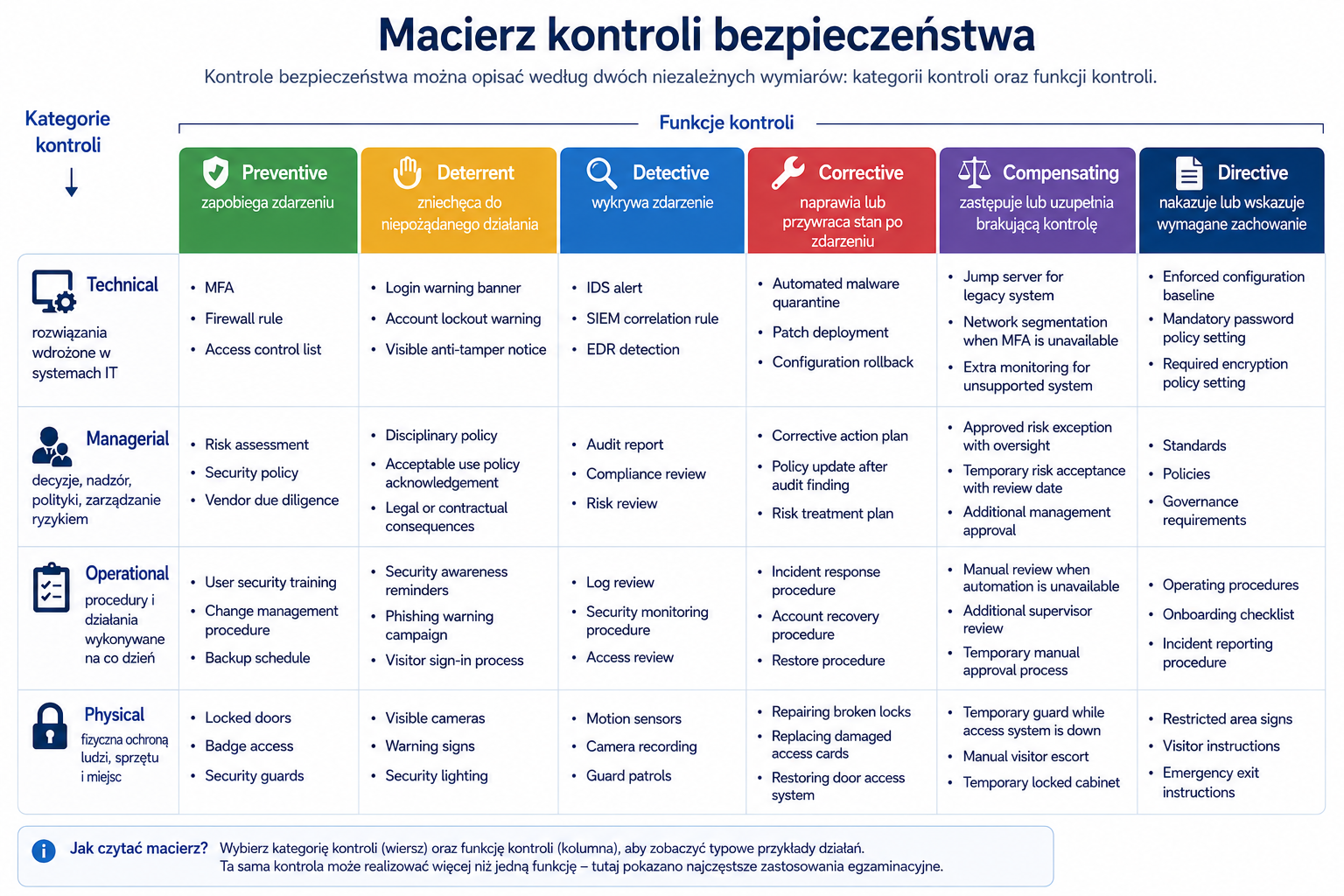
How to read this matrix
| Element | Meaning | How to use it on the exam |
|---|---|---|
| Control category | The table row. It defines the area the control belongs to: IT systems, management, daily procedures, or physical protection. | First decide whether the scenario is about technology, policy, an operational process, or a physical safeguard. |
| Control function | The table column. It defines what the control does: prevents, deters, detects, corrects, compensates, or directs action. | Do not ask only what the control is. Ask what effect it has in this scenario. |
| Examples in cells | They show common exam uses, but one control can perform more than one function depending on context. | A firewall rule is usually preventive, but firewall event logging can support detection. Context decides the best answer. |
1. Security checks
Problem
An organization cannot protect itself with intentions alone. It needs specific mechanisms, policies, procedures and actions that reduce risk. These mechanisms are security controls.
Without security controls, a company may have valuable assets, know threats and vulnerabilities, but still have no practical way to mitigate the risk. Example: If a company knows that employee passwords can be stolen but does not implement multi-factor authentication, monitoring or training, awareness of the problem is not enough.
Explanation from scratch
A security control is a mechanism, process, procedure, setting, tool, or activity intended to reduce risk. Control can operate before an event occurs, during event detection, or after the event.
CompTIA divides controls by category and by function. The categories indicate what area the control covers: technical, managerial, operational or physical. Features say what the control does: prevent, deter, detect, correct, compensate, or order a specific action.
Control categories
Technical controls are implemented in IT systems. Examples include firewalls, encryption, Multi-Factor Authentication (MFA), access control lists, Endpoint Detection and Response (EDR), and intrusion detection systems.
Management controls concern decisions, supervision, policies and risk management. Examples include a security policy, formal approval of changes, risk analysis, or requiring periodic review of authorizations.
Operational controls concern the daily way of working. An example is an incident handling procedure, employee training, creating backup copies according to a schedule or manual verification of a report.
Physical controls protect physical access to people, equipment, buildings and rooms. Examples are badges, locks, fences, cameras, security, lighting and sensors.
Types of control
Preventive control is intended to prevent an event from happening. Example: MFA makes it difficult to take over an account even if the password is leaked.
Deterrent control is intended to deter. Example: a visible camera may discourage people from entering a protected area.
Detective control is supposed to detect. Example: Security Information and Event Management (SIEM) can detect suspicious logins.
Corrective control is intended to restore the condition after a problem. Example: restoring data from a backup after a failure or ransomware.
A compensating control replaces or supplements another control when the primary control cannot be implemented. Example: an older system does not support MFA, so the company limits access to it via a private network, jump server and additional monitoring.
Directive control commands or indicates required behavior. Example: password policy, incident reporting procedure, or a "authorized personnel only" sign.
How it works step by step
The organization identifies a resource, e.g. a customer base.
Identifies risks, e.g. unauthorized access.
Selects preventive controls, e.g. MFA and the principle of least privilege.
Adds detective control, e.g. login alerts from unusual locations.
Prepares corrective checks, e.g. account blocking and credential reset procedures.
If full control is not possible, it implements compensating control.
Documents required behaviors as directive control.
Regularly checks whether controls are working.
Practical example
The company wants to secure access to the administration panel.
Technical inspection: MFA.
Management Controls: A policy requiring separate administrative accounts.
Operational control: a procedure for the periodic review of administrators.
Physical control: access to the server room only with ID.
Preventive control: blocking logins from outside VPN.
Detective control: alert on admin login outside business hours.
Corrective check: procedure for resetting credentials and blocking an account after a takeover.
Compensating check: additional monitoring of an older system that does not support MFA.
Exam example
Scenario
The company has an older app that cannot be updated for three months. The application must work but has a known vulnerability. What is the best temporary solution?
Best answer
Implement compensatory controls, e.g. limit network access, add monitoring, WAF, segmentation or additional detection rules.
Not to be confused with this
The most common mistake is mixing categories and functions. A firewall is a technical control, but its function can be preventive, if it blocks unauthorized traffic, or detective, if it only logs and alerts. One control can have more than one function.
Common mistakes
Mistake one: assuming that every technical inspection is automatically preventive.
Mistake two: ignoring administrative and operational controls because they seem “less technical.”
Mistake three: choosing the most expensive control instead of the one that best fits the scenario.
A definition to remember
A security control is a mechanism, process, or activity that reduces risk by preventing, detecting, correcting, deterring, compensating, or enforcing specific behavior.
2. Confidentiality, Integrity, Availability (CIA)
Problem
Security doesn't just mean "no one can break in." Data can be compromised in several ways: someone can disclose it, change it, or make it inaccessible. The Confidentiality, Integrity, Availability (CIA) model helps organize these three basic security goals.
Explanation from scratch
Confidentiality means that data is available only to authorized people, systems or processes.
Integrity means that the data is correct, complete and has not been unauthorizedly changed.
Availability means that systems and data are available when they are needed.
CIA is one of the most important models in Security+. It makes it easier to recognize what effect a given event has. Ransomware can affect accessibility because it blocks access to data. Unauthorized modification of the transfer compromises integrity. Customer database leak violates confidentiality.
How it works step by step
You are looking at an asset, such as medical records.
You ask: can data be disclosed? It's a confidentiality issue.
You ask: can data be changed? It's an integrity issue.
You ask: can data be unavailable? It's an accessibility problem.
You match the control to the purpose of protection.
Practical example
The banking system must protect all three elements of the CIA.
Confidentiality: A customer should not see another customer's data.
Integrity: Your account balance cannot be changed without an authorized transaction.
Availability: the customer should be able to make a transfer when the system is needed.
Exam example
Scenario
The attacker changed the bank account number in the payment system, but did not download the data and did not turn off the system. Which element of the CIA was most compromised?
Correct answer:
Integrity, because the problem is unauthorized change of data.
Not to be confused with this
Confidentiality does not mean integrity. The data may be encrypted and still incorrect. Integrity does not mean availability. The data may be correct, but the system may be unavailable. Accessibility does not mean lack of security - a system available to everyone without access control can be very dangerous.
Common mistakes
The most common mistake is automatically selecting confidentiality as the answer to every data question. During the exam you need to look at the effect: disclosure, change or lack of access.
A definition to remember
CIA is a model of three basic security objectives: confidentiality protects against unauthorized disclosure, integrity against unauthorized change, and availability against lack of access to a system or data.
3. Authentication, Authorization, Accounting (AAA)
Problem
The system must know who is trying to gain access, what that person is allowed to do, and how to record their actions. Without this, access cannot be safely managed or liability can be subsequently determined.
Explanation from scratch
Authentication answers the question: "Who are you?" Examples are a password, certificate, hardware token, biometrics or one-time code.
Authorization answers the question: "What are you allowed to do?" The system checks whether the account has permission to the file, application, function, or operation.
Accounting, i.e. accountability or activity recording, answers the question: "What did you do?" The system records activities in logs.
How it works step by step
The user provides a login and password.
The system checks the identity - it is authentication.
The user tries to open the report.
The system checks authorizations - to authorization.
The system saves information about logging in and access to the report - to accounting.
Practical example
The administrator logs in to the management panel. MFA confirms his identity. Role-Based Access Control (RBAC) allows him to manage servers, but does not allow him to approve payments. The logs record that the administrator changed the firewall configuration at a specific time.
Exam example
Scenario
The user logged in successfully, but cannot delete the file. What should be checked?
Best answer
Authorization, i.e. permissions to perform the operation.
Not to be confused with this
The biggest trap is confusing authentication and authorization. Correct login does not mean that the user has access to everything. The second trap is ignoring accounting. Without logs, it is difficult to prove who made a given change.
Common mistakes
A common mistake in practice is using shared administrative accounts. If five people use the same "admin" account, accounting loses value because it is not known who actually performed the action.
A definition to remember
AAA means: authentication confirms identity, authorization specifies allowed actions, and accounting records user or system activity.
4.Non-repudiation
Problem
In some situations, you need to be able to prove that a specific person or system performed a specific action. Without this, the user may deny sending a message, confirming a transaction or signing a document.
Explanation from scratch
Non-repudiation means the ability to link an action with a specific entity in a way that is difficult to dispute. In practice, it is achieved by digital signatures, certificates, access control, logs, timestamps and proper security of private keys.
Non-repudiation is not the same as confidentiality. Encryption can hide the content of a message, but in itself it does not always prove who sent it. A digital signature helps confirm authorship and integrity.
How it works step by step
The sender has the private key.
Creates a digital signature for a document or message.
The recipient uses the sender's public key to verify the signature.
If the signature matches, the recipient knows that the document has not been altered and that the signature comes from the holder of the private key.
Logs and timestamps strengthen the evidence.
Practical example
The director approves the contract electronically. The system uses a digital signature and saves a log: who signed it, when, from what account and what document. Later, it becomes more difficult for the director to deny that he approved the document.
Exam example
Scenario
The company wants to make sure that the sender of the message will not be able to deny sending it later. Which mechanism is best?
Best answer
Digital signature.
Not to be confused with this
Don't confuse non-repudiation with encryption. Encryption protects confidentiality. Digital signature supports integrity, sender authentication and non-repudiation.
Common mistakes
A common mistake is to claim that the password itself provides non-repudiation. If an account is shared or poorly protected, it is difficult to prove who actually performed the action.
A definition to remember
Non-repudiation is the ability to prove that a specific entity has performed a specific action, most often thanks to digital signatures, logos and proper identity protection.
5. Zero Trust
Problem
The traditional approach often assumed that a user or system located "on the corporate network" was more trusted. This approach performs poorly in cloud, hybrid, remote work, and mobile device environments. After taking over an account or device, the attacker can move around the network if the system trusts the location too much.
Explanation from scratch
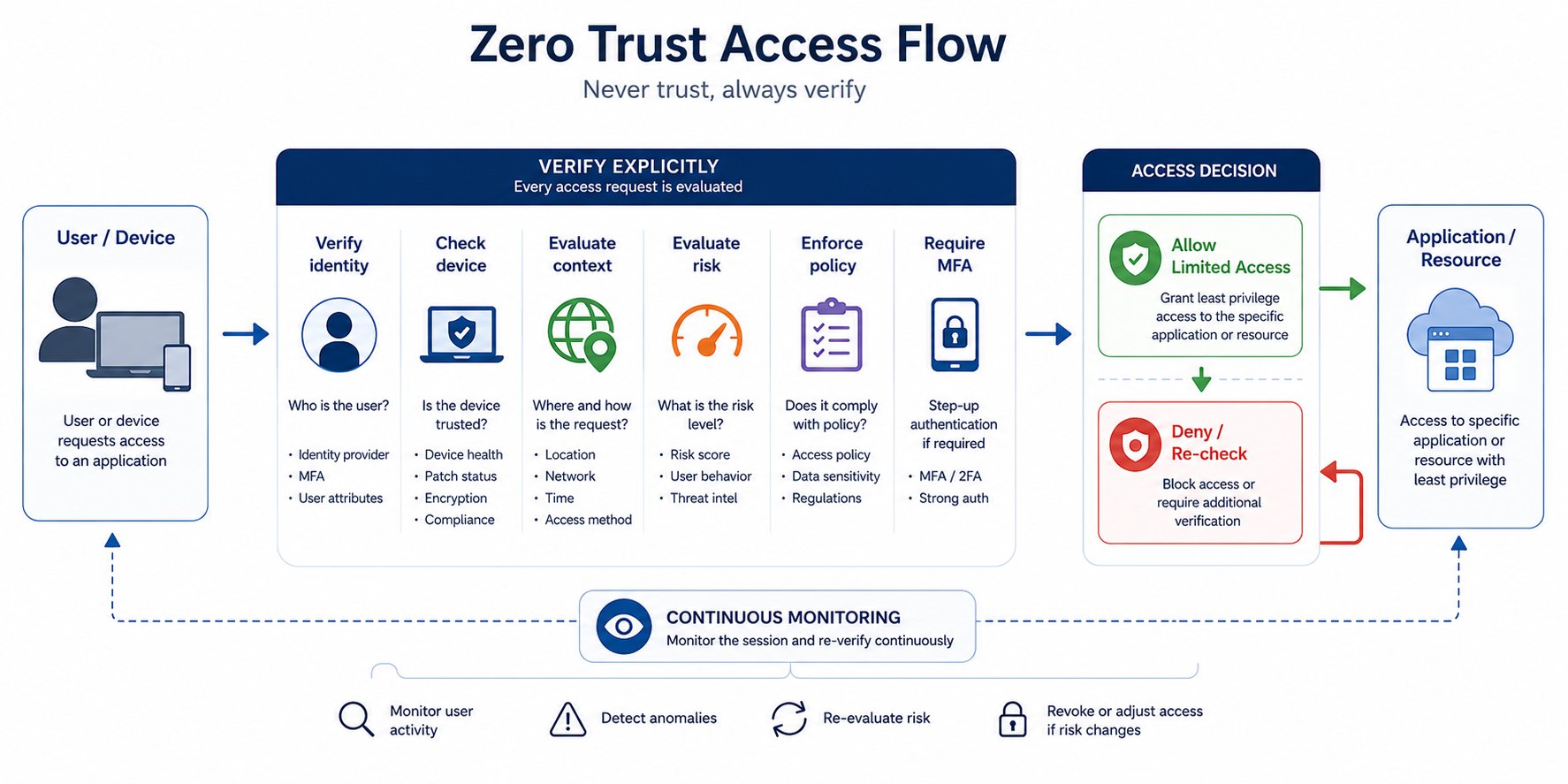
Zero Trust is a security model based on the principle: do not trust by default, verify constantly. Access should depend on identity, device state, context, risk, policy, and the specific resource, not just on someone being "in the middle of the network."
For SY0-701 purposes, Zero Trust covers control plane and data plane elements, including adaptive identity, policy-driven access control, policy administrator, policy engine and policy enforcement point.
How it works step by step
A user or system requests access to a resource.
The system checks the user's identity.
The system evaluates context, such as device, location, risk, resource type, and behavior.
The policy engine makes decisions based on policies.
The policy administrator translates decisions into action.
Policy enforcement point forces a decision: allows, blocks or limits access.
The decision may be constantly re-evaluated.
Practical example
The employee logs into the financial application from a company laptop with an up-to-date system, from a typical location and after passing MFA. The system allows access. The same employee later tries to log in from an unknown device from an unusual country. Zero Trust may require additional verification or block access.
Exam example
Scenario
The company wants to reduce the risk resulting from compromised accounts and remote work. It wants access to be assessed based on identity, device status and risk, not just IP address. Which model fits best?
Correct answer:
Zero Trust.
Not to be confused with this
Zero Trust is not one product. It is a model of architecture and approach to access control. The product may support Zero Trust, but purchasing the tool does not constitute Zero Trust implementation.
Also, don't confuse Zero Trust with a complete lack of trust in users. It's about a lack of default technical trust, not a culture of suspicion towards people.
Common mistakes
A common mistake is to think that Zero Trust only means MFA. MFA is an important element, but Zero Trust also includes segmentation, policies, risk assessment, devices, monitoring and enforcement of access decisions.
A definition to remember
Zero Trust is a security model in which no user, system or location is trusted by default and access is constantly verified based on policy, identity, context and risk.
6. Physical security
Problem
Cybersecurity does not end with IT systems. If an attacker enters the server room, steals a laptop, connects an unauthorized device or views an employee's screen, he or she can bypass many logical security measures.
Explanation from scratch
Physical security protects people, buildings, rooms, devices and data media. For official purposes, SY0-701 appears in the 1.2 domain, among others: bollards, access control vestibule, fencing, video surveillance, security guard, access badge, lighting and sensors.
Bollards are physical bollards that prevent vehicle entry. An access control vestibule, often commonly called a mantrap, is a controlled space between two doors that restricts the entry of many people at once. Cameras and security have a detection and deterrent effect. Badges and locks restrict access.
How it works step by step
The organization identifies physically sensitive places.
Limits access only to authorized people.
Adds monitoring, e.g. cameras and sensors.
Introduces procedures for entry, identification and escort of guests.
Records physical events.
Periodically checks the effectiveness of controls.
Practical example
The server room has a card-operated door, a camera, a door opening sensor and a guest entry procedure. An employee from the marketing department cannot enter on their own because there is no business need. An outside technician can only enter if approved and supervised by an employee.
Exam example
Scenario
The company wants to prevent one person with an ID from letting in several unauthorized people. Which control is best?
Best answer
Access control vestibule.
Not to be confused with this
Don't confuse cameras with preventive control in the strict sense. The camera often acts as a detective and deterrent, but it does not physically block the entrance itself. A lock or access control vestibule is better suited for preventive control.
Common mistakes
A common mistake is to disregard physical safety in a technical exam. Security+ considers physical security as part of a comprehensive security program.
A definition to remember
Physical security is a set of controls that protect physical access to people, devices, rooms and data media.
7. Deception and disruption technology
Problem
The organization wants not only to block attacks, but also to detect suspicious activity, delay the attacker and collect information about his activities. This is what deception and disruption technologies are used for.
Explanation from scratch
A honeypot is a decoy that pretends to be a real system or service. Its purpose is to attract the attacker and detect activity that should not be there.
Honeynet is a network of honeypots.
Honeyfile is a trap file, e.g. a document that looks like a list of passwords, and opening it generates an alert.
A honeytoken is a fake item, such as a fake API key, account or data record, whose use indicates suspicious activity.
These technologies are listed in domain 1.2 as deception and disruption technologies.
How it works step by step
The organization places the decoy in a controlled location.
Normal users should not use it.
Someone is trying to interact with the decoy.
The system generates an alert.
The security team analyzes the source of the activity.
The information helps detect intrusion, misconfiguration or unauthorized activity.
Practical example
The company creates a fake "admin_passwords.xlsx" file in a place that regular users don't look at. The file does not contain real passwords. If someone opens it, the system generates an alert. This may indicate malware, insider threat, or an account that has been misused.
Exam example
Scenario
An organization wants to detect unauthorized browsing of network shares. I want to use a file that should not be opened by legitimate users. What will be best?
Correct answer:
Honeyfiles.
Not to be confused with this
Honeypot is not a primary production system. It should not store real customer data. Its purpose is detection, analysis and delay, not to provide a normal business service.
Common mistakes
A common mistake is placing a honeypot without monitoring. A decoy without alerting and analysis provides no security value. The second mistake is creating decoys that can harm the production environment.
A definition to remember
Deception technology uses controlled decoys such as honeypot, honeynet, honeyfile and honeytoken to detect, analyze or delay suspicious activity.
8. Change management
Problem
Many incidents and failures result not from an advanced attack, but from a poorly implemented change. Someone changes a firewall rule, updates an application, restarts a service, or modifies a configuration without checking the impact on security and availability.
Explanation from scratch
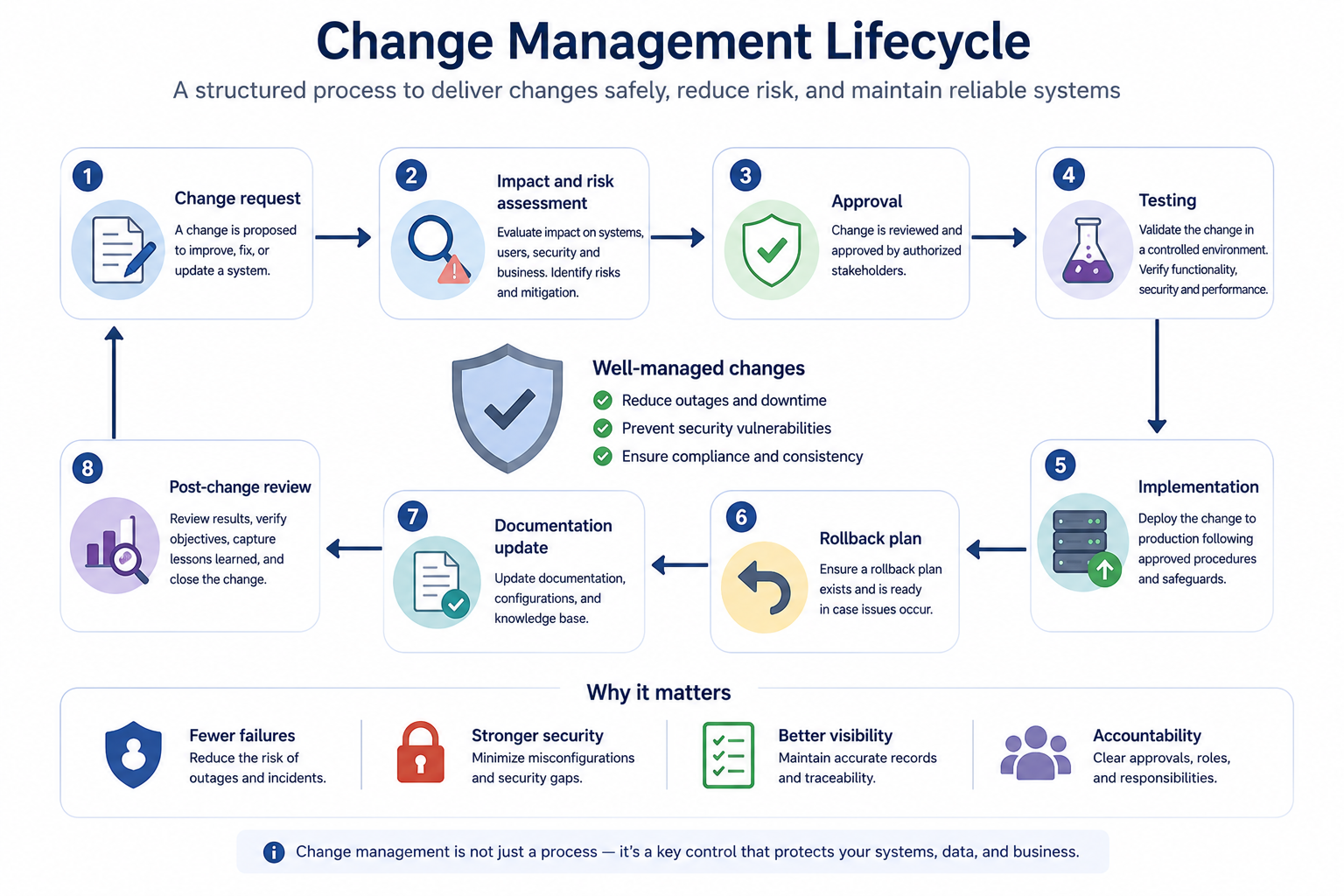
Change management is the process of controlled introduction of changes. It is intended to ensure that changes are justified, approved, tested, documented and can be rolled back.
For the purposes of SY0-701, change management includes, among others: approval process, ownership, stakeholders, impact analysis, test results, backout plan, maintenance window, standard operating procedure, allow lists/deny lists, downtime, service restart, dependencies, documentation and version control.
How it works step by step
Someone expresses the need for change.
The change owner describes the purpose and scope.
Stakeholders evaluate the impact on systems, users, security and compliance.
The team performs tests.
The change is approved.
A service window is established.
A backout plan is being prepared.
The change is being implemented.
The result is verified.
Documentation, diagrams, procedures and configuration versions are updated.
Practical example
The administrator wants to add a firewall rule that will allow the new application to communicate with the database. Without change management it may accidentally open too wide access. Z change management must determine what source address, what destination address, what port, why, for how long, who approves and how to check whether the rule works without excessive risk.
Exam example
Scenario
After changing the firewall configuration, the company lost access to the business application. There is no rollback plan or documentation of previous settings. What was missing?
Best answer
Correct change management process, especially backout plan, impact analysis and documentation.
Not to be confused with this
Change management is not the same as patch management. Patch management is about updates and fixes. Change management is broader and covers any significant change in the environment.
Also, do not confuse change management with bureaucracy. Its goal is to reduce technical, operational and security risks.
Common mistakes
A common mistake is implementing a change without a rollback plan. The second error is not taking into account dependencies, e.g. the application works, but integration with the database stops working. The third error is the failure to update the documentation after the change.
A definition to remember
Change management is a controlled process of introducing changes that reduces the risk of failures, security gaps and undocumented configurations.
9. Cryptography and cryptographic solutions
Problem
Data needs to be protected in a variety of situations: when it is stored on disk, transmitted over a network, signed, compared, masked, or used to confirm identity. One cryptographic tool does not solve all problems.
Explanation from scratch
Cryptography is a field related to the mathematical protection of information. Security+ is all about understanding when to use encryption, hashing, salting, digital signature, certificate, tokenization, or public key infrastructure.
The official 1.4 target includes, among others: Public Key Infrastructure (PKI), public and private keys, key escrow, encryption, symmetric/asymmetric encryption, key exchange, Trusted Platform Module (TPM), Hardware Security Module (HSM), key management system, secure enclave, obfuscation, steganography, tokenization, data masking, hashing, salting, digital signatures, key stretching, blockchain, certificates, Certificate Authorities (CA), Certificate Revocation Lists (CRLs), Online Certificate Status Protocol (OCSP), Certificate Signing Request (CSR) and wildcard certificates.
9.1 Encryption
Problem
If data is intercepted or stolen, it should not be readable by an unauthorized person. Encryption solves the confidentiality problem.
Explanation from scratch
Encryption turns readable data into unreadable data using a key. A person or system with the right key can decrypt the data.
Symmetric encryption uses the same key for encryption and decryption. It is fast and good for large amounts of data.
Asymmetric encryption uses a public and private key pair. The public key can be shared, but the private key must be protected. It is useful for exchanging keys, digital signatures and certificates.
How it works step by step
The system selects data for protection.
Selects an algorithm and a key.
The data is encrypted.
Data can be saved or transferred.
The legitimate recipient uses the correct decryption key.
Practical example
The employee's laptop has full-disk encryption. If a laptop is stolen, the data on the drive should not be readable without the key or proper authentication.
Exam example
Scenario
The company wants to protect data stored on laptops from being read after the device is stolen. What's the best?
Correct answer:
Full-disk encryption.
Not to be confused with this
Don't confuse encryption with hashing. Encryption is reversible using the key. Hashing is one-way.
Common mistakes
A common mistake is to think that encrypted data is always safe. If the key is poorly protected, an attacker can decrypt the data. Key protection is as important as the algorithm.
A definition to remember
Encryption protects the confidentiality of data by turning it into an unreadable form without the correct key.
9.2 Hashing, salting and key stretching
Problem
Sometimes we don't want to store or compare the original data. For example, the system should not store passwords in plain text. I need a way to check a password without writing down the password itself.
Explanation from scratch
Hashing creates a hash of the data. For the same input data, the result should be the same, but the result should not be able to easily reproduce the original.
Salting adds a random value to the data before hashing. Thanks to this, two identical passwords do not have to have the same hashes.
Key stretching intentionally slows down the calculation of password hashes to make mass guessing more difficult.
How it works step by step
The user creates a password.
The system generates a random somersault.
The password and salt are processed by the hash function.
The system saves the hash and salt, not the plaintext password.
When logging in, the system repeats the process and compares the result.
Practical example
Two users have the same password. Without salting, their hash could look identical. With salting, the system stores different results, which makes attacks using ready-made hash tables difficult.
Exam example
Scenario
The company wants to limit the effects of the password database leak. Which solution is best?
Correct answer:
Storing passwords as salted hashes with key stretching mechanism.
Not to be confused with this
Hashing does not provide confidentiality in the same sense as encryption. The hash is not decrypted. Hash is mainly used for integrity and secure comparison.
Common mistakes
A common mistake is to say "passwords are hashed" when in fact they should be hashed and salted. Encrypting passwords implies the possibility of decryption, which is usually not desirable.
A definition to remember
Hashing creates a one-way hash of data, salting adds randomness, and key stretching makes it difficult to quickly guess passwords.
9.3 Digital signature
Problem
The recipient wants to know that the message or file comes from the correct sender and that it has not been tampered with. Integrity, sender confirmation and often non-repudiation are needed.
Explanation from scratch
The digital signature uses asymmetric cryptography. The sender signs the data with his private key. The recipient verifies the signature with the sender's public key.
A digital signature does not have to hide content. Its main purpose is to confirm integrity and origin.
How it works step by step
The system creates a hash of the document.
The hash is signed with the sender's private key.
The document and signature are delivered to the recipient.
The recipient calculates the hash of the document.
The recipient verifies the signature with the public key.
If everything is correct, the document has not been changed and comes from the holder of the private key.
Practical example
The software vendor signs the update. The client system checks the signature before installation. If the signature is invalid, the update may be rejected.
Exam example
Scenario
The company wants to make sure that the installation package has not been modified by a third party. What should she check?
Correct answer:
Digital signature of the package.
Not to be confused with this
Don't confuse digital signature with encryption. A digital signature does not necessarily hide data. Encryption hides the content, but it does not always confirm the author.
Common mistakes
A common mistake is to choose encryption when the question is about integrity and authorship. If "verify the sender" or "ensure the file has not been altered" appears in the script, it is often a digital signature or hashing.
A definition to remember
The digital signature confirms the integrity of the data and its origin from the holder of the private key.
9.4 Public Key Infrastructure (PKI) and certificates
Problem
Asymmetric cryptography requires trust in public keys. How do you know that a public key really belongs to a particular party, company or person? This problem is solved by Public Key Infrastructure (PKI).
Explanation from scratch
Public Key Infrastructure (PKI) is a certificate, key and trust management system. A digital certificate binds a public key to a specific identity, such as an Internet domain or organization.
Certificate Authority (CA) is a certification authority that issues certificates.
Certificate Signing Request (CSR) is a request for signing a certificate, which includes, among others: entity information and public key.
Certificate Revocation List (CRL) and Online Certificate Status Protocol (OCSP) are used to check whether a certificate has been revoked.
A self-signed certificate is signed by yourself, not by a trusted third party. It may be useful in a lab or internal environment, but on the public Internet it tends to cause trust issues.
How it works step by step
The organization creates a key pair.
Generates CSR.
CA verifies information.
CA issues certificate.
The server uses a certificate, e.g. for HTTPS.
The client verifies that the certificate is valid, trusted, and not revoked.
If verification is successful, trusted communication can be established.
Practical example
User opens online banking. The browser checks the server certificate. If the certificate is valid, issued for the correct domain, and signed by a trusted CA, the user can be more confident that they are communicating with the correct server.
Exam example
Scenario
Users see a browser warning that the website's certificate is not trusted. The certificate was generated by an administrator and is not signed by a trusted authority. What is the cause?
Correct answer:
- Self-signed certificate or lack of trusted CA.
- Not to be confused with this
Don't confuse a certificate with a private key. The certificate contains the public key and identity information. The private key must remain secret.
Don't confuse CRL and OCSP with encryption. They are used to check the status of the certificate.
Common mistakes
A common mistake is to ignore certificate expiration. In practice, an expired certificate may cause the application to crash or interrupt integration between systems.
A definition to remember
PKI is a trust infrastructure that binds public keys to identities using certificates and certification authorities.
9.5 Tokenization, data masking, steganography and obfuscation
Problem
It is not always necessary or possible to encrypt data classically. Sometimes you need to hide part of the data, replace the data with a token, or make it more difficult to understand.
Explanation from scratch
Tokenization replaces a sensitive value with a token. Example: the payment card number is replaced with a random token and the real value is stored in a secure system.
Data masking hides part of the data. Example: card number shown as **** **** **** 1234.
Steganography hides information in another medium, such as an image.
Obfuscation makes data or code harder to understand, but it doesn't necessarily provide as strong protection as cryptography.
How it works step by step
The organization identifies sensitive data.
Selects the method: tokenization, masking, obfuscation or encryption.
The data is transformed.
The user or application sees only what it needs.
Real data is protected or hidden.
Practical example
The call center consultant only sees the last four digits of the customer's card. This is enough for verification, but does not reveal the full number.
Exam example
Scenario
The test application needs realistic data, but developers should not see real customer numbers. What is a good solution?
Correct answer:
Data masking or tokenization, depending on the scenario.
Not to be confused with this
Masking is not always the same as encryption. If the data is only hidden in the interface but still available in the database in explicit form, this is not full cryptographic protection.
Common mistakes
A common mistake is to consider obfuscation as a strong cryptographic security measure. Obfuscation can make analysis more difficult, but it should not be the only way to protect sensitive data.
A definition to remember
Tokenization replaces data with a token, data masking hides part of the data, steganography hides data in another medium, and obfuscation makes it difficult to understand.
Key concepts
Concept Meaning
Security control A mechanism, process or action that reduces risk.
Technical control Control implemented technologically, e.g. MFA, firewall, encryption.
Managerial control Management control, e.g. policy, risk analysis, approval of changes.
Operational control Control of everyday operations, e.g. procedures, training, backups.
Physical control Physical control, e.g. locks, cameras, security, ID badges.
Preventive control Control that prevents an event.
Detective control Control that detects an event.
Corrective control Control that helps correct the effects of an event.
Compensating control Substitute or supplementary control when primary control is not possible.
CIA Confidentiality, Integrity and Availability.
AAA Authentication, authorization and accountability.
Non-repudiation Non-repudiation of the execution of an action.
Zero Trust A model of no default trust and continuous access verification.
Change management Controlled process of introducing changes.
Encryption Data encryption to protect confidentiality.
Hashing Creating a one-way hash of data.
Salting Adding a random value before hashing.
Digital signature A digital signature confirming integrity and origin.
PKI Key, certificate and trust management infrastructure.
CA Certification authority that issues certificates.
CRL Certificate Revocation List.
OCSP Online certificate status checking protocol.
Examples
Example 1: Selecting controls for the problem
The company has a problem with account takeovers after phishing. The best set of controls is not a single technology, but a layered approach:
- MFA as preventive control
- phishing training as operational and directive control
- login alerts as detective control
- account blocking procedure as corrective control
- limiting administrator access as preventive control
- additional monitoring of older systems as compensating control.
- Example 2: CIA in the medical system
The medical system stores test results. Confidentiality means that patient A cannot see patient B's data. Integrity means that the test result has not been changed without authorization. Accessibility means that the doctor has access to the data when making a medical decision.
Example 3: Change management in a firewall rule
The administrator wants to open a port to a new application. The correct process requires change reporting, ownership, impact analysis, approval, testing, service window, retirement plan, and documentation updates. Without this, you could accidentally open access to a sensitive service from all over the Internet.
Example 4: Choosing a cryptographic mechanism
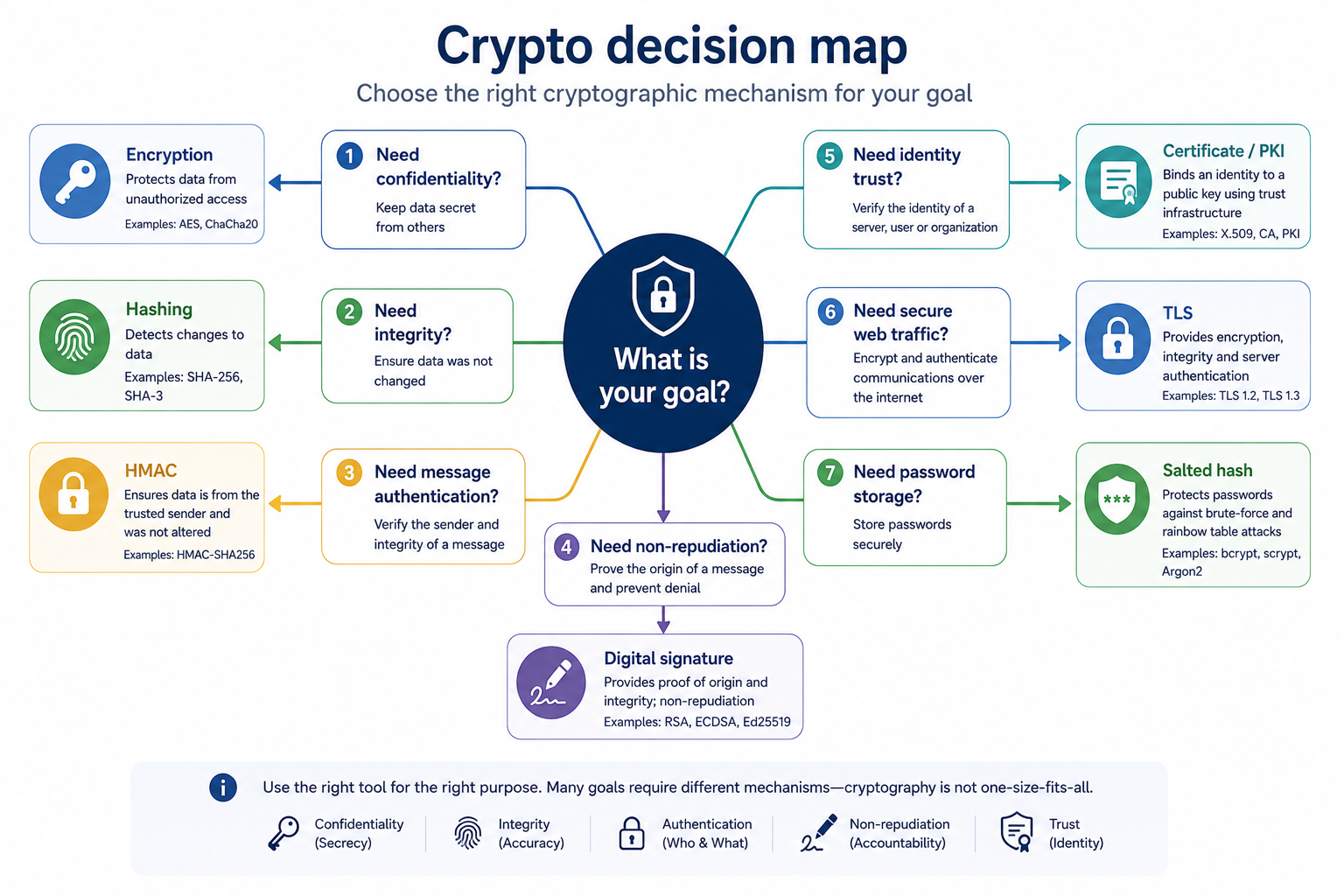
You want to hide data on disk: encryption.
You want to check if the file hasn't changed: hashing.
You want to confirm the author and integrity of the digital signature.
You want to safely handle website certificates: PKI.
You want to limit the visibility of the card number: masking or tokenization.
Practical applications
Designing layered security.
Analysis of "best control" exam scenarios.
Selecting cryptographic mechanisms for the purpose.
Understanding why technology alone without process is not enough.
Preparation for IAM, vulnerability management, incident response, security architecture and governance modules.
Common mistakes
Wrong Why is it wrong Correct understanding
| "Firewall is always preventive." | It can block, but can also only log or alarm. | The control function depends on how it is used. |
|---|---|---|
| "Authentication and authorization are the same thing." | One confirms identity, the other determines permissions. | First who you are, then what you can do. |
| “Encryption and hashing are the same thing.” | Encryption is key reversible, hashing is unidirectional. | Encryption protects confidentiality, hashing helps with integrity and passwords. |
| “Zero Trust is a product.” | It's a security model. | Products may support Zero Trust, but do not replace it. |
| "Backup is preventive control." | A backup usually does not prevent an attack. | Backup is mainly corrective/recovery. |
| “The camera physically blocks the entrance.” | The camera detects or deters, but does not stop, the person. | A lock, gate or vestibule are more preventive. |
| “A digital signature encrypts the content.” | The signature confirms the integrity and author. | Encryption is used for confidentiality. |
| "Change management is a formality." | Lack of a change process can cause gaps and failures. | This is a security and stability check. |
Common mistakes
Control learning as a list without scenarios
In the exam, you have to choose a control for the problem. This requires an understanding of the control function.
Choosing the most technical answer
Security+ often rewards the most accurate solution, not the most advanced one.
Confusing the purpose of cryptography
Confidentiality, integrity, authentication and non-repudiation are different goals.
Ignoring processes
Change management, documentation and approval are as important as tools.
Treating Zero Trust as MFA
MFA is an element, but Zero Trust takes a broader approach to access and policy.
What you need to know for the exam
In domain 1.0 you need to be particularly able to:
- classify controls by categories and functions
- recognize which element of the CIA has been compromised
- distinguish authentication, authorization and accounting
- choose a mechanism ensuring non-repudiation
- understand the elements of Zero Trust
- indicate the physical control that fits the scenario
- distinguish honeypot, honeynet, honeyfile and honeytoken
- indicate the missing element of change management
- choose encryption, hashing, salting, digital signature, certificate, tokenization or masking for the purpose.
Checklist
User should be able to:
- Explain what a security check is.
- Distinguish between technical, managerial, operational and physical controls.
- Distinguish between preventive, deterrent, detective, corrective, compensating and directive controls.
- Indicate whether the scenario violates confidentiality, integrity or availability.
- Distinguish between authentication, authorization and accounting.
- Explain non-repudiation.
- Describe the basic principle of Zero Trust.
- Explain the meaning of change management.
- Distinguish between encryption and hashing.
- Explain the role of salting and key stretching.
- Explain the basic roles of PKI, CA, CRL and OCSP.
- Select a cryptographic mechanism for the scenario.
- Review questions
- What is the difference between a control category and a control function?
- Give an example of technical, managerial, operational and physical control.
- What is the difference between preventive control and detective control?
- When is compensating control used?
- What are the three goals of the CIA?
- What is the difference between authentication and authorization?
- What does accounting provide?
- What does non-repudiation mean?
- Why isn't Zero Trust just one product?
- Why is change management important for security?
- What is the difference between encryption and hashing?
- Why is salting used?
- When to use a digital signature?
- What is the role of the Certificate Authority?
- What is the difference between data masking and encryption?
- Answers with explanations
- The category says what area the control applies to, and the function says what the control does.
- A firewall is a technical control, but it can act as a preventive or detective.
- Technical: MFA. Management: security policy. Operational: backup procedure. Physical: Access ID.
- Each of them reduces risk in a different area.
- Preventive control prevents and detective control detects.
- MFA makes account takeover difficult, and SIEM can detect suspicious logins.
- Compensating control is used when basic control cannot be implemented.
- Example: an older system does not support MFA, so you limit access via the network and add monitoring.
- CIA covers confidentiality, integrity and availability.
- Confidentiality protects against disclosure, integrity against change, availability against lack of access.
- Authentication confirms identity, authorization determines permissions.
- You can log in successfully and still not be able to access the file.
- Accounting records activity.
- This allows you to determine who performed a given operation.
- Non-repudiation means the non-repudiation of an action.
- Digital signatures, logs, timestamps and key protection help with this.
- Zero Trust is a model, not a product.
- It includes continuous access verification based on identity, context, policy and risk.
- Change management reduces the risk of failures and gaps resulting from changes.
- Requires impact analysis, testing, approval, retirement plan, and documentation.
- Encryption is key reversible, hashing is unidirectional.
- Encryption protects confidentiality, hashing supports the integrity and secure storage of passwords.
- Salting adds randomness to hashing.
- Makes it difficult to compare hashes and use ready-made tables.
- A digital signature is used to confirm integrity and origin.
- It is good for signing documents, code and messages.
- Certificate Authority issues and signs certificates.
- It helps associate a public key with an identity.
- Data masking hides part of the data, and encryption encrypts the data using a key.
- Masking can only be presentational, while encryption provides stronger confidentiality protection.
- Practical tasks
- Lab 1: Classification of security controls
Purpose:
Learn to distinguish the category and function of control.
Context:
The company implements the following security measures:
- Control Description
- MFA Required for remote login
- Camera Monitors the entrance to the server room
- Password Policy Specifies the minimum password length
- Backup Allows you to restore data
- Incident Reporting Procedure Outlines steps for employees
- Network Segmentation Restricts traffic between departments
- Additional monitoring of the old system Used because the system does not support MFA
Steps:
- For each control, specify a category: technical, managerial, operational, or physical.
- For each control, define the function: preventive, deterrent, detective, corrective, compensating or directive.
- Justify each decision in one sentence.
- Indicate which controls can have more than one function.
Expected result:
Table with classification and short justification.
Pass criteria:
- The distinction between category and function was correct.
- Each technical inspection was not automatically assigned as preventive.
- Backup was recognized as a mainly corrective control.
- Additional monitoring of the old system was recognized as potentially compensating.
Only perform this exercise in a legal, controlled laboratory environment. Don't use it on other people's systems, networks or accounts.
Laboratory 2: Selection of a cryptographic mechanism
Purpose:
Learn to choose the right cryptographic solution for the purpose.
Context:
Match the solution to your requirements:
- Requirement Solution
- Data protection on a stolen laptop?
- Checking if the file has not been changed?
- Confirmation of the author of the document?
- Safe password storage?
- Hiding the full card number in the consultant's panel?
- Verification of trust in the website's certificate?
Steps:
- Match the mechanism: encryption, hashing, salting, key stretching, digital signature, data masking, PKI.
- Justify each choice.
- Indicate which requirements concern confidentiality, integrity or non-repudiation.
Expected result:
Correct adjustment of the mechanism to the purpose.
Pass criteria:
- Encryption and hashing have not been confused.
- Hashing with salting and key stretching are indicated for passwords.
- A digital signature is indicated for the author of the document.
- The PKI/CA/certificate status is indicated for the certificate.
Only perform this exercise in a legal, controlled laboratory environment. Don't use it on other people's systems, networks or accounts.
Lab 3: Firewall change analysis
Purpose:
Understand how change management reduces risk.
Context:
The administrator wants to add a firewall rule that allows Internet access to the test application. The change is to be implemented quickly because the design team is waiting for tests.
Steps:
- List the information that should be included in the change report.
- Identify the change owner and stakeholders.
- Indicate potential security impacts.
- Offer tests before implementation.
- Prepare a simple recovery plan.
- Indicate what documentation needs to be updated.
Expected result:
A short change management plan for a firewall rule.
Pass criteria:
- Approval process included.
- Impact analysis included.
- Maintenance window included.
- Backout plan included.
- Documentation update included.
Only perform this exercise in a legal, controlled laboratory environment. Don't use it on other people's systems, networks or accounts.
Mini-test
Question 1
Which control best suits the detective type?
A. MFA that blocks login without a second component
B. SIEM generating an alert after an unusual login
C. Backup used to restore data
D. Incident reporting policy
Correct answer:
B
Explanation:
SIEM detects suspicious events and generates alerts, so it serves as a detective.
Why the other answers are worse:
- A: It's mainly preventive.
- C: It's mostly corrective.
- D: It's directive or managerial/operational, depending on the approach.
- Question 2
The attacker changed the transfer details, but did not reveal the data and did not turn off the system. Which element of the CIA was compromised?
A. Confidentiality
B. Integrity
C. Availability
D. Accounting
Correct answer:
B
Explanation:
The problem is unauthorized change of data, i.e. integrity violation.
Why the other answers are worse:
- A: No data was disclosed.
- C: The system is still working.
- D: Accounting belongs to AAA, not CIA.
- Question 3
The user has logged in successfully, but cannot open the folder. What most likely failed?
A. Authentication
B. Authorization
C. Hashing
D. Availability
Correct answer:
B
Explanation:
Login confirmed your identity. The problem is with the permissions on the resource.
Why the other answers are worse:
- A: Authentication probably worked.
- C: Hashing does not apply to folder access.
- D: The folder may be accessible, but not for this user.
- Question 4
The company cannot implement MFA on a legacy system, but limits access via VPN, segmentation and additional monitoring. What type of control best describes these activities?
A. Compensating
B. Corrective
C. Deterrent
D. Physical
Correct answer:
A
Explanation:
A compensating control replaces or complements a control that cannot be implemented directly.
Why the other answers are worse:
- B: Corrective repairs the effects of the event.
- C: Deterrent repels.
- D: Physical refers to physical protection.
- Question 5
Which mechanism best ensures non-repudiation?
A. Symmetric encryption
B. Digital signature
C. Data masking
D. Backup
Correct answer:
B
Explanation:
A digital signature can confirm the authorship and integrity of the data, supporting non-repudiation.
Why the other answers are worse:
- A: Protects confidentiality but does not ensure non-repudiation.
- C: Hides some data.
- D: Helps with playback.
- Question 6
What best describes Zero Trust?
A. Full trust in users on the company network
B. Continuous access verification model without default trust
C. Disk encryption product
D. Backup Procedure
Correct answer:
B
Explanation:
Zero Trust assumes no default trust and assesses access based on policy, identity, context and risk.
Why the other answers are worse:
- A: It's the opposite of Zero Trust.
- C: It's a single technology, not a model.
- D: It's a backup, not Zero Trust.
- Question 7
What is the most important element of change management when a change may cause a failure?
A. No documentation to make it faster
B. Backout plan
C. Disable logging
D. Use of a self-signed certificate
Correct answer:
B
Explanation:
A backout plan allows you to roll back a change if the implementation causes a problem.
Why the other answers are worse:
- A: Lack of documentation increases risk.
- C: Not a standard part of every change.
- D: Does not apply to rollback.
- Question 8
Which mechanism is best for storing passwords securely?
A. Reversible encryption
B. Hashing with salting and key stretching
C. Data masking
D. Steganography
Correct answer:
B
Explanation:
Passwords should be stored as hard-to-reverse hashes with a random salt and slower guessing.
Why the other answers are worse:
- A: The ability to decrypt passwords increases the risk.
- C: Masking is not the right way to store passwords.
- D: Steganography hides data on the media but does not solve the password problem.
- Question 9
Users see a warning that the site's certificate is not trusted. The certificate was issued by the server itself. What does this mean?
A. The certificate is self-signed
B. A certificate is always more secure
C. The certificate is CRL
D. The certificate is a hash of the password
Correct answer:
A
Explanation:
The self-signed certificate is not signed by a trusted CA, so the browser may not trust it.
Why the other answers are worse:
- B: The lack of a trusted signature does not mean greater security.
- C: CRL is a revocation list.
- D: The certificate is not a password hash.
- Question 10
The company wants to detect unauthorized opening of a fake file called "passwords.xlsx". Which solution is best?
A. Honeypot
B. Honeyfile
C.CRL
D. Full-disk encryption
Correct answer:
B
Explanation:
Honeyfile is a trap file that, if used, may indicate suspicious activity.
Why the other answers are worse:
- A: Honeypot is a fake system or service, not a specific file.
- C: CRL is about certificates.
- D: Full-disk encryption protects data on the disk, but does not detect when the decoy is opened.
- Flashcards
- Front of the index card. Back of the index card
| What is a security check? | A mechanism, process or action that reduces risk. |
|---|---|
| What is technical control? | Technologically implemented controls, e.g. MFA, firewall, encryption. |
| What is managerial control? | Management controls, e.g. policy, risk analysis, approval of changes. |
| What is operational control? | Control of daily operations, e.g. procedure, training, backup. |
| What is physical control? | Controls that protect physical access, e.g. lock, camera, security. |
| What is preventive control? | Control to prevent an event. |
| What is detective control? | Event detection control. |
| What is corrective control? | Inspection to help remedy the effects of the incident. |
| When is compensating control used? | When basic control cannot be implemented or needs to be supplemented. |
| What does CIA mean? | Confidentiality, Integrity, Availability. |
| What does AAA mean? | Authentication, Authorization, Accounting. |
| Difference: authentication vs authorization? | Authentication confirms identity, authorization determines permissions. |
| What does non-repudiation mean? | Ability to prove that the entity performed the action. |
| What does Zero Trust mean? | No default trust and constant access verification. |
| What is change management? | Controlled change implementation process. |
| What does encryption do? | Protects data confidentiality through encryption. |
| What does hashing do? | Creates a one-way hash of data. |
| What is salting for? | Adds randomness to hashing, especially passwords. |
| What does a digital signature do? | Confirms the integrity and origin of data. |
| What is PKI? | Key, certificate and trust management infrastructure. |
| What does CA do? | Issues and signs certificates. |
| What is CRL? | List of revoked certificates. |
| What is OCSP? | Protocol for checking certificate status online. |
| What is honeyfile? | Fake trap file used for detection. |
| What is tokenization? | Replacing a sensitive value with a token. |
| What is data masking? | Hiding some data, e.g. card number. |
Images to generate
IMG_M01_S01_SECURITY_CONTROL_MATRIX
Place in the material:
"Introduction" section, after explaining the role of security controls.
Image Purpose:
Show the difference between control categories and control functions.
Description of the image to generate:
A clear 4 × 6 matrix. In the lines: technical, managerial, operational, physical. In the columns: preventive, deterrent, detective, corrective, compensating, directive. In selected cells, short examples: MFA, policy, training, camera, backup, SIEM, access badge, backout plan. Add a legend: "category = control area", "function = how the control works".
Style:
Technical infographic/visual table.
Mandatory elements:
- four categories of control
- six control functions
- short examples
- clear legend.
Elements to avoid:
- too much text
- icons without meaning
- random cyber attack symbols
- small illegible inscriptions.
- IMG_M01_S02_ZERO_TRUST_FLOW
- Place in the material:
- Zero Trust section, following definition and practical example.
Image Purpose:
Explain the access decision flow in the Zero Trust model.
Description of the image to generate:
Flow diagram: subject/user/system → access request → checking identity, device posture, location, risk, resource sensitivity → policy engine → policy administrator → policy enforcement point → allow / deny / step-up authentication / limited access. Add a short rule at the top: "Never trust by default, continuously verify".
Style:
Technical block diagram.
Mandatory elements:
- subject/user/system
- identity
- device posture
- risk/context
- policy engine
- policy administrator
- policy enforcement point
- allow/deny/step-up decisions.
Elements to avoid:
- presenting Zero Trust as one product
- excess text
- complicated cloud architecture without the need.
- IMG_M01_S03_CHANGE_MANAGEMENT_FLOW
- Place in the material:
- "Change management" section, followed by a step-by-step description.
Image Purpose:
Show the full process of controlled change.
Description of the image to generate:
Process diagram: request → owner → stakeholders → impact analysis → testing → approval → maintenance window → implementation → validation → documentation update → version control. Add a "backout plan" side path from implementation to rollback.
Style:
Flow chart/operating process.
Mandatory elements:
- request
- approval
- impact analysis
- test results
- backup plan
- maintenance window
- documentation
- versioncontrol.
Elements to avoid:
- decorations
- illegible arrows
- skipping the backout plan.
- IMG_M01_S04_CRYPTO_DECISION_MAP
- Place in the material:
- "PKI and certificates" section, after discussing cryptographic mechanisms.
Image Purpose:
Help you choose a cryptographic mechanism for your purpose.
Description of the image to generate:
Decision map with questions: "Do you want to hide data?" → encryption. “Do you want to check if the data has changed?” → hashing. “Is it about passwords?” → salted hash + key stretching. “Do you want to confirm the author?” → digital signature. “Do you want to associate your public key with your identity?” → certificate/PKI. "Do you want to hide some data in the interface?" → data masking. “Do you want to replace the data with a token?” → tokenization.
Style:
Decision algorithm/educational diagram.
Mandatory elements:
- encryption
- hashing
- salting
- key stretching
- digital signature
- certificate/PKI
- tokenization
- date masking.
Elements to avoid:
- mathematical formulas
- detailed names of algorithms without context
- complicated icons.
- Coverage of exam requirements
- SY0-701 Exam Requirement Where It Is Covered Level of Coverage Notes
- 1.1 Compare and contrast various types of security controls Security Controls Section Full Categories and controls with examples.
- 1.2 Summarize fundamental security concepts Sections CIA, AAA, non-repudiation, Zero Trust, physical security, deception technology Full Exam mechanism and pitfalls developed.
- 1.3 Explain the importance of change management processes and the impact to security Section "Change management" Full Approval, impact analysis, backout plan, documentation and version control included.
- 1.4 Explain the importance of using appropriate cryptographic solutions Cryptography and cryptographic solutions section Full Covers encryption, hashing, salting, digital signatures, PKI, certificates, tokenization and masking.
- Which is worth repeating before moving on
- Difference between category and control function.
- CIA and examples of violations of each element.
- AAA, especially authentication vs authorization.
- Encryption vs hashing vs digital signature.
- The role of PKI, CA, CRL and OCSP.
- Elements of change management.
- Zero Trust as a model, not a product.
- Module completeness check
Scope from outline covered:
- types and categories of security controls
- CIA
- AAA
- non-repudiation
- Zero Trust
- physical security
- deception and disruption technology
- change management
- cryptography, PKI, certificates, hashing, salting, digital signature, tokenization and masking
- examples, exercises, mini-test, flashcards and images.
Scope requiring deepening:
- detailed cryptographic algorithms will only be needed at the level of application recognition, not mathematics.
- IAM will be developed further in the Security Operations I module.
- Certificate management will return to architecture and operations.
- Detailed logging and detection mechanisms will return in Security Operations II.
Most important things to remember:
- Classify controls by category and function.
- The CIA describes the purposes of protecting data and systems.
- AAA describes identity, authority and accountability.
- Zero Trust means no default trust.
- Change management reduces the risk of incorrect changes.
- Encryption, hashing and digital signature solve various problems.
- PKI is used to manage trust in keys and certificates.
Is the material sufficient to master this part:
Yes, as a complete introduction to the 1.0 General Security Concepts domain from zero to exam level.
Potential vulnerabilities:
- It is worth doing an additional session later with questions only about cryptography, because this is an area that is often confused.
- It is worth returning to the security inspection after module 2 when specific threats and mitigations appear.
Recommended replay:
- Take the mini-test without looking at the answer.
- Work through the flashcards.
- Do lab 1 and 2.
- On your own, write one example for each type of control.
- Explanation depth control
- Important concepts are developed, not just mentioned.
- For each key concept, the problem, mechanism, worked example, pitfalls, and definition are shown.
- Exam scenarios added.
- Added checklist, review questions, answers, labs, flashcards and image descriptions.
- The material follows the structure of generating the actual module: explanations, examples, exercises, mini-test, flashcards and completeness check.