Module 3
Security Architecture
Purpose
After this module, you are expected to understand how to design a safe environment, not just the names of devices and technologies. Security architecture answers the questions:
- where to place the control
- what to separate
- how to limit the effects of failure or embarrassment
- how to protect data in different states
- how to choose an infrastructure model based on risk, cost, availability and reproducibility.
After the module you should be able to:
- compare on-premises, cloud and hybrid
- explain the shared responsibility model in the cloud
- distinguish virtualization, containerization, serverless and microservices
- understand the specific risks of Internet of Things (IoT), Industrial Control Systems (ICS), Supervisory Control and Data Acquisition (SCADA), Real-Time Operating System (RTOS) and embedded systems
- design simple segmentation
- choose the right security device for the scenario
- select a data protection method appropriate to its type and condition
- distinguish high availability, disaster recovery, backup and resilience
- understand RTO and RPO as concepts that will return in the risk management module.
Introduction
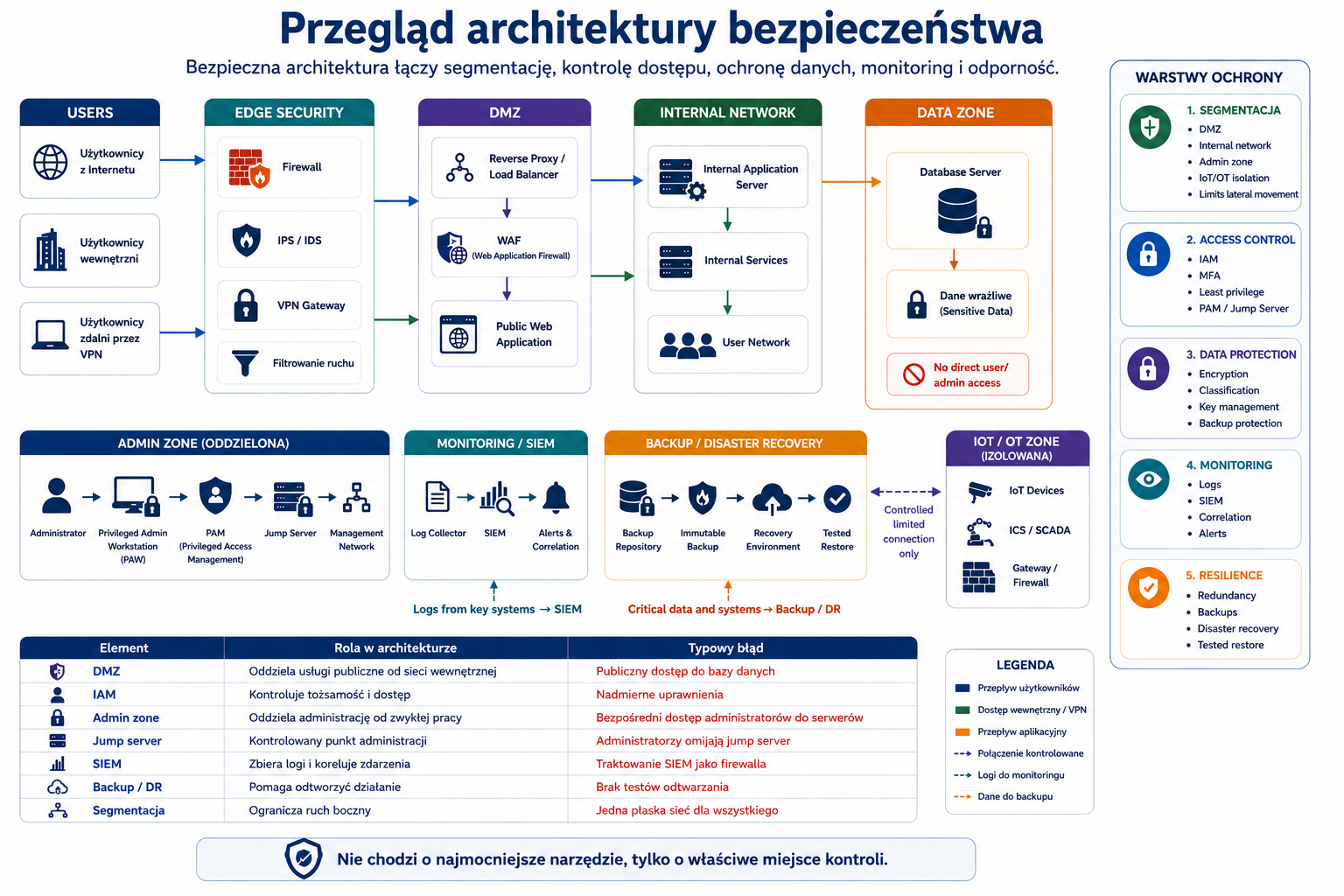
Security architecture is how you arrange systems, networks, data, controls, and processes to make the whole thing harder to attack, easier to monitor, and more resilient to failure.
At Security+, the architectural question often looks like this: the company has specific constraints - cost, cloud, legacy system, availability requirement, regulated data, or the need to work remotely - and you need to choose the best design. It is not about the "strongest tool", but about the solution that best fits the scenario.
1. Architecture models: on-premises, cloud and hybrid
Problem
The organization must decide where to maintain its systems: in its own data center, in the cloud, or in a mixed model. Each model changes costs, responsibilities, risks, how controls are implemented, and disaster recovery.
Explanation from scratch
On-premises means an environment maintained locally by the organization: own servers, own network, own server room or data center. The organization has a lot of control, but also a lot of responsibility for hardware, power, cooling, physical security, updates and backups.
Cloud means using the provider's resources: computing power, memory, application services, databases or platforms. The cloud offers flexibility, scalability and rapid deployment, but requires an understanding of responsibility between customer and provider.
Hybrid, i.e. the hybrid model, combines on-premises and cloud. Example: a company keeps its financial system locally, but uses the cloud for backup, a web application or analytics.
The official SY0-701 targets point to cloud, hybrid considerations, third-party vendors, on-premises, centralized vs decentralized, virtualization, containerization, IoT, ICS/SCADA, RTOS, embedded systems and high availability as architectural elements that need to be compared in the context of security.
How it works step by step
The organization identifies requirements: security, cost, scalability, compatibility, availability.
Chooses a model: local, cloud or hybrid.
It determines who is responsible for each layer: hardware, network, system, application, data, identity.
Designs controls: segmentation, IAM, encryption, monitoring, backup, logging.
Tests immunity and recovery processes.
It updates the architecture regularly as risks and requirements change over time.
Practical example
A small company moves email and files to the cloud, but leaves the local storage system because it is old and difficult to move. This creates a hybrid environment. The company must secure integration between the local network and the cloud, user accounts, identity synchronization, logs, backup and administrator access.
Exam example
Scenario
The company wants to scale its seasonal application quickly, but needs to keep some of its data in an on-premises data center for regulatory reasons. Which model fits best?
Best answer
Hybrid cloud because it combines local maintenance of some resources with the flexibility of the cloud.
Not to be confused with this
Don't confuse the cloud with automated security. The cloud provider secures some of the infrastructure, but the customer is still responsible for configuration, identities, data, permissions, network access rules, and many service settings.
Common mistakes
The most common mistake is moving the system to the cloud without changing the management method. The cloud requires configuration control, monitoring, identity management, resource tagging, automation and cost control. The second mistake is the lack of clear responsibility for backup and recovery.
A definition to remember
On-premises gives the greatest direct control, cloud gives flexibility and scalability, and hybrid combines both models but increases the complexity of integration and responsibility.
3. Virtualization, containerization, serverless and microservices
Problem
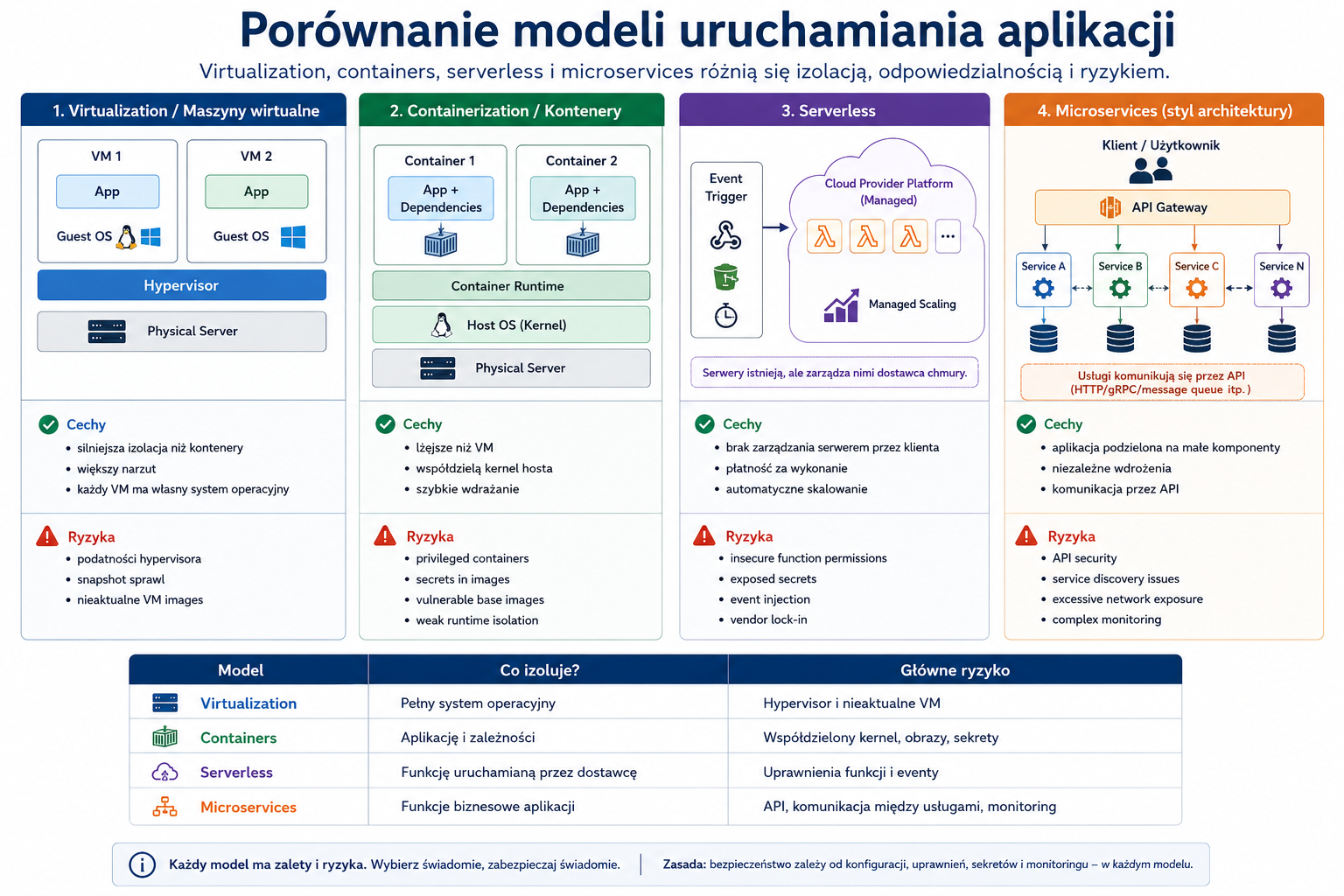
Modern environments don't just consist of physical servers. Applications run on virtual machines, in containers, as serverless functions or sets of microservices. Each model offers benefits but has different risks.
Explanation from scratch
Virtualization allows you to run multiple virtual machines on one physical host. Each machine has its own operating system. The risks include, among others: poorly secured hypervisor, excessive administrative privileges and the possibility of one machine influencing the host's resources.
Containerization runs applications in containers, which share the host system's kernel but have their own runtime environment. Containers are lighter than virtual machines, but require protection of images, registries, secrets, configuration and orchestration.
Serverless means that the developer implements the function or logic and the vendor manages much of the execution infrastructure. Risks shift towards feature permissions, event configuration, secrets, logging and dependencies.
Microservices is an approach in which an application is divided into many smaller services. It provides flexibility but increases the number of connections, Application Programming Interfaces (APIs), dependencies, and monitoring points.
How it works step by step
The organization selects an application launch model.
It divides responsibilities between infrastructure, platform and application.
Secures images, configurations, secrets and connections.
Restricts the permissions of each service or feature.
Monitors communication between components.
Automates deployment and configuration control.
Practical example
An online store application may consist of a microservice for a shopping cart, payments, shipping, and user accounts. If each microservice has too broad access to the database, compromising one component can jeopardize the entire system. A better approach is to limit permissions, segmentation, separate secrets, API monitoring and control of communication between services.
Exam example
Scenario
The company wants to quickly deploy small features without managing servers, but needs to be careful with feature permissions and secrets. Which model describes the scenario?
Best answer
Serverless.
Not to be confused with this
A container is not the same as a virtual machine. The virtual machine has its own operating system, and the container usually shares the host kernel. Serverless doesn't mean "there are no servers"; means that the client does not manage them directly.
Common mistakes
A common mistake is running containers with excessive permissions. The second mistake is storing secrets in container images or code. The third error is the lack of scanning of images and dependencies.
A definition to remember
Virtualization isolates full operating systems, containerization isolates applications more lightly, serverless hides server management, and microservices divide an application into many small services.
4. IoT, ICS, SCADA, RTOS and embedded systems
Problem
Not all systems are classic laptops and servers. Industrial devices, sensors, controllers, cameras, access control systems and Internet of Things devices often have limited resources, long life cycles and difficulty in updating.
Explanation from scratch
Internet of Things (IoT) are devices connected to the network that collect data or perform actions: cameras, sensors, smart locks, medical devices, HVAC systems.
Industrial Control Systems (ICS) are systems that control industrial processes.
Supervisory Control and Data Acquisition (SCADA) are systems that supervise and collect data from industrial processes, e.g. energy, production or infrastructure.
Real-Time Operating System (RTOS) is an operating system designed to respond in a predictable time. It is common in embedded and industrial systems.
Embedded systems are systems built into devices that perform specialized functions.
How it works step by step
The device performs a physical or measurement function.
Connects to a network or management system.
It often works for many years.
Updates may be difficult, risky, or unavailable.
Security requires segmentation, access restriction, monitoring, vendor control and secure configuration.
In industrial environments, availability and physical security may be more important than quick patching.
Practical example
The factory has a SCADA system controlling the production line. It cannot be restarted at any time because stopping the line costs a lot of money. Instead of immediate patching in the middle of the day, the organization can use segmentation, access control, monitoring, maintenance window and change testing.
Exam example
Scenario
The organization has industrial equipment that cannot be updated frequently. What architectural control is particularly important?
Best answer
Network segmentation, access restriction and monitoring as risk-reducing controls.
Not to be confused with this
Don't treat IoT and ICS the same as employee laptops. The principles are similar, but the limitations are different: no EDR agent, no frequent restarts, limited updates, vendor lock-in, and potential impact on physical security.
Common mistakes
A common mistake is connecting IoT devices to the same network as critical systems. The second mistake is leaving default passwords. The third mistake is the lack of equipment inventory.
A definition to remember
IoT, ICS, SCADA, RTOS and embedded systems require special security architecture because they are often difficult to update, have a long life cycle and can affect physical processes.
5. Segmentation, security zones, air gap and SDN
Problem
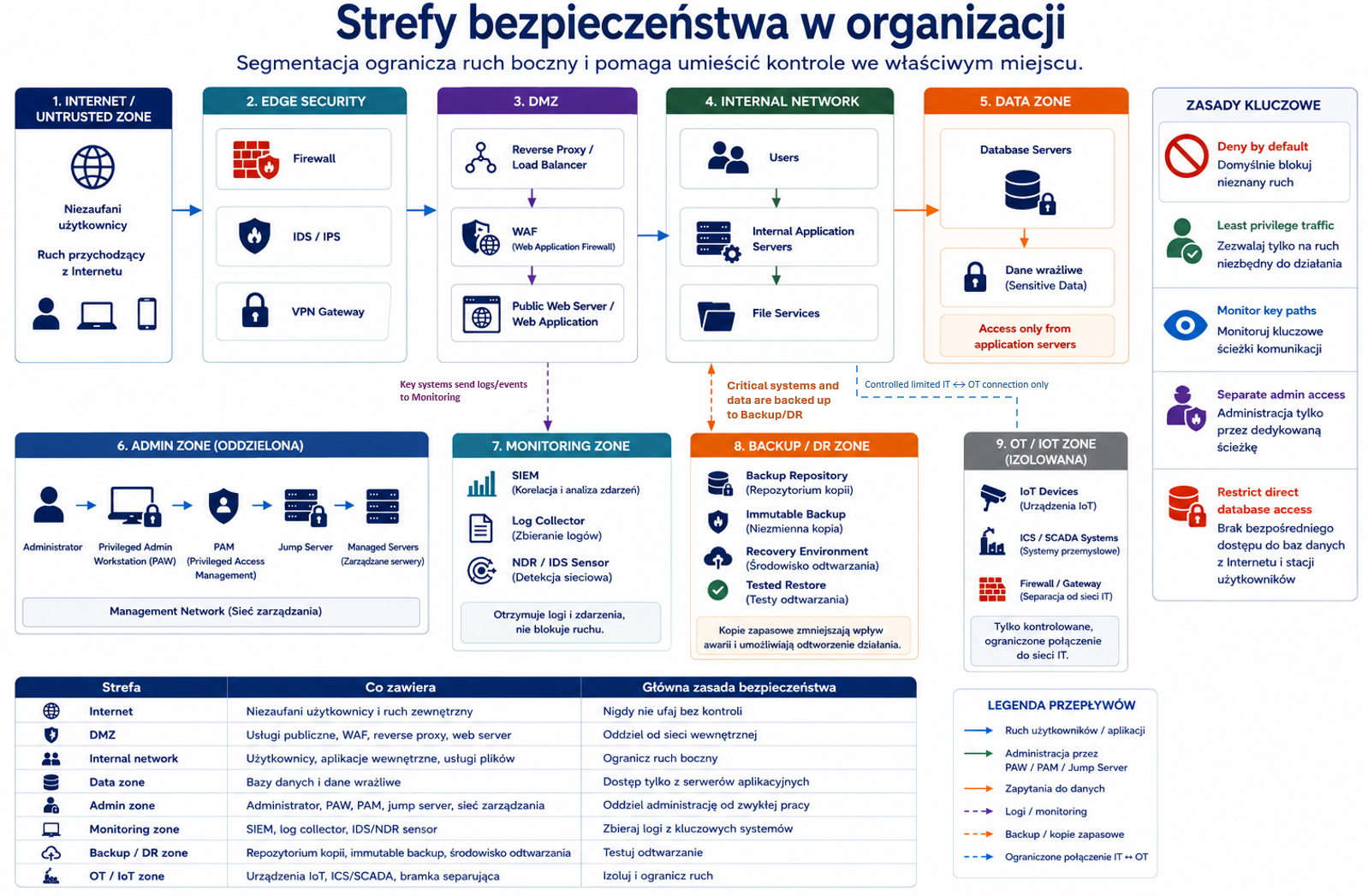
If the entire network is flat, a compromise on one host can quickly spread to other systems. Segmentation limits traffic, reduces the impact of an attack and facilitates monitoring.
Explanation from scratch
Segmentation is the division of the environment into parts with different levels of trust, functionality or risk. Example: user network, servers, administration systems, guests, IoT, production and test environment.
Security zone is an area with a specific trust level and access rules.
Air gap is the physical or logical isolation of a system from other networks. It is used in very sensitive environments but is operationally difficult.
Software-Defined Networking (SDN) allows you to manage your network programmatically. It can facilitate dynamic segmentation, but requires management layer security.
How it works step by step
You identify resource types.
You group them by function and risk.
You create safety zones.
You define allowed traffic between zones.
You are blocking unnecessary traffic.
You monitor transitions between zones.
You regularly check whether the rules meet real needs.
Practical example
The company creates separate zones: users, application servers, databases, administration, Wi-Fi and IoT guests. Users can connect to the application, but not directly to the database. Administrators can only manage servers via jump server. Wi-Fi guests cannot access the corporate network.
Exam example
Scenario
Ransomware on the user's computer spread to file servers and production systems because all systems were on one network. What architectural control would reduce the impact?
Best answer
Network segmentation.
Not to be confused with this
Segmentation is not the same as backup. Segmentation limits traffic and compromising effects. Backup helps restore data after loss or encryption.
Common mistakes
A common mistake is to create segments but leave the rules between them too broad, e.g. "any-any". The second mistake is the lack of documentation of business traffic. The third mistake is the lack of monitoring at segment boundaries.
A definition to remember
Segmentation divides the environment into zones and controls traffic between them to reduce the attack surface and compromise effects.
6. Infrastructure devices and controls
Problem
Security architecture requires proper placement of tools. The same device may be effective or almost useless depending on the place of implementation and mode of operation.
The official goals of SY0-701 in the area of securing infrastructure include, among others: device placement, security zones, attack surface, connectivity, fail-open/fail-closed, active/passive, inline/tap, jump server, proxy, IDS/IPS, load balancer, sensors, port security, WAF, UTM, NGFW, Layer 4/Layer 7, VPN, TLS, IPSec, SD-WAN and SASE.
Explanation from scratch
A jump server is a controlled intermediate server used for administration. The administrator does not connect directly to production servers, but goes through a checkpoint where MFA, session logging and access restrictions can be enforced.
The proxy server mediates communication. It can filter traffic, hide internal addresses, enforce policies, and log requests.
Intrusion Detection System (IDS) detects suspicious movement and alerts. Intrusion Prevention System (IPS) can actively block traffic. IDS is usually detective, IPS can be preventive.
The load balancer distributes traffic among multiple servers. It improves availability and scaling, but must be well secured itself.
Web Application Firewall (WAF) protects web applications against typical application attacks, e.g. injection or cross-site scripting.
Unified Threat Management (UTM) combines multiple security functions into a single device or service.
Next-Generation Firewall (NGFW) provides more advanced control than a classic firewall, such as application, user recognition and additional inspection.
Layer 4 firewall works mainly at the level of IP addresses, ports and transport protocols. Layer 7 control understands the application layer, e.g. HTTP and specific requests.
How it works step by step
You determine what you want to protect.
You determine where the traffic goes.
You match the control to the layer of the problem.
You decide whether the control should run inline or in monitoring mode.
You determine whether the failure means fail-open or fail-closed.
You monitor the effectiveness of controls and fine-tune rules.
Fail-open and fail-closed
Fail-open means that in the event of a failure, the system allows traffic or access. This may protect availability, but increases security risk.
Fail-closed means that in the event of a failure, the system blocks traffic or access. This protects safety, but may result in an interruption in operation.
In exam questions, the choice depends on priority. A security system in a very sensitive environment may need to be fail-closed. A life-saving system may require accessibility, but other compensatory controls must be added.
Inline vs tap/monitor
Inline means that the device is in the path of traffic and may be blocking it. IPS often works inline.
Tap/monitor means that the device watches a copy of the traffic and alerts, but usually does not block. IDS often operates in this mode.
Practical example
The company has a public web application. The best architecture may include a WAF in front of the application, a load balancer to distribute traffic, segmentation between the application and the database, SIEM logging, a jump server for administrators, and limiting administrative access to VPN.
Exam example
Scenario
The company wants to detect suspicious traffic without the risk of interrupting the application. The device is supposed to receive a copy of the traffic and generate alerts. What suits best?
Best answer
IDS in tap/monitor mode.
Not to be confused with this
Don't confuse WAF with a classic network firewall. WAF understands the web application, HTTP requests and application attack patterns. Firewall Layer 4 can filter ports and addresses, but it does not replace WAF for application problems.
Common mistakes
A common mistake is placing the tool in the wrong place. The IDS behind the wrong segment may not see significant traffic. WAF will not help the application if the traffic bypasses the WAF. A jump server will not improve security if administrators can still connect directly.
A definition to remember
Infrastructure control is only effective if it is matched to the problem layer, properly placed, and operates in the appropriate mode: blocking, monitoring, or proxying.
7. Secure communication and access: VPN, TLS, IPsec, SD-WAN, SASE
Problem
Users, applications, and branch offices must communicate over networks that are not always trusted. Confidentiality, integrity and access control must be protected during transmission.
Explanation from scratch
A Virtual Private Network (VPN) creates an encrypted tunnel between a user or location and an organization's network.
Transport Layer Security (TLS) protects application communications such as HTTPS.
Internet Protocol Security (IPsec) protects IP-level communications and is often used in site-to-site tunnels.
Software-Defined Wide Area Network (SD-WAN) programmatically manages connectivity between locations and can select the best traffic paths.
Secure Access Service Edge (SASE) combines networking and security functions as an access model, often cloud-based, useful in distributed environments and remote work.
How it works step by step
A user or location needs access to a resource.
The system checks identity and policy.
Communication is tunneled or encrypted.
Traffic can be filtered, logged and controlled.
Access is limited to needed resources.
Events are monitored.
Practical example
A remote worker connects to the company. Instead of giving it full access to the entire network, the organization can use a VPN or SASE with Zero Trust policies, MFA, device rating, and access only to specific applications.
Exam example
Scenario
The company has many branches and wants to centrally manage traffic routes and communication policies between locations. What suits best?
Best answer
SD-WAN.
Not to be confused with this
A VPN does not mean complete security. If a VPN user gets access to the entire network, taking over his account may have major consequences. VPN must be combined with MFA, segmentation, access policies and monitoring.
Common mistakes
A common mistake is to allow split tunneling without a risk assessment. The second error is the lack of control of end devices. The third error is the failure to log remote sessions.
A definition to remember
Secure communications combines encryption, tunneling, identity control, access policies, and monitoring to protect traffic between users, locations, and applications.
8. Data protection: types, classifications and states of data
Problem
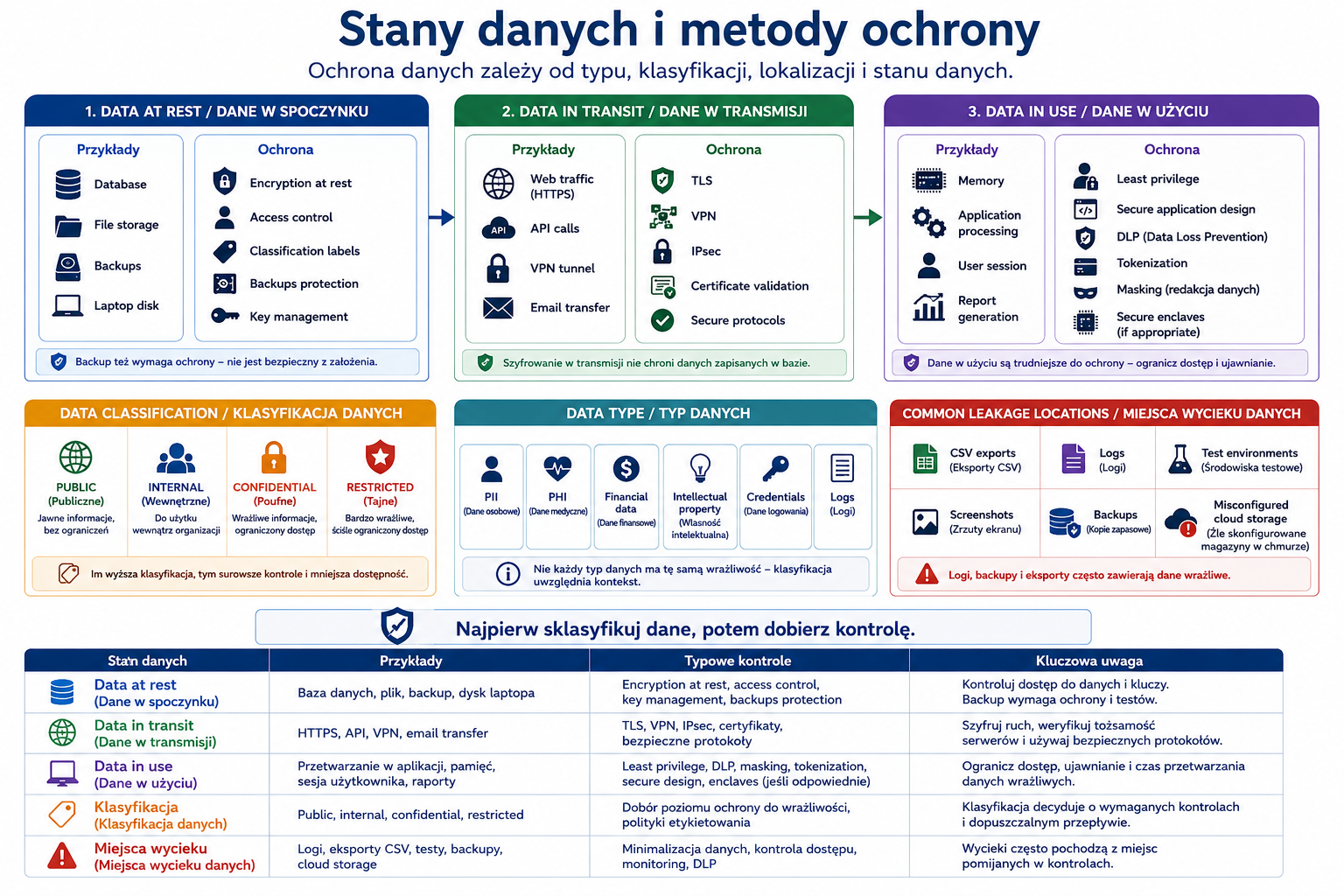
Not all data requires the same protection. Public, financial, legal, private, regulated, critical and confidential data have different requirements. Additionally, data must be protected differently when it is stored, transmitted or actively processed.
SY0-701's official data protection goals include data types, classifications, data states, data sovereignty, geolocation, and protection methods such as encryption, hashing, masking, tokenization, obfuscation, segmentation, and permission restrictions.
Explanation from scratch
Data classification is the assignment of data to protection categories, e.g. public, private, sensitive, confidential, restricted, critical.
Data at rest is data saved, e.g. on disk, in a database or in a backup copy.
Data in transit is data sent over the network.
Data in use is data actively processed by an application, process or user.
Data sovereignty means that data is subject to the laws and requirements of the country or region in which it is stored or processed.
How it works step by step
You identify data.
You classify them according to sensitivity and requirements.
You define the data state: at rest, in transit, in use.
You choose protection: encryption, tokenization, masking, segmentation, permission restrictions.
You check localization and regulatory requirements.
You monitor access and data usage.
You determine data retention and deletion.
Practical example
The payment card number in the database may be tokenized. In the consultant's panel it may be masked as **** **** **** 1234. During transmission it should be protected by TLS. Access to full data should be limited to a very narrow group of systems and users.
Exam example
Scenario
The company wants consultants to only see the last four digits of a customer's card number. Which method is best?
Best answer
Date masking.
Not to be confused with this
Don't confuse masking with encryption. Masking often concerns the presentation of data to the user. Encryption protects your data cryptographically. Don't confuse tokenization with hashing. The token replaces the value and can be mapped in a secure system, and the hash is a one-way hash.
Common mistakes
A common mistake is to protect only the data in transmission. Data may also leak from the database, backup, logs, CSV exports, test environments and reports. The second mistake is the lack of classification, whereby everything is treated the same or nothing is taken seriously enough.
A definition to remember
Data protection requires recognizing the type, classification, state and location of data, and then selecting appropriate protection methods.
9. Resilience, high availability and disaster recovery
Problem
Security includes not only preventing attacks, but also maintaining operations and recovering from disasters. The system may be confidential and integral, but if it is unavailable at a critical moment, the organization still suffers losses.
Explanation from scratch
Resilience is the ability of a system or organization to survive a failure, attack, or disruption and continue operating or recover quickly.
High availability (HA) means designing the system to minimize downtime. Redundancy, load balancing, clusters, replication and monitoring are used.
Disaster recovery (DR) is the plan and ability to restore systems after a major event.
Load balancing distributes traffic among multiple instances. Clustering connects systems so that they can jointly ensure availability or take over work after a failure.
The hot site is ready to take over quickly. Warm site has some infrastructure and requires startup or synchronization. A cold site is a primary location that requires more preparation before going live.
The official SY0-701 goals indicate high availability, load balancing vs clustering, hot/warm/cold sites, geographic dispersion, platform diversity, multi-cloud, continuity of operations, capacity planning, testing, backups, snapshots, recovery, replication, journaling, UPS and generators as elements of resilience and recovery.
How it works step by step
The organization determines which systems are critical.
Establishes accessibility requirements.
Designs redundancy.
Creates backups and replication.
Prepares alternative locations.
Tests failover and recovery.
Updates the plan after architecture changes.
RTO and RPO
Recovery Time Objective (RTO) answers the question: how long can the system be unavailable?
Recovery Point Objective (RPO) answers the question: how much data can be lost, measured in time since the last copy or replication?
Example: RTO = 4 hours means the system should return within 4 hours. RPO = 15 minutes means that the organization accepts the loss of a maximum of approximately 15 minutes of data.
Practical example
The online store has a lot of traffic. The load balancer distributes traffic among three application servers. The database is replicated. Backups are encrypted and stored off the main location. The company tests failover once a quarter. It increases immunity.
Exam example
Scenario
The company wants to have a backup location ready to operate almost immediately, with up-to-date systems and data. Which option suits you best?
Best answer
Hot site.
Not to be confused with this
Backup is not the same as high availability. Backup helps restore data, but does not necessarily ensure business continuity. Load balancing is not the same as backup. A load balancer improves the availability of the service, but does not replace a copy of the data.
Common mistakes
A common mistake is creating backups without testing the recovery. A backup that cannot be restored does not serve its purpose. The second mistake is storing all copies in the same location or administrative domain. The third error is the lack of backup encryption.
A definition to remember
Resilience is the ability to survive disruptions, high availability minimizes downtime, and disaster recovery enables recovery after a serious event.
Key concepts
Concept Meaning
On-premises Infrastructure maintained locally by the organization.
Cloud Resources and services provided by a cloud provider.
Hybrid A combination of local and cloud infrastructure.
Shared responsibility model Division of security responsibility between the cloud provider and the client.
Virtualization Running multiple virtual machines on one host.
Containerization Running applications in lightweight, isolated containers.
Serverless Model in which the customer implements the function and the provider manages the execution layer.
Microservices An architecture that divides an application into many small services.
IoT Networked devices that collect data or perform actions.
ICS/SCADA Industrial and supervisory systems for physical processes.
Segmentation Dividing the environment into zones and controlling traffic between them.
Air gap Isolation of the system from other networks.
SDN Software-managed network.
Jump server Controlled intermediate point for administration.
Proxy A communication intermediary, often filtering and logging traffic.
IDS Intrusion detection system.
IPS Intrusion Prevention System.
WAF Firewall protecting web applications.
NGFW An advanced firewall that analyzes more than port and address.
VPN Encrypted access tunnel.
TLS Application communication protection protocol.
IPsec Communication protection mechanism at the IP level.
SASE A model combining network and security as an access service.
Data at rest Data saved.
Data in transit Data in transit.
Data in use Data actively processed.
Data sovereignty Legal requirements related to data localization.
High availability Design to minimize downtime.
RTO Maximum acceptable unavailability time.
RPO The maximum acceptable data loss, measured in time.
Hot site A backup location ready to quickly take over operations.
Warm site Location partially prepared.
Cold site A location that requires significant preparation.
Examples
Example 1: Small business segmentation
The company has office users, a file server, a financial application, guest Wi-Fi and IP cameras. Without segmentation, all devices can see each other. After segmentation:
- Wi-Fi guests only have Internet
- cameras are in a separate IoT network
- users have access to the application, but not directly to the database
- administrators enter via jump server
- traffic between segments is logged.
This reduces the impact of a single device being taken over.
Example 2: Public web application
A more secure application architecture might look like this:
- the user connects via HTTPS
- traffic goes to WAF
- then to the load balancer
- then to application servers
- application servers connect to the database in a separate segment
- administration is only possible via VPN and jump server
- logs are sent to central monitoring.
- Example 3: Protecting customer data
Customer data is classified as confidential. They are encrypted in the database. TLS is used during transmission. In the consultant's panel, some data is masked. Access is limited by roles. Backups are encrypted and stored off the main location.
Example 4: Resilience of an online store
The online store uses load balancing, multiple application instances, database replication, off-site backups and failover tests. Thanks to this, the failure of one server does not mean the complete unavailability of the service.
Practical applications
Designing simple safety zones.
Selecting devices and controls for their place in the architecture.
Mitigating the effects of ransomware through segmentation.
Designing secure remote access.
Classifying data and selecting protection methods.
Planning backups, replication and recovery.
Preparation for scenario questions about "best architecture".
Common mistakes
Wrong Why is it wrong Correct understanding
| “The cloud automatically solves security.” | The customer remains responsible for configuration, data and identities. | The cloud changes responsibility, but does not remove it. |
|---|---|---|
| “A container is a virtual machine.” | The container usually shares the host kernel, the VM has its own operating system. | These are different insulation models. |
| "Segmentation is backup." | Segmentation limits traffic, backup restores data. | Both checks solve different problems. |
| “IDS and IPS are the same.” | IDS detects, IPS can block. | The mode of operation matters. |
| “WAF replaces code improvement.” | WAF mitigates the risk but does not fix the underlying error. | Secure coding is still needed. |
| "VPN gives you complete security." | VPN provides a tunnel, but it does not replace MFA, segmentation and monitoring. | Remote access must be restricted by policies. |
| "Backup means high availability." | Backup helps with recovery, but does not automatically minimize downtime. | HA requires redundancy and failover. |
| “Hot, warm and cold sites only differ in price.” | They differ in readiness, recovery time and cost. | Hot is the fastest and most expensive, cold the slowest and cheaper. |
Common mistakes
No segmentation
A flat network increases the impact of compromising one host.
Wrong control place
WAF does not protect applications if traffic can bypass it. IDS will not detect traffic that it cannot see.
Over-reliance on VPNs
VPN access should be limited, monitored and preferably supported by MFA and device assessment.
No playback tests
Backup without restore test is only an assumption, not a confirmed capability.
No data classification
Without classification, it is difficult to choose encryption, masking, retention and access restrictions.
Underestimating legacy systems, IoT and ICS
Systems that are difficult to update require a compensatory architecture: segmentation, access control, monitoring and service windows.
What you need to know for the exam
In the 3.0 domain you need to be able to:
- compare architecture models and indicate their security consequences
- understand the shared responsibility model
- distinguish virtualization, containerization, serverless and microservices
- indicate the risks of IoT, ICS, SCADA, RTOS and embedded systems
- select segmentation, air gap or security zones for the scenario
- choose WAF, UTM, NGFW, IDS, IPS, proxy, jump server or load balancer
- understand fail-open vs fail-closed
- understand inline vs tap/monitor
- choose VPN, TLS, IPsec, SD-WAN or SASE
- recognize data at rest, data in transit and data in use
- choose encryption, hashing, masking, tokenization, segmentation or permission restrictions
- distinguish load balancing from clustering
- distinguish hot, warm and cold sites
- understand backup, snapshot, replication, journaling, UPS and generators.
Checklist
User should be able to:
- Compare on-premises, cloud and hybrid.
- Explain the shared responsibility model.
- Distinguish between virtualization, containerization, serverless and microservices.
- Indicate the risks of IoT, ICS/SCADA, RTOS and embedded systems.
- Design a simple division into security zones.
- Explain why segmentation is used.
- Distinguish IDS from IPS.
- Distinguish WAF from a classic firewall.
- Explain jump server and proxy.
- Explain fail-open and fail-closed.
- Distinguish inline from tap/monitor.
- Select VPN, TLS, IPsec, SD-WAN or SASE for your scenario.
- Distinguish between data at rest, data in transit and data in use.
- Select a data protection method to suit your requirements.
- Distinguish between high availability, disaster recovery and backup.
- Explain RTO and RPO.
- Distinguish between hot, warm and cold sites.
- Review questions
- What is the difference between on-premises and cloud?
- What does shared responsibility model mean?
- What is the difference between a virtual machine and a container?
- Why doesn't serverless mean "no servers"?
- Why do IoT and ICS require special protection?
- What is the difference between segmentation and air gap?
- What is a jump server used for?
- What is the difference between IDS and IPS?
- What is the difference between WAF and Layer 4 firewall?
- What does fail-open mean?
- What does fail-closed mean?
- When to use a VPN?
- How is TLS different from IPsec?
- What does data at rest mean?
- What is the difference between masking and encryption?
- What is the difference between load balancing and clustering?
- What is the difference between a hot site and a cold site?
- What is the difference between RTO and RPO?
- Answers with explanations
- On-premises is maintained locally by the organization, and the cloud uses the provider's resources.
- In on-premises, the organization has more direct control, but also more operational responsibilities.
- The shared responsibility model defines the division of responsibility between the cloud provider and the client.
- The provider secures some of the infrastructure, but the customer is still responsible for data, configuration, permissions and many policies.
- The virtual machine has its own operating system, and the container usually shares the host kernel.
- Containers are lighter, but require protection of images, secrets, and the orchestration environment.
- Serverless means that the client does not directly manage servers.
- The servers still exist, but are managed by the platform provider.
- IoT and ICS are often difficult to update and can impact physical processes.
- That's why segmentation, monitoring, access control and supplier management are important.
- Segmentation divides the environment into zones, and the air gap isolates the system from other networks.
- Air gap is a more radical form of insulation.
- The jump server is a controlled intermediate point for administration.
- Makes it easier to log activities, MFA and restrict direct access to servers.
- IDS detects and alarms, IPS can block.
- IDS is usually detective, IPS can act preventively.
- WAF protects web applications at the application request level, and the Layer 4 firewall filters mainly addresses, ports and protocols.
- Fail-open means that in the event of a failure, the system allows traffic or allows operation.
- Protects availability, but may increase risk.
- Fail-closed means that in the event of a failure, the system blocks traffic or access.
- Protects security, but may interrupt service.
- VPN is used to create an encrypted access tunnel through an untrusted network.
- TLS protects application communications, such as HTTPS, and IPsec protects IP-level communications.
- Data at rest is data saved on disk, in a database, backup or other medium.
- Masking hides part of the data in the presentation, and encryption cryptographically encrypts the data.
- Load balancing distributes traffic between instances, and clustering connects systems to work together or take over operation.
- A hot site is ready to take over quickly, a cold site requires a lot of preparation.
- RTO determines the maximum unavailability time, and RPO determines the maximum acceptable data loss measured in time.
- Practical tasks
- Lab 1: Design a small business segmentation
Purpose:
Learn to create simple security zones.
Context:
The company has 40 employees, a file server, a financial application, guest Wi-Fi, IP cameras, printers, administrator accounts and a public web application.
Steps:
- Divide the environment into at least five security zones.
- Determine which zones can communicate.
- Indicate which connections should be blocked.
- Add space for a jump server.
- Indicate where it is worth collecting logs.
- Justify how segmentation reduces the effects of embarrassment.
Expected result:
Simple description of zones and allowed traffic.
Pass criteria:
- Guest Wi-Fi is separated from company resources.
- IoT/cameras are in a separate zone.
- The database is not directly available to users.
- The administration passes through a controlled point.
- Movement between zones is limited and monitored.
Only perform this exercise in a legal, controlled laboratory environment. Don't use it on other people's systems, networks or accounts.
Lab 2: Selection of architectural controls
Purpose:
Practice choosing the right control for the problem.
Context:
Problem Your task
| The public web application is vulnerable to application attacks. | Select control. |
|---|---|
| Administrators connect directly to production servers. | Choose a safer model. |
| The company wants to detect suspicious traffic without blocking. | Choose a tool and mode. |
| The company wants to block suspicious inline traffic. | Choose a tool and mode. |
| Company branches need centrally managed connectivity. | Choose a solution. |
| Remote workers only need access to selected applications. | Choose an access model. |
Steps:
- For each problem, select a control.
- Justify why this control is appropriate.
- Identify one pitfall or implementation error.
- Indicate what logs or metrics are worth monitoring.
Expected result:
Table problem → control → justification → implementation risk.
Pass criteria:
- WAF was indicated for the web application.
- A jump server is provided for administration.
- For non-blocking detection, IDS/tap is indicated.
- IPS/inline is indicated for blocking.
- SD-WAN is indicated for branches.
- For remote work, VPN/SASE with access policies was considered.
Only perform this exercise in a legal, controlled laboratory environment. Don't use it on other people's systems, networks or accounts.
Lab 3: Data Protection and Recovery Plan
Purpose:
Combine data classification with backup, encryption and RTO/RPO.
Context:
The company stores public data, employee data, financial data and customer data. The sales application is supposed to run almost all the time. The company accepts a maximum of 1 hour of unavailability and a maximum of 15 minutes of data loss.
Steps:
- Classify the data.
- Indicate which data requires encryption.
- Indicate where to apply masking or tokenization.
- Determine RTO and RPO based on the scenario.
- Offer backup and replication.
- Suggest a playback test.
Expected result:
A quick data protection and recovery plan.
Pass criteria:
- Customer and financial data has a higher level of protection.
- Encryption at rest and in transit is included.
- Masking or tokenization for sensitive data is included.
- RTO = 1 hour and RPO = 15 minutes were correctly indicated.
- Restore/failover test included.
Only perform this exercise in a legal, controlled laboratory environment. Don't use it on other people's systems, networks or accounts.
Mini-test
Question 1
The company maintains its financial system locally, but uses the cloud for web applications and backups. What model is it?
A. On-premises only
B.Hybrid
C.Air-gapped
D.Embedded
Correct answer:
B
Explanation:
Hybrid combines on-premises and cloud environments.
Why the other answers are worse:
- A: It's not just local.
- C: Air gap means isolation from the network.
- D: Embedded refers to embedded systems.
- Question 2
In the cloud, a public data bucket was incorrectly set to be accessible to everyone. Who is most often responsible for this configuration?
A. Customer
B. Processor manufacturer
C. Every Internet user
D. Energy supplier
Correct answer:
A
Explanation:
In the shared responsibility model, the client is responsible for many configurations, including data access and permissions.
Why the other answers are worse:
- B and D: Not applicable to cloud configuration.
- C: Internet users do not configure the bucket.
- Question 3
Which solution best limits the effects of compromising one computer in a flat network?
A. Segmentation
B. Changing the wallpaper
C. Larger disk
D. Disabling all logs
Correct answer:
A
Explanation:
Segmentation limits the movement and ability of the attack to spread.
Why the other answers are worse:
- B and C: They do not solve the security problem.
- D: Makes detection and analysis difficult.
- Question 4
The company wants to protect the web application against typical application attacks. What suits best?
A. WAF
B.UPS
C. Cold site
D. Keylogger
Correct answer:
A
Explanation:
Web Application Firewall protects web applications against application attack patterns.
Why the other answers are worse:
- B: UPS is about power supply.
- C: Cold site is about playback.
- D: Keylogger is a malicious tool, not a control.
- Question 5
An IDS connected to a non-blocking copy of traffic operates in what mode?
A. Tap/monitor
B. Fail-closed
C. Tokenization
D.Serverless
Correct answer:
A
Explanation:
Tap/monitor means observing a copy of the traffic and alerting without directly blocking.
Why the other answers are worse:
- B: Refers to failure behavior.
- C: Concerns data protection.
- D: Refers to the application launch model.
- Question 6
Which mechanism is best for administering servers through a controlled point with session logging?
A. Jump server
B. Public admin account
C. Guest Wi-Fi
D. Cold backup
Correct answer:
A
Explanation:
Jump server centralizes and controls administrative access.
Why the other answers are worse:
- B: A shared or public admin account increases the risk.
- C: Does not apply to administration.
- D: Concerns data recovery.
- Question 7
The data sent over the network is:
- A. Date at rest
- B. Date in transit
- C. Data in use
- D. Data sovereignty
Correct answer:
B
Explanation:
Data in transit is data in transit.
Why the other answers are worse:
- A: Data saved.
- C: Data actively processed.
- D: Location and legal requirements.
- Question 8
The consultant should only see the last four digits of the card number. Which method suits you best?
A. Data masking
B.DDoS
C. Load balancing
D. Fail-open
Correct answer:
A
Explanation:
Masking hides some data from the user's view.
Why the other answers are worse:
- B: This is an attack on accessibility.
- C: Splits traffic.
- D: Refers to failure behavior.
- Question 9
The company wants a backup location ready to take over the work very quickly. What suits best?
A. Hot site
B. Cold site
C. No backup
D. Public Wi-Fi
Correct answer:
A
Explanation:
A hot site has a high level of readiness and allows you to take over quickly.
Why the other answers are worse:
- B: Cold sites require a lot of preparation.
- C: Lack of backup increases the risk.
- D: Does not apply to playback.
- Question 10
RPO means:
- A. Maximum acceptable unavailability time
- B. Maximum acceptable data loss measured by time
- C. Number of administrators
- D. Application firewall type
Correct answer:
B
Explanation:
The Recovery Point Objective determines the maximum amount of data an organization can lose, measured in time since the last recovery point.
Why the other answers are worse:
- A: It's an RTO.
- C and D: They do not apply to the Ombudsman.
- Flashcards
- Front of the index card. Back of the index card
| What does on-premises mean? | Infrastructure maintained locally by the organization. |
|---|---|
| What does cloud mean? | Services and resources provided by the cloud provider. |
| What does hybrid mean? | A combination of local and cloud environments. |
| What does shared responsibility model mean? | Division of security responsibility between the cloud provider and the customer. |
| VM vs container? | VM has its own operating system; the container usually shares the host kernel. |
| What does serverless mean? | The client implements the feature and the provider manages the server layer. |
| What are microservices? | Architecture that divides the application into small services. |
| What does IoT mean? | Networked devices that collect data or perform actions. |
| What does ICS/SCADA mean? | Industrial and supervisory systems controlling physical processes. |
| What does segmentation do? | It divides the environment and limits movement between zones. |
| What is an air gap? | System isolation from other networks. |
| What is a jump server? | Controlled intermediate point to administration. |
| IDS vs. IPS? | IDS detects, IPS can block. |
| What does WAF do? | Protects web applications against application attacks. |
| What does NGFW mean? | Next-Generation Firewall with advanced inspection and control. |
| Fail-open vs fail-closed? | Fail-open passes on failure; fail-closed blocks on failure. |
| Inline vs tap/monitor? | Inline is on the movement path; tap/monitor watches copy. |
| What does a VPN do? | Creates an encrypted access tunnel. |
| TLS vs IPsec? | TLS protects application-wise, IPsec at the IP level. |
| What does SASE mean? | A model combining network and security as an access service. |
| Date at rest? | Data saved. |
| Date in transit? | Data being transferred. |
| Date in use? | Data actively processed. |
| What does data sovereignty mean? | Data is subject to country or region requirements. |
| Masking vs encryption? | Masking hides part of the data; encryption encrypts cryptographically. |
| Load balancing vs clustering? | Load balancing distributes traffic; clustering ensures joint work or acquisition. |
| Hot site vs cold site? | Hot is ready quickly; cold requires preparation. |
| RTO vs RPO? | RTO is time of unavailability; RPO is data loss measured in time. |
Images to generate
IMG_M03_S01_SECURE_ARCHITECTURE_OVERVIEW
Place in the material:
"Introduction" section.
Image Purpose:
Show a high-level model of secure enterprise architecture.
Description of the image to generate:
Architecture diagram with users, Internet, WAF, load balancer, application servers, database, administration segment with jump server, IoT segment, cloud, VPN/SASE for remote work and a central login system. Show security zone boundaries and allowed traffic arrows.
Style:
System architecture / technical diagram.
Mandatory elements:
- users
- Internet
- WAF
- load balancer
- application servers
- database
- jumpserver
- VPN/SASE
- IoT segment
- cloud
- log monitoring
- security zones.
Elements to avoid:
- too many subnets
- illegible icons
- random hacker symbols
- realistic company data.
- IMG_M03_S02_COMPUTE_MODELS_COMPARISON
- Place in the material:
- "Virtualization, containerization, serverless and microservices" section.
Image Purpose:
Compare application launch models.
Description of the image to generate:
A visual table comparing virtualization, containerization, serverless and microservices. For each model, show: isolation level, who manages the infrastructure, main benefits, main security risks. Use short labels, e.g. "VM = full OS", "container = shared kernel", "serverless = function", "microservices = many small services".
Style:
Technical infographic/comparison table.
Mandatory elements:
- virtualization
- containerization
- serverless
- microservices
- insulation
- responsibility
- risk
- advantages.
Elements to avoid:
- long paragraphs
- vendor-specific details
- code.
- IMG_M03_S03_ENTERPRISE_SECURITY_ZONES
- Place in the material:
- “Infrastructure Devices and Controls” section.
Image Purpose:
Show segmentation and locus of control.
Description of the image to generate:
Network diagram with security zones: guest Wi-Fi, user zone, server zone, database zone, admin zone, IoT zone and DMZ/public app zone. Add WAF in front of the web application, firewall between zones, IDS in monitor mode, IPS inline, jump server in admin zone, proxy for outgoing traffic and SIEM/logging as a central log recipient.
Style:
Network diagram/security architecture.
Mandatory elements:
- security zones
- DMZ/public app
- WAF
- firewall
- IDS
- IPS
- jumpserver
- proxy
- database zone
- IoT zone
- SIEM/logging.
Elements to avoid:
- public IP addresses
- too detailed firewall rules
- offensive instructions.
- IMG_M03_S04_DATA_STATES_AND_PROTECTION
- Place in the material:
- "Data Protection" section.
Image Purpose:
Show three data states and appropriate protection methods.
Description of the image to generate:
Diagram with three columns: data at rest, data in transit, data in use. For data at rest, show database, disk, backup and encryption/access control. For data in transit, show network/TLS/VPN. For data in use, show application/user/process and permission restrictions, masking, monitoring. Add a side section: data sovereignty/geolocation.
Style:
Educational infographic/flowchart.
Mandatory elements:
- date at rest
- date in transit
- data in use
- encryption
- TLS/VPN
- masking
- tokenization
- permission restrictions
- date sovereignty.
Elements to avoid:
- excess text
- cryptographic patterns
- unclear icons.
- IMG_M03_S05_RESILIENCE_RECOVERY_MAP
- Place in the material:
- "Resilience, high availability and disaster recovery" section.
Image Purpose:
Show the difference between high availability, backup and recovery.
Description of the image to generate:
Concept map: high availability → load balancing, clustering, failover; backups → onsite/offsite, encryption, snapshots, frequency; disaster recovery → hot site, warm site, cold site, recovery testing; power → UPS, generators. Add a small box: RTO = how quickly to get back, RPO = how much data can be lost.
Style:
Concept map/educational diagram.
Mandatory elements:
- high availability
- load balancing
- clustering
- failover
- backup
- snapshots
- replication
- hot/warm/cold site
- UPS
- generators
- RTO
- Ombudsman.
Elements to avoid:
- complicated data center architecture
- hardly legible arrows
- too many abbreviations without elaboration.
- Coverage of exam requirements
- SY0-701 Exam Requirement Where It Is Covered Level of Coverage Notes
- 3.1 Compare and contrast security implications of different architecture models Architecture models; cloud; virtualization; containerization; IoT/ICS/SCADA Full Security models and implications are covered.
- 3.2 Given a scenario, apply security principles to secure enterprise infrastructure Segmentation; infrastructure devices; secure communication/access Full Includes placement, zones, fail-open/closed, IDS/IPS, WAF, VPN, SD-WAN and SASE.
- 3.3 Compare and contrast concepts and strategies to protect data Data protection Full Includes data types, classifications, data states, sovereignty and protection methods.
- 3.4 Explain the importance of resilience and recovery in security architecture Resilience, HA and disaster recovery Full Includes HA, sites, backups, replication, journaling, UPS, generators and tests.
- Which is worth repeating before moving on
- On-premises vs cloud vs hybrid.
- Shared responsibility model.
- VM vs container vs serverless.
- Segmentation and security zones.
- WAF vs Layer 4 firewall.
- IDS vs. IPS.
- Inline vs tap/monitor.
- Fail-open vs fail-closed.
- VPN vs TLS vs IPsec.
- Data at rest vs in transit vs in use.
- Masking vs tokenization vs encryption.
- High availability vs disaster recovery vs backup.
- Hot site vs warm site vs cold site.
- RTO vs. RPO.
- Module completeness check
Scope from outline covered:
- infrastructure models: on-premises, cloud, hybrid
- virtualization, containerization, serverless, microservices
- IoT, ICS, SCADA, RTOS and embedded systems
- segmentation, security zones, air gap, SDN
- infrastructure devices: WAF, UTM, NGFW, IDS/IPS, proxy, jump server, load balancer
- secure communication: VPN, TLS, IPsec, SD-WAN, SASE
- data protection: types, classifications, states, sovereignty, encryption, masking, tokenization
- immunity and recovery: HA, backup, replication, journaling, hot/warm/cold sites, UPS and generators
- exercises, mini-test, flashcards, images and check of coverage of requirements.
Scope requiring deepening:
- specific firewall rules and access lists will be developed in Security Operations.
- detailed IAM and federation will appear in Security Operations I.
- detailed backup, BIA, RTO and RPO will return in Security Program Management and Oversight.
- monitoring, SIEM and log analysis will be developed in Security Operations II.
Most important things to remember:
- Architecture decides where you place controls and how you limit the effects of failure or compromise.
- The cloud does not remove customer responsibility.
- Segmentation is one of the most important controls to limit the effects of an attack.
- The safety tool must be properly placed.
- Data must be protected by type, classification, state and location.
- Backup, high availability and disaster recovery are different concepts.
- RTO says "how to get back quickly", RPO says "how much data can be lost".
Is the material sufficient to master this part:
Yes, as a complete introduction to the 3.0 Security Architecture domain from zero to exam level.
Potential vulnerabilities:
- An additional review of scenario questions about the selection of WAF/IDS/IPS/NGFW/proxy will be useful.
- An additional RTO/RPO exercise after the Business Impact Analysis module will be useful.
- It is worth returning to segmentation in the ransomware and incident response module.
Recommended replay:
- Work through the flashcards.
- Take the mini-test without looking at the answer.
- Do lab 1 and 2.
- Draw your own diagram of a small company with at least five security zones.
- For each important system, write down: data, access, segment, monitoring, backup, RTO/RPO.
- Explanation depth control
- Important concepts are developed, not just mentioned.
- For each key area, a problem, a mechanism, a practical example, an exam scenario, common mistakes and a definition are shown.
- Added exercises, checklist, control questions, answers, mini-test, flashcards and image descriptions.
- The exercises are defensive and intended only for a legal, controlled environment.
- The structure meets the requirements for generating appropriate training material.