Module 2
Threats, Vulnerabilities, and Mitigations
Purpose
After this module, you should be able to read attack scenarios and understand what happened, why it was possible and what mitigation best reduces the risk.
After the module you should be able to:
- distinguish threat, vulnerability, exploit, attack and incident
- recognize the type of threat actor by motivation and method of action
- distinguish the attack vector from the attack surface
- recognize typical attacks: phishing, ransomware, password spraying, SQL injection, cross-site scripting, on-path attack, Denial of Service
- indicate indicators of malicious activity
- choose the right mitigation for the scenario
- avoid common exam pitfalls.
Introduction
In the previous module you learned what security controls are. Now we come to the other side of the equation: what can go wrong.
In Security+, knowing the name of the attack is rarely enough. The exam often describes symptoms: users report encrypted files, the server has unusual outgoing traffic, the logs have disappeared, the account is operating from an impossible location, the application returns other users' data, or an employee clicked a link in a message impersonating the IT department. Your task is to recognize the mechanism and then choose the best risk mitigation.
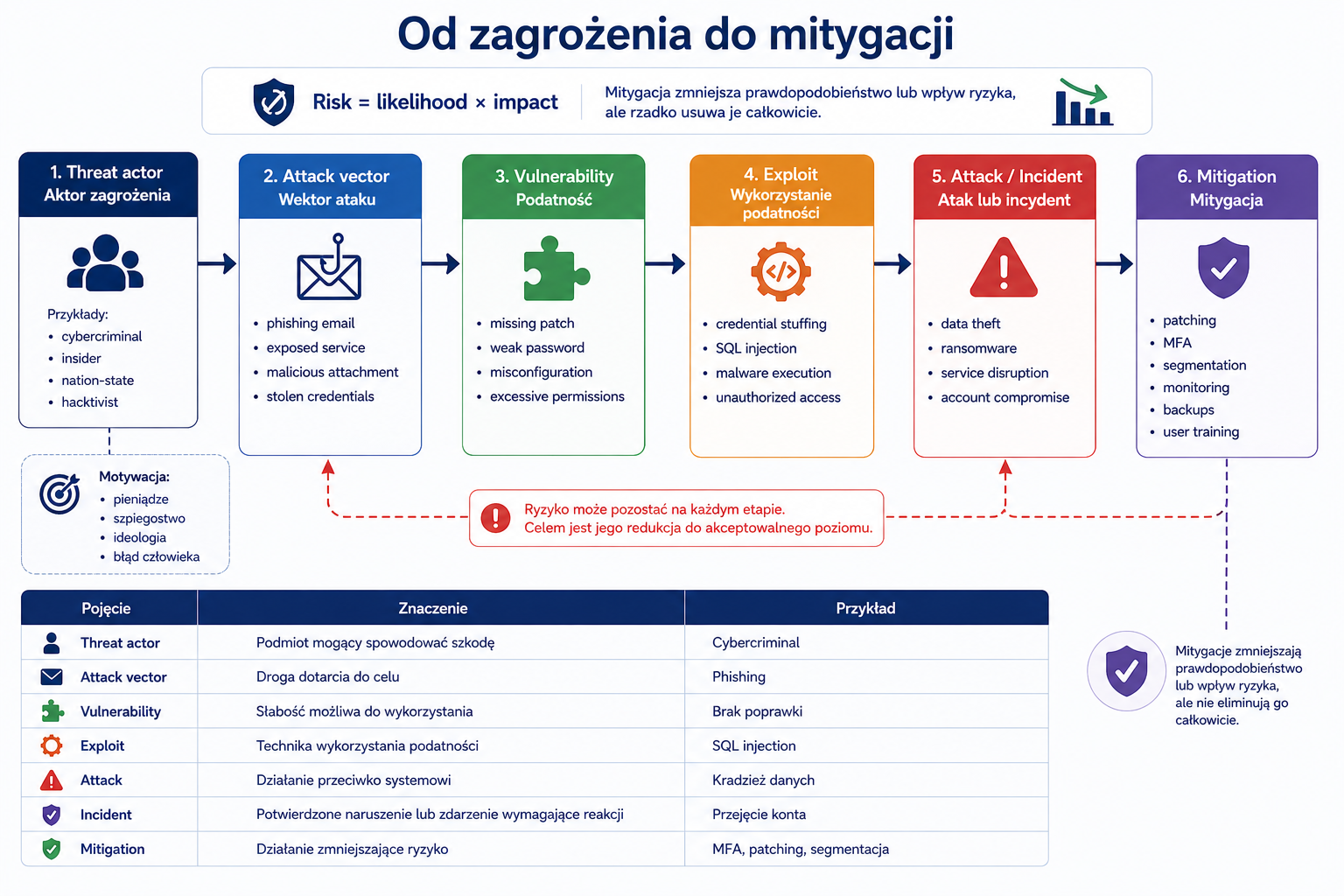
1. Threat actor - threat actor
Problem
Not every threat looks the same. Organized cybercrime works differently, an insider, a state spy team works differently, and a person without great skills using ready-made tools works differently. If you don't understand the actor, you may misjudge motivation, resources, patience, and the likely target of the attack.
Explanation from scratch
A threat actor is a person, group, organization or entity that may cause harm to a system, data or process. An actor may act intentionally or unintentionally. An employee who accidentally sends a file to the wrong recipient can also pose a threat, although he or she is not a malicious attacker.
The most important types of actors on Security+ are:
- Actor Characterization
- Nation-state Resourceful, patient, often focused on espionage, sabotage or political influence.
- Organized crime Aimed at financial gain, e.g. ransomware, data theft, fraud.
- Hacktivist Motivated by ideology, politics or protest.
- Insider threat A person inside the organization; may act maliciously or accidentally.
- Unskilled attacker A person who uses ready-made tools without in-depth knowledge.
- Shadow IT Systems or services used without the knowledge or control of the IT department.
How it works step by step
You read the script.
You are looking for motivation: money, espionage, revenge, ideology, random mistake.
You're looking for the resource level: a simple mass attack or a long-term campaign.
You are looking for a relationship to the organization: external attacker, supplier, employee, former employee.
You match the actor and the likely target.
Practical example
The company notices that someone has been slowly stealing technical documentation related to the new product for many months. The attack is not high profile, it is not about a quick ransom, and the actions are cautious. Such a scenario may suggest an advanced actor focused on industrial or state espionage.
Another scenario: users receive mass phishing emails with a link to a fake login page, and then the company receives a ransom demand for encrypted files. Organized cybercrime fits better here.
Exam example
Scenario
A non-profit organization that criticizes government actions experiences defacement of its website and publication of a political manifesto. Which actor is most likely?
Best answer
Hacktivist because the motivation is an ideological or political message.
Not to be confused with this
Don't confuse actor with technique. “Phishing” is a vector or method, not an actor. The same phishing scam could be used by cybercriminals, a state actor, or a person without much skill.
Common mistakes
A common mistake is to assume that every attack comes from an advanced actor. In practice, many incidents result from simple errors, stolen passwords, lack of updates or massive campaigns.
A definition to remember
Threat actor is an entity that may cause damage; his motivation, resources and relationship with the organization help predict the goal and course of action.
2. Threat vector and attack surfaces
Problem
To reduce the risk, you need to know where the threat can enter and how many places it can attack. Without this, the organization secures incidental items instead of reducing real exposure.
Explanation from scratch
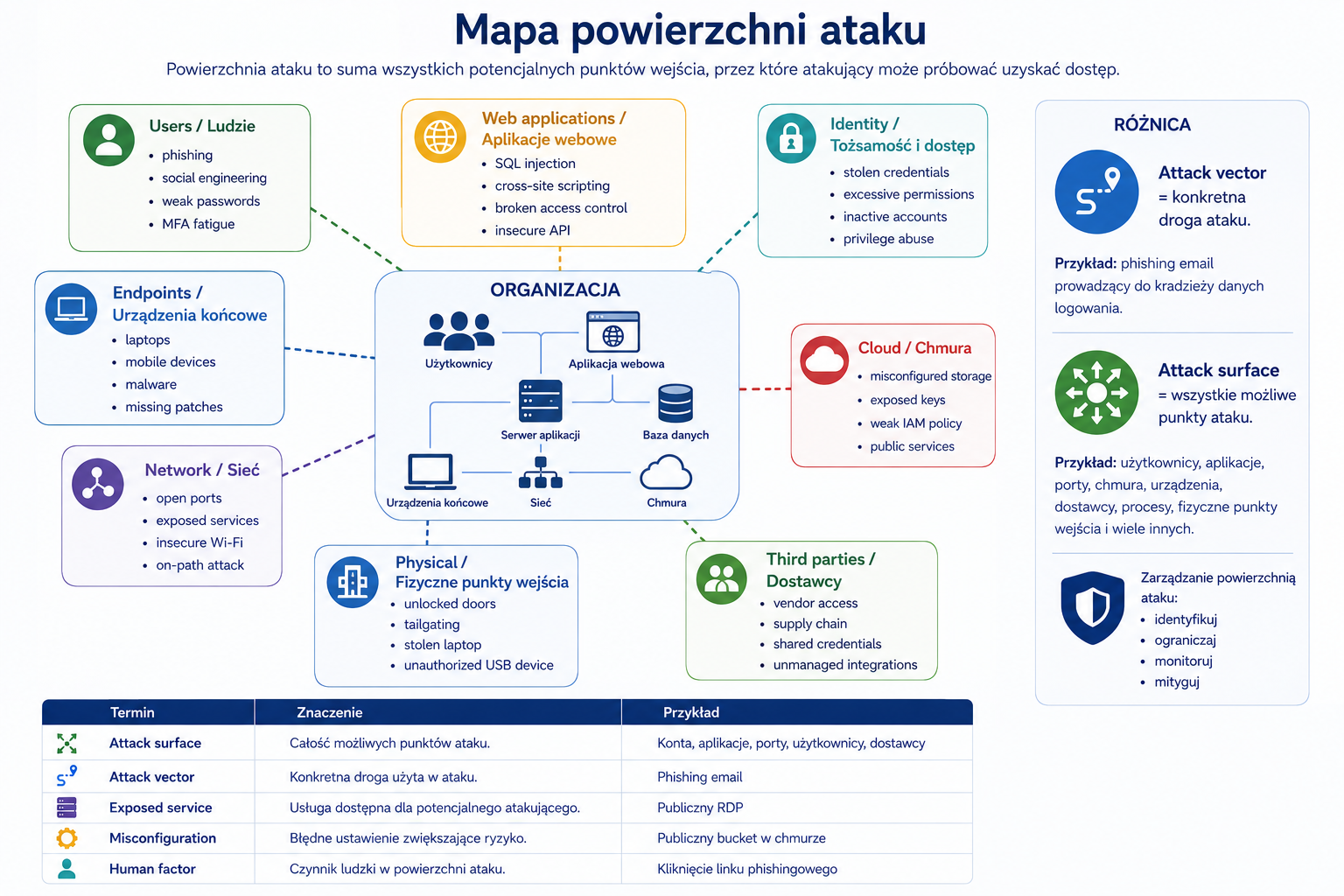
Threat vector or attack vector is a route by which an attacker can reach the target. It could be an email, text message, phone call, a vulnerable app, a malicious file, an unsecured Wi-Fi network, a provider, a USB device, or a publicly available service.
Attack surface is the sum of places that can be attacked. The more public services, accounts, integrations, devices, applications and providers there are, the larger the attack surface.
How it works step by step
You identify resources, e.g. applications, accounts, devices, data.
You check how to reach them.
You list the vectors: e-mail, Internet, VPN, provider, web application, mobile devices.
You assess the attack surface.
You remove unnecessary entries and secure the remaining ones.
Practical example
The company has a public admin panel, an unused vendor account, an old test application exposed to the Internet, and no MFA for remote logins. Each of these elements increases the attack surface. The vector may be phishing, using an old account, exploiting application vulnerabilities or logging in with a stolen password.
Exam example
Scenario
The company disabled unused services, deleted old accounts, closed the public admin panel and restricted VPN access. What did she do?
Best answer
Reduced attack surface.
Not to be confused with this
The attack vector is the path. The attack surface is the sum of possible routes and entry points. Phishing is a vector. All email accounts, users, and messaging processes are part of the attack surface.
Common mistakes
A common mistake is to focus only on public systems. The attack surface also includes accounts, vendors, mobile devices, the cloud, code repositories, business processes, and people.
A definition to remember
Attack vector is the path of attack, and attack surface is the total number of places and ways through which an organization can be attacked.
3. Vulnerability, exploit, attack and mitigation
Problem
This is one of the most important examination distinctions. If you confuse vulnerability with exploit or attack with risk, you may choose the wrong answer.
Explanation from scratch
Vulnerability is a weakness that can be exploited. It may be technical, procedural or organizational.
An exploit is a method or code that exploits a vulnerability.
Attack is actual action against the system.
Mitigation means reducing risk. Mitigation does not always remove the vulnerability completely; sometimes it just reduces the likelihood or impact.
How it works step by step
The system has weaknesses, e.g. lack of updates.
There is a way to exploit this weakness.
The attacker tries to use an exploit.
If the attack is successful, an incident may occur.
The organization implements mitigation: patching, segmentation, hardening, access blocking, monitoring or compensatory control.
Practical example
The web application does not properly validate input data. It's a vulnerability. The technique of using the bug to modify a database query is an exploit. Attempting to use this technique against an application is an attack. Input validation, code patching, and Web Application Firewall (WAF) can be mitigations.
Exam example
Scenario
The scanner detected a critical vulnerability on the server, but there is no evidence that anyone exploited it. What was detected?
Best answer
Vulnerability, i.e. susceptibility, unconfirmed incident.
Not to be confused with this
Don't confuse vulnerability with active compromise. Vulnerability can exist without an attack. Don't confuse mitigation with elimination. Segmentation can limit the impact even if the vulnerability itself still exists.
Common mistakes
A common mistake is to respond "patch everything immediately" in every scenario. Patching is important, but sometimes you need an interim control, testing, a service window, a business exception, or segmentation.
A definition to remember
A vulnerability is a weakness, an exploit is a way to exploit it, an attack is an action, and mitigation is a risk reduction.
4. Social engineering
Problem
Not all attacks start with a technical vulnerability. Often, the easiest route is through a human: clicking a link, entering a code, approving a payment, opening an attachment, or letting a person into the building.
Explanation from scratch
Social engineering is manipulating people to perform actions that benefit the attacker. The attacker exploits trust, haste, fear, authority, curiosity or the desire to help.
Typical forms:
- Technique Description
- Phishing A fake email that tricks you into clicking, entering your details, or opening a file.
- Spear phishing Phishing that targets a specific person or organization.
- Whaling Attack on high-level people, e.g. management.
- Smishing Phishing via SMS or instant messenger.
- Vishing Voice phishing, e.g. a call from the "IT department".
- Pretexting Constructing a false story or role.
- Baiting The use of bait, e.g. an "important document" or a flash drive.
- Tailgating Entry following an authorized person into a protected area.
- Impersonation Impersonating another person or function.
How it works step by step
The attacker chooses a target.
He prepares a credible excuse.
Contacts the victim by e-mail, telephone, text message, instant messenger or in person.
It creates pressure: urgency, authority, fear, or opportunity.
The victim performs an action.
The attacker gains access, data, money or an entry point.
Practical example
A finance employee receives an e-mail from a person impersonating the president. The message contains a request for an urgent transfer to a new contractor. The attacker exploits authority and urgency. The best mitigations include the payment verification procedure, training, external message marking, MFA and the process of approving changes to contractor data.
Exam example
Scenario
The employee receives an SMS with a link to "reset the company account". The link takes you to a fake login page. What type of attack is this?
Correct answer:
Smishing.
Not to be confused with this
Phishing usually involves e-mail, smishing SMS or instant messaging, and vishing a voice call. Spear phishing is more targeted than mass phishing.
Common mistakes
Mistake one: treating social engineering as a purely training problem. Training is important, but technical and process controls are also needed.
Mistake two: assuming that only "naive" users fall for it. Good attacks leverage pressure, context, and credibility.
A definition to remember
Social engineering is an attack on the human decision-making process, not just on the technical system.
5. Malware and malicious activity
Problem
Malware can steal data, encrypt files, spy on the user, take over the system, hide the attacker's presence, or spread across the network. During the exam, you must recognize the type of malware by its symptoms.
Explanation from scratch
Malware is malicious software. Not all malware works the same.
Type Mechanism
Virus Attaches itself to files or programs and requires execution.
Worm It spreads on its own through the network.
Trojan pretends to be a legitimate program but performs malicious activities.
Ransomware Blocks or encrypts data and demands a ransom.
Spyware Spyes on user activity.
Keylogger Records keystrokes.
Rootkit Hides its presence or gives deep access to the system.
Logic bomb Runs when a condition is met, e.g. a specific date.
Malware botnet Inserts a device into a network controlled by an attacker.
How it works step by step
Malware enters the system via a vector, such as an attachment, vulnerability, file download, or infected device.
It runs as a process, script, service or macro.
Trying to maintain access.
Performs the purpose: theft, encryption, spying, communication with command and control server.
It may try to spread further.
Detection systems can detect unusual processes, connections, file changes or behavior.
Practical example
User opens an attachment from a fake invoice. After a while, files on the disk and network share change extensions and a ransom note appears on the desktop. The symptoms point to ransomware.
The best mitigations include: offline or immutable backup, EDR, macro blocking, email filtering, training, privilege restriction, segmentation, and quick isolation of the infected host.
Exam example
Scenario
Workstations start generating a lot of traffic to random addresses, and the infection quickly spreads without user intervention. What type of malware is most suitable?
Best answer
Worm because it spreads on its own.
Not to be confused with this
Not all malware is a virus. A "virus" is a specific type of malware. Ransomware, Trojan, worm and spyware have different mechanisms and different best mitigations.
Common mistakes
A common mistake is to focus only on removing malware from one computer. In practice, you need to check the entry vector, scope, accounts, logs, network traffic and the possibility of re-infection.
A definition to remember
Malware is malicious software; its type is recognized by the way it infects, is maintained, acts and spreads.
6. Password and account attacks
Problem
Accounts are one of the most important targets for attack. Account takeover often gives the attacker legitimate-looking access. Many incidents do not start with a "server hack" but with the use of correct login credentials.
Explanation from scratch
The most important password attacks:
- Attack Mechanism
- Brute force Trying multiple passwords for one account.
- Password spraying Trying one or more common passwords on multiple accounts.
- Credential stuffing The use of login/password pairs leaked from other websites.
- Dictionary attack Trying entries from a dictionary.
- Offline cracking Cracking password hashes outside the system after a database leak.
- MFA fatigue Repeatedly sending MFA requests until the user approves.
How it works step by step
The attacker obtains a list of users or passwords.
Selects a method.
Trying offline login or cracking.
If an account is compromised, it checks access.
It can escalate privileges or move laterally.
The organization detects unusual logins, account lockouts, impossible travel, or unusual MFA attempts.
Practical example
The logs show one failed login for hundreds of accounts with the same password. This is more like password spraying than brute force. Brute force usually means multiple attempts against a single account.
Exam example
Scenario
The analyst sees attempts to log in to multiple accounts with the same common password. Account bans do not occur because each account has only one attempt. What is this?
Correct answer:
Password spraying.
Not to be confused with this
Password spraying is not the same as brute force. Brute force intensively attacks a single account or a small number of accounts. Password spraying spreads attempts across multiple accounts to avoid blocks.
Credential stuffing is not about guessing from scratch. It uses previously leaked login details.
Common mistakes
A common mistake is to assume that MFA is the complete solution to the problem. MFA helps a lot, but you also need to monitor logins, block risky attempts, use guess-proof passwords, detect MFA fatigue, and delete unused accounts.
A definition to remember
Password attacks attempt to gain access by guessing, reusing, or abusing login mechanisms; their symptoms are often seen in authentication logs.
7. Application and web attacks
Problem
Web applications are common targets because they are accessible to users, handle data, and often connect to databases. A bug in the application can give access to data without having to take over the entire server.
Explanation from scratch
The most important application attacks at the Security+ level:
- Sens attack
- SQL injection Injection of data affecting the query into the database.
- Cross-site scripting (XSS) Injection of a script executed in the user's browser.
- Cross-site request forgery (CSRF) Inducing a logged-in user to perform an unintended action.
- Directory traversal Attempt to access files outside the allowed directory.
- Buffer overflow Exceeding the memory buffer, potentially leading to a crash or code execution.
- Insecure API Poorly secured application interface.
- Race condition An error resulting from incorrect order or timing of operations.
How it works step by step
The application accepts data from the user.
If it doesn't validate data correctly, the data can affect the application logic.
The attacker tries to cause unintended behavior.
The impact may include disclosure of data, change of data, execution of an action, or failure.
Mitigations include input validation, secure coding, parameterized queries, security testing, WAF, session control, and proper permissions.
Practical example
The online store application accepts the order ID in the URL. If the user changes the order number and sees another customer's details, the problem may be lack of proper authorization on the server side. This doesn't have to be an advanced exploit; sometimes it's a simple access control error.
Exam example
Scenario
The application returns data from the database in a way that suggests that the user's input has changed the database query. What mitigation is best?
Best answer
Input validation and parameterized queries.
Not to be confused with this
Don't confuse XSS with SQL injection. SQL injection affects database queries. XSS affects the user's browser and script execution.
Don't confuse WAF with code improvement. WAF can mitigate risk, but the root fix is a secure application.
Common mistakes
A common mistake is to assume that browser-side filtering is enough. Validation must be on the server side, because the user or attacker can bypass the client.
A definition to remember
Application attacks exploit errors in the application's logic, validation, access control, or input handling.
8. Network attacks
Problem
Network communication is necessary, but it creates risks: eavesdropping, interception, redirection, congestion or traffic manipulation.
Explanation from scratch
The most important network attacks:
- Attack Mechanism
- Denial of Service (DoS) An attempt to prevent a service from working.
- Distributed Denial of Service (DDoS) DoS from multiple sources.
- On-path attack The attacker is located between the communicating parties.
- DNS poisoning Manipulation of DNS responses.
- ARP poisoning Manipulation of address mapping in the local network.
- Rogue access point Unauthorized access point.
- Evil twin A fake Wi-Fi network impersonating a legitimate one.
- Replay attack Reusing captured broadcast data.
How it works step by step
The attacker finds a point in the communication.
It tries to eavesdrop, redirect, overload, or manipulate traffic.
The victim may not notice the problem if the movement appears normal.
Controls include encryption, segmentation, secure protocols, DNS filtering, monitoring, Wi-Fi security, and DDoS protection.
Practical example
An employee connects to a fake Wi-Fi network in a public place because the name looks like a legitimate company or hotel network. The attacker may try to intercept traffic or trick the user into logging in to a fake website. Mitigations include VPN, certifications, training, secure Wi-Fi setup, and avoiding automatic connections to unknown networks.
Exam example
Scenario
Users are redirected to a fake website despite entering the correct domain name. Which attack suits you best?
Best answer
DNS poisoning or other name resolution manipulation, depending on the details of the scenario.
Not to be confused with this
Not every accessibility problem is DDoS. It could be a failure, a configuration error, an overload of legitimate traffic, or a problem with the provider. Look for clues on the exam: multiple sources, sudden increase in traffic, service overload.
Common mistakes
A common mistake is to choose encryption as a mitigation for every network attack. Encryption helps with confidentiality and transmission integrity, but it will not stop DDoS or remove an unauthorized access point.
A definition to remember
Network attacks exploit communications between systems to eavesdrop, redirect, disrupt, or manipulate traffic.
9. Indicators of malicious activity
Problem
The analyst rarely sees a "full attack" right away. It usually sees symptoms: unusual process, traffic, logging in, error, file change or no logs. Must be able to associate symptoms with possible activity.
Explanation from scratch
An Indicator of Compromise (IoC) is a trace that suggests a possible compromise. This could be an IP address, domain, file hash, unusual process, new administrator account, configuration change, unusual traffic, or disappearing logs.
Typical indicators:
- Indicator Possible meaning
- Impossible travel Logins from temporarily incompatible locations.
- Unusual outgoing traffic Possible data exfiltration or command and control.
- Missing logs Attempt to hide activity.
- New administrator account Escalation or maintenance of access possible.
- Multiple failed logins Password attack.
- CPU/disk spike Malware, mining, file encryption, crash.
- Changing file extensions Possible ransomware.
- Unknown Malware processes or unauthorized tools.
How it works step by step
The system generates events and logs.
The tool or analyst notices an unusual pattern.
The indicator is compared with the context.
The analyst looks for related events.
If there is sufficient evidence, the matter may be considered an incident.
The team responds in accordance with the incident response process.
Practical example
The user logs in at 09:00 from Warsaw and at 09:07 from a country thousands of kilometers away. This may be an impossible journey. This is not yet complete proof of account hijacking, as the user may have been using a VPN, but it needs to be checked.
Exam example
Scenario
The analyst notices that security logs from a critical server disappeared just before a new administrator account was created. What's the most suspicious?
Best answer
Possible attempt to hide activity and maintain access.
Not to be confused with this
IoC is an indicator, not a complete diagnosis. One indicator requires context. Multiple indicators together provide a stronger picture of the incident.
Common mistakes
A common mistake is to ignore "missing data". The lack of logs may also be a signal. If the system usually logged events and suddenly stopped, you need to check whether it is a failure, a configuration change or the attacker's actions.
A definition to remember
IoC is a technical or behavioral trace suggesting a possible security breach that requires contextual verification.
10. Mitigations
Problem
Recognizing an attack is only half the task. The Security+ exam often asks about the best mitigation. The good answer depends on the cause, risk, constraints and time.
Explanation from scratch
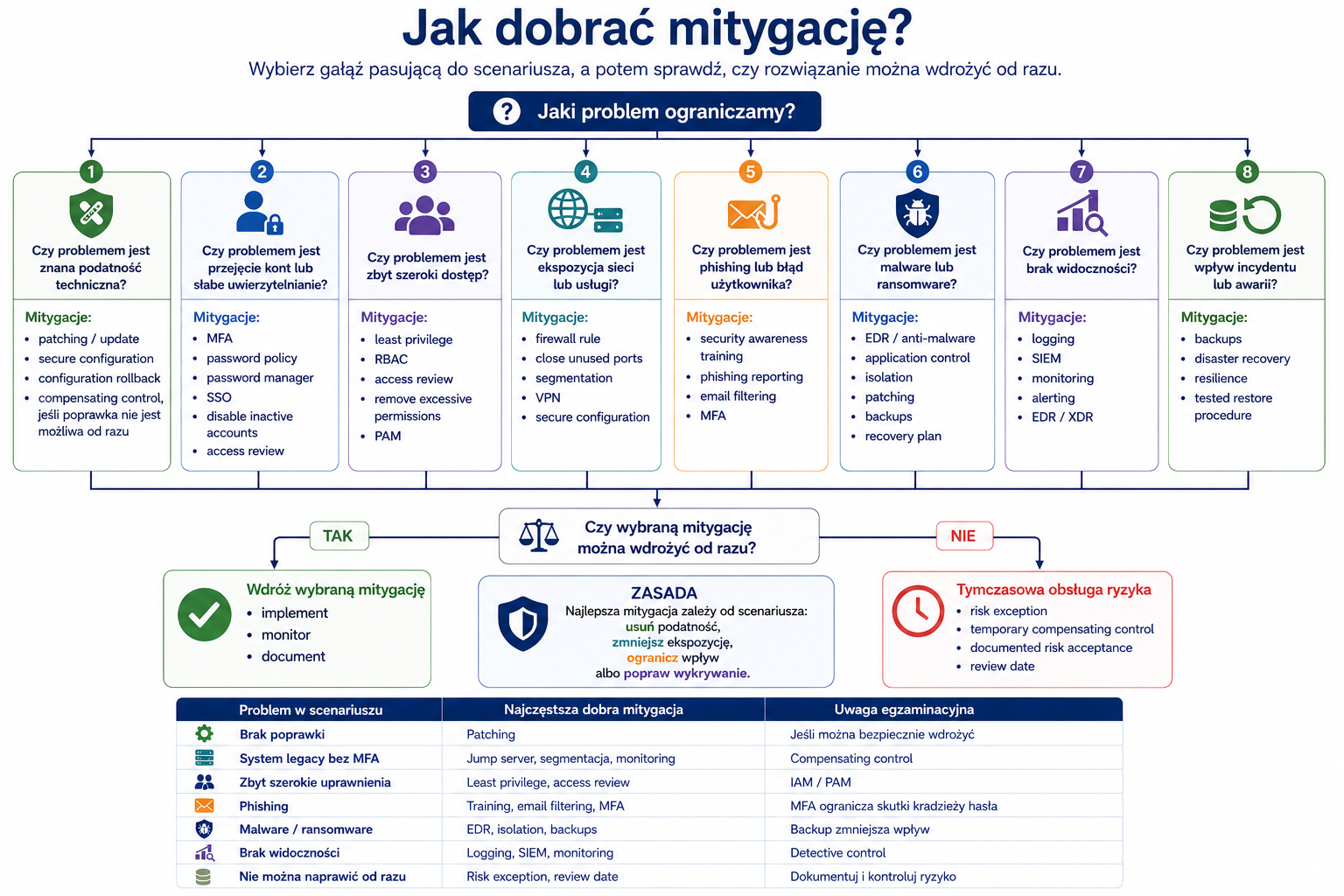
Mitigation is an action that reduces risk. It may remove a vulnerability, limit exploitation, reduce impact, or improve detection.
The most important mitigations:
- Mitigation When it helps
- Patching When there is a known vulnerability with a patch.
- Hardening When you need to reduce your attack surface through a secure configuration.
- Segmentation When you need to limit traffic and embarrassment.
- Access control When the problem is too wide access.
- Least privilege When accounts or services have excessive privileges.
- Isolation When a host or system may be infected.
- Configuration enforcement When systems deviate from a secure baseline.
- Monitoring When you need to detect and respond to activity.
- Allow list When you want to allow only approved applications, addresses or activities.
- Disable unused services When unused services increase the attack surface.
- Input validation When the application accepts unsafe input.
- Backup When you need to restore data after a disaster or ransomware.
How it works step by step
You define the problem.
You distinguish whether it is a vulnerability, active attack, bad access, malware, failure or lack of monitoring.
You choose source mitigation if possible.
If it is not possible immediately, you choose compensatory control.
You verify whether the risk has decreased.
You document the decision and monitor the consequences.
Practical example
The server has a critical vulnerability but cannot be updated until the weekend. The best interim actions may include access restriction, segmentation, WAF rules, increased monitoring and patching during the maintenance window.
Exam example
Scenario
The company discovered that users had local administrator privileges without a business need. What mitigation is best?
Best answer
The principle of least privilege and the removal of unnecessary administrative privileges.
Not to be confused with this
Don't confuse backup with infection mitigation. Backup helps recover data, but does not remove the source of the infection. Don't confuse monitoring with blocking. Monitoring detects, but may not prevent on its own.
Common mistakes
A common mistake is to choose a mitigation that is true but not the best for the scenario. Security+ often has several technically correct answers, but one best solves a specific problem.
A definition to remember
Mitigation is the action of reducing the likelihood or impact of a risk by removing a vulnerability, restricting access, reducing the attack surface, or detecting or recovering.
Key concepts
Concept Meaning
Threat actor An entity that may cause damage.
Motivation The reason for an actor's action, e.g. money, espionage, ideology.
Attack vector The path by which the attacker reaches the target.
Attack surface The total number of possible attack points.
Vulnerability A weakness that can be exploited.
Exploit A method of exploiting a vulnerability.
Malware Malware.
Phishing Email spoofing for the purpose of fraud.
Smishing Phishing via SMS or instant messenger.
Vishing Voice phishing.
Password spraying Trying a common password on multiple accounts.
Credential stuffing Using credentials from previous leaks.
SQL injection An attack affecting database queries.
XSS Script attack performed in the user's browser.
DDoS Distributed attack on service availability.
On-path attack The attacker is located between the parties to the communication.
IoC Indicator of possible compromise.
Mitigation Action that reduces risk.
Hardening Safe hardening of the configuration.
Segmentation Division of the environment to limit traffic and attack effects.
Isolation Isolation of a system, e.g. an infected host.
Examples
Example 1: Password spraying
The logs show one or two login attempts for hundreds of accounts with the same password. This indicates password spraying. The best mitigations are MFA, login pattern detection, blocking risky sources, password policy, limiting attempts, and user education.
Example 2: Ransomware
Employees report that files have new extensions and the system shows a ransom note. This indicates ransomware. The most important defensive actions are isolation of infected hosts, scope analysis, backup protection, restoring from a secure backup, and entry vector removal.
Example 3: SQL injection
The application returns data that the user should not see after unusual input. The problem may be lack of validation and unsafe query construction. Mitigations include secure coding, parameterized queries, server-side validation, security testing and WAF as a supporting layer.
Example 4: Insider threat
Before leaving the company, an employee downloads a large number of project documents outside normal working hours. This could be an insider threat. Mitigations include least privilege, access monitoring, Data Loss Prevention (DLP), offboarding process and access restriction after role change.
Practical applications
Analysis of exam scenarios such as "what attack occurred?"
Matching mitigation to the vulnerability and vector.
Pattern recognition in authentication logs.
Assessment of the organization's attack surface.
Prioritization of activities: insulation, patching, hardening, monitoring, segmentation.
Preparation for the Security Architecture and Security Operations modules.
Common mistakes
Wrong Why is it wrong Correct understanding
| “Vulnerability is attack.” | Vulnerability is a weakness, not an action. | The attack could exploit the vulnerability. |
|---|---|---|
| “Phishing, smishing and vishing are the same thing.” | They differ in the communication channel. | E-mail, SMS/messenger and voice. |
| “Any login attack is brute force.” | Password spraying and credential stuffing work differently. | Look at the trial pattern. |
| "WAF fixes the application." | WAF can reduce risk, but it does not fix the error in the code. | Code repair is source mitigation. |
| “Backup stops ransomware.” | Backup helps restore data, but does not block infections. | Prevention, detection and isolation are also needed. |
| “Abnormal movement always means an incident.” | Might have a legal explanation. | IoC requires context. |
| “Zero-day means any critical error.” | Zero-day is a vulnerability that is unknown or has no patch available at the time of exploitation. | Not every critical vulnerability is zero-day. |
| “Shadow IT is an attacker.” | Shadow IT is the unauthorized use of technology. | It can increase risk, even without malicious intent. |
Common mistakes
Recognizing an attack by one keyword
The exam may use similar symptoms for different attacks. You have to look at the whole scenario.
Choosing mitigation without understanding the reason
Patching will not solve the problem of excessive permissions, and training will not replace technical control.
Ignoring accounts and identities
A compromised account may appear to be legitimate activity. That's why MFA, monitoring, least privilege and log analysis are important.
Confusing detection with prevention
SIEM detects, but usually does not block itself. The firewall can block, but if it only logs, it has a detection function.
Assuming that one inspection is enough
Effective defense is layered: technology, processes, people, monitoring and response.
What you need to know for the exam
In the 2.0 domain you need to be able to:
- recognize the threat actor and his motivation
- distinguish attack vector from attack surface
- explain the difference: vulnerability, exploit, attack, mitigation
- recognize social engineering by channel and technique
- recognize the type of malware by symptoms
- distinguish brute force, password spraying and credential stuffing
- distinguish SQL injection from XSS
- recognize DDoS, on-path, DNS poisoning and rogue access points
- indicate IoC in logs and system behavior
- choose mitigation: patching, hardening, segmentation, isolation, access control, configuration enforcement, monitoring.
Checklist
User should be able to:
- Explain who a threat actor is.
- Match the motivation to the type of actor.
- Distinguish attack vector from attack surface.
- Distinguish between vulnerability, exploit, attack and mitigation.
- Recognize phishing, smishing, vishing, spear phishing and whaling.
- Recognize the basic types of malware.
- Distinguish between brute force, password spraying and credential stuffing.
- Explain the basic meaning of SQL injection and XSS without performing attacks.
- Recognize common network attacks by their symptoms.
- Indicate IoC in a short scenario.
- Choose the right mitigation for the problem.
- Justify why a given mitigation is better than others.
- Review questions
- What is the difference between threat actor and attack vector?
- What is the difference between attack vector and attack surface?
- What is the difference between vulnerability and exploit?
- When do we talk about insider threat?
- What is the difference between phishing and spear phishing?
- What is the difference between smishing and vishing?
- What malware spreads itself across the network?
- What is the difference between password spraying and brute force?
- What does credential stuffing mean?
- What is the difference between SQL injection and XSS?
- What might indicate ransomware?
- What can impossible travel mean?
- When is segmentation the best mitigation?
- When is host isolation used?
- Why isn't WAF a substitute for improving application code?
- Answers with explanations
- Threat actor is the entity and attack vector is the path of the attack.
- The actor may be a cybercriminal and the vector may be phishing.
- An attack vector is a specific route, and an attack surface is the sum of possible entry points.
- Email is a vector, and all accounts, inboxes, processes, and users form part of the attack surface.
- Vulnerability is a weakness, an exploit is a way to exploit it.
- Failure to update is a vulnerability and code exploiting the vulnerability is an exploit.
- Insider threat occurs when the source of risk is a person inside the organization.
- It may act maliciously, negligently or accidentally.
- Phishing is usually indiscriminate, spear phishing is targeted.
- Spear phishing uses the context of a specific person or organization.
- Smishing uses SMS or instant messaging, vishing uses voice chat.
- Worm.
- The worm can spread on its own without direct action by the user.
- Brute force tries multiple passwords on one account, password spraying tries common passwords on multiple accounts.
- Credential stuffing is the use of logins and passwords from previous leaks in other systems.
- SQL injection affects database queries, XSS affects script execution in the user's browser.
- Changing file extensions, ransom demands, massive data modifications and a sudden increase in disk operations.
- Impossible travel may indicate account hijacking, but requires context verification, e.g. VPN.
- Segmentation is good when you need to limit movement between parts of the environment and reduce the effects of compromise.
- Isolation is used when a host may be infected or is actively involved in an incident.
- WAF can mitigate attacks, but the underlying bug in the application should still be fixed.
- Practical tasks
- Laboratory 1: Classification of threat scenarios
Purpose:
Learn to recognize the actor, vector, vulnerability and mitigation.
Context:
Scenario Your task
| The employee receives an SMS with a link to a fake password reset. | Recognize attack type and mitigations. |
|---|---|
| The logs show attempts at one password on multiple accounts. | Recognize a password attack. |
| The test application is publicly available and not updated. | Indicate vulnerabilities and mitigations. |
| The former employee still has an active VPN account. | Indicate risk and mitigation. |
| The files on the network share have been encrypted. | Recognize probable malware and defensive actions. |
Steps:
- For each scenario, identify the actor, if identifiable.
- Indicate the attack vector.
- Indicate a vulnerability or weakness in the process.
- Indicate possible IoC.
- Suggest at least two mitigations.
Expected result:
Table: scenario → actor → vector → vulnerability → IoC → mitigation.
Pass criteria:
- The vector was not confused with the actor.
- Smishing was recognized correctly.
- Password spraying was recognized correctly.
- Offboarding was indicated as a way of mitigating the former employee's active account.
- Isolation, backup and scope analysis were indicated for ransomware.
Only perform this exercise in a legal, controlled laboratory environment. Don't use it on other people's systems, networks or accounts.
Laboratory 2: Mitigation selection
Purpose:
Practice selecting the best mitigation for a specific problem.
Context:
- Problem Possible mitigations
- Outdated public server patching, segmentation, WAF, monitoring
- Users have local administrator rights - least privilege, PAM, removal of admin rights
- The application is susceptible to invalid input validation, secure coding, WAF
- A suspicious host generates traffic to an unknown domain isolation, EDR analysis, DNS filtering
- The old supplier account still works deprovisioning, access review, MFA
Steps:
- Choose the best source mitigation.
- Select one temporary or compensatory control.
- Justify your choice.
- Indicate how to check whether the mitigation has worked.
Expected result:
A short justification of the choices, not just a list of tools.
Pass criteria:
- For vulnerabilities, patching or code improvement was indicated as a source fix.
- Isolation was indicated for active suspicion of infection.
- Least privilege is indicated for excessive privileges.
- Post-implementation effectiveness validation is included.
Only perform this exercise in a legal, controlled laboratory environment. Don't use it on other people's systems, networks or accounts.
Mini-test
Question 1
Which statement best describes attack vector?
A. Total number of vulnerable systems
B. The path by which the attacker can reach the target
C. The person or group carrying out the attack
D. Failure recovery mechanism
Correct answer:
B
Explanation:
An attack vector is an attack vector, e.g. email, SMS, malicious file, vulnerable application or unsecured network.
Why the other answers are worse:
- A: This is closer to the attack surface.
- C: To threat actor.
- D: To recovery or backup.
- Question 2
The logs show one attempt to log in with the same password on hundreds of accounts. What is it most likely?
A. Brute force
B. Password spraying
C.XSS
D. DNS poisoning
Correct answer:
B
Explanation:
Password spraying involves trying a common password on multiple accounts.
Why the other answers are worse:
- A: Brute force usually means multiple attempts against a single account.
- C:XSS affects web applications and scripts.
- D: DNS poisoning refers to DNS manipulation.
- Question 3
Users receive an SMS with a link to a fake login page. What attack is this?
A.Vishing
B. Smishing
C.Whaling
D. Tailgating
Correct answer:
B
Explanation:
Smishing is phishing via SMS or instant messaging.
Why the other answers are worse:
- A: Vishing uses voice.
- C: Whaling targets high-level people.
- D: Tailgating refers to physical input.
- Question 4
Which malware is best suited to quickly spread itself across the network?
A. Worm
B. Keylogger
C. Logic bomb
D. Spyware
Correct answer:
A
Explanation:
The worm can spread on its own.
Why the other answers are worse:
- B: Keylogger records keystrokes.
- C: Logic bomb fires after a condition.
- D: Spyware is spying on the user.
- Question 5
The web application does not properly check the input data, which allows it to influence database queries. What mitigation is best?
A. Parameterized queries and input validation
B. Larger monitor for administrator
C. Only backup once a month
D. Changing the server name
Correct answer:
A
Explanation:
This inherently limits the risk of SQL injection.
Why the other answers are worse:
- B: Not relevant to the problem.
- C: Backup does not prevent application vulnerabilities.
- D: Renaming does not fix the error.
- Question 6
Which action best reduces the effects of compromising one segment of the network?
A. Segmentation
B. Steganography
C. More users
D. Disabling all logs
Correct answer:
A
Explanation:
Segmentation limits movement between parts of the environment and reduces the possibility of an attack spreading.
Why the other answers are worse:
- B: Steganography hides data in the medium.
- C: Not a security check.
- D: Disabling logs worsens detection.
- Question 7
The company detected a suspicious computer generating traffic to an unknown command and control domain. What is the best first defensive action?
A. Isolate the host from the network
B. Delete all logs
C. Give the user administrator privileges
D. Turn off backups
Correct answer:
A
Explanation:
Isolation limits further communication and potential spread.
Why the other answers are worse:
- B: Deleting logs destroys evidence.
- C: Increases risk.
- D: Decreases reproducibility.
- Question 8
Which example best describes credential stuffing?
A. Trying all possible passwords for one account
B. Using logins and passwords from another website's leak
C. Impersonating the IT department over the phone
D. Hiding data in the image
Correct answer:
B
Explanation:
Credential stuffing uses credentials from previous leaks.
Why the other answers are worse:
- A: It's brute force.
- C: It's vishing/impersonation.
- D: It's steganography.
- Question 9
What is the best example of insider threat?
A. DDoS botnet from thousands of devices
B. An employee downloading an unnecessarily large number of files before leaving the company
C. Public vulnerability in an open source library
D. DNS error at the Internet provider
Correct answer:
B
Explanation:
Insider threat comes from someone inside the organization or with trusted access.
Why the other answers are worse:
- A: This is an external DDoS attack.
- C: It's a vulnerability, not an insider.
- D: This is a service or configuration issue.
- Question 10
Which statement best describes IoC?
A. Any physical inspection
B. An indicator that suggests a possible security breach
C. Rollback plan
D. Full guarantee that an incident occurred
Correct answer:
B
Explanation:
IoC is a technical or behavioral trace that requires analysis.
Why the other answers are worse:
- A: Does not apply to IoC.
- C: It's an element of change management.
- D: The IoC does not always confirm the incident itself.
- Flashcards
- Front of the index card. Back of the index card
| What is a threat actor? | An entity that may cause damage. |
|---|---|
| What is an attack vector? | The path by which an attacker can reach the target. |
| What is an attack surface? | The total number of points and possible attack methods. |
| Vulnerability vs exploit? | Vulnerability is a weakness, an exploit is a way to exploit it. |
| Attack vs incident? | Attack is an action; an incident is a security situation requiring a response. |
| What is mitigation? | Risk reducing action. |
| Phishing vs smishing? | Phishing usually email; smishing SMS or instant messenger. |
| Smishing vs vishing? | Smishing uses text messaging, vishing uses voice chat. |
| Spear phishing vs phishing? | Spear phishing is targeted at a specific person or organization. |
| What is whaling? | Phishing targeted at high-level people. |
| What is ransomware? | Malware that locks or encrypts data and demands a ransom. |
| What is a worm? | Malware spreading itself across the network. |
| What is a Trojan? | Malware pretending to be a legitimate program. |
| What is a keylogger? | Keystroke logging malware. |
| Brute force vs password spraying? | Brute force multiple passwords to one account; spraying one password on multiple accounts. |
| What is credential stuffing? | Using credentials from previous leaks. |
| SQL injection vs XSS? | SQLi affects the database; XSS on scripts in the user's browser. |
| What does DDoS mean? | Distributed attack on service availability. |
| What is on-path attack? | The attacker is between the communicating parties. |
| What is IoC? | Indicator of possible embarrassment. |
| When to use isolation? | When a host may be infected or actively involved in an incident. |
| When to use segmentation? | When you need to limit movement and the effects of embarrassment. |
| When to use patching? | When there is a known vulnerability with a patch. |
| When to use hardening? | When you need to safely limit your configuration and attack surface. |
Images to generate
IMG_M02_S01_THREAT_VULNERABILITY_RISK_FLOW
Place in the material:
"Introduction" section.
Image Purpose:
Show the relationship between threat actor, vector, vulnerability, attack, impact and mitigation.
Description of the image to generate:
Flow diagram: threat actor → motivation → attack vector → vulnerability → exploit/attack → impact on assets → mitigation. A short example for each element: cybercriminal, financial gain, phishing, weak password, account takeover, data theft, MFA/monitoring.
Style:
Technical block diagram.
Mandatory elements:
- threat actor
- motivation
- attack vector
- vulnerability
- exploit/attack
- asset impact
- mitigation.
Elements to avoid:
- offensive instructions
- exploit code
- dramatic hacker graphics
- excess text.
- IMG_M02_S02_ATTACK_SURFACE_MAP
- Place in the material:
- "Vulnerability, exploit, attack and mitigation" section.
Image Purpose:
Help you understand your organization's attack surface.
Description of the image to generate:
Organization map with attack surface elements: users, email, web application, VPN, cloud, mobile devices, providers, public API, Wi-Fi, code repository. Show that any element can be an entry point. Add a side list of mitigations: MFA, patching, access review, segmentation, monitoring, secure configuration.
Style:
Concept map/high-level architecture diagram.
Mandatory elements:
- users
- VPN
- web application
- cloud
- mobile devices
- third party/vendor
- public API
- monitoring
- mitigation list.
Elements to avoid:
- details enabling an attack
- realistic company data
- complicated subnets.
- IMG_M02_S03_MITIGATION_DECISION_TREE
- Place in the material:
- "Mitigation" section.
Image Purpose:
Show how to match mitigation to the problem.
Description of the image to generate:
Decision tree: "Is the problem a known vulnerability?" → patching. “Can't it be patched right away?” → compensating control/segmentation/WAF/monitoring. “Is excessive privileges the problem?” → least privilege/access control. "Is the host suspiciously active?" → isolation/EDR analysis. “Is the large attack surface an issue?” → hardening/disable unused services. “Is the application input the problem?” → input validation/secure coding.
Style:
Decision algorithm/educational diagram.
Mandatory elements:
- patching
- segmentation
- isolation
- hardening
- least privilege
- access control
- input validation
- monitoring
- compensating control.
Elements to avoid:
- detailed attack instructions
- code
- excess text.
- Coverage of exam requirements
- SY0-701 Exam Requirement Where It Is Covered Level of Coverage Notes
- 2.1 Threat actors and motivations Threat actor Full Includes nation-state, organized crime, hacktivist, insider, unskilled attacker, shadow IT.
- 2.2 Threat vectors and attack surfaces Threat vector and attack surfaces, social engineering Full Discussed e-mail, SMS, voice, files, networks, supply chain and people.
- 2.3 Types of vulnerabilities Vulnerability, exploit, attack and mitigation; application attacks Full Application, system, web, configuration and process vulnerabilities are included.
- 2.4 Indicators of malicious activity Malware, attacks on accounts, network, IoC Full Includes ransomware, password attacks, network attacks and typical symptoms.
- 2.5 Mitigation techniques Mitigation Full Includes segmentation, access control, patching, hardening, isolation, monitoring and configuration enforcement.
- Which is worth repeating before moving on
- Vulnerability vs exploit vs attack vs mitigation.
- Attack vector vs attack surface.
- Phishing vs smishing vs vishing.
- Brute force vs password spraying vs credential stuffing.
- SQL injection vs. XSS.
- Malware: ransomware, worm, trojan, spyware, rootkit.
- Selection of mitigation measures to the cause of the problem.
- IoC as a context-requiring indicator.
- Module completeness check
Scope from outline covered:
- threat actors
- motivations
- attack vectors and attack surface
- vulnerabilities, exploit, attack and mitigation
- social engineering
- malware
- password attacks
- application and web attacks
- network attacks
- indicators of malicious activity
- mitigation techniques
- exercises, mini-test, flashcards and image descriptions.
Scope requiring deepening:
- Detailed logs and detection tools will appear in Security Operations II.
- Vulnerability management as a process will appear in Security Operations I.
- Architectural mitigations such as segmentation and resiliency will return in Security Architecture.
- Supply chain risk will be developed in Security Program Management and Oversight.
Most important things to remember:
- Not every alert is an incident, but every suspicious pattern requires context.
- A vulnerability is a weakness, an exploit is a method of exploitation, an attack is an action.
- Mitigation must match the cause of the problem.
- The best exam answer is often the one that reduces risk most accurately, not the one that sounds the most technical.
- Account attacks are very common and require MFA, monitoring, least privilege and a good account lifecycle.
Is the material sufficient to master this part:
Yes, as a complete introduction to the 2.0 Threats, Vulnerabilities, and Mitigations domain from zero to exam level.
Potential vulnerabilities:
- It is worth doing a separate review of the application attacks themselves later.
- It is worth practicing more scenario mitigation questions, because it is easy to choose the technically correct answer, but not the best one.
- It is worth returning to IoC for the module on SIEM, EDR and log analysis.
Recommended replay:
- Work through the flashcards.
- Take the mini-test without looking at the answer.
- Do lab 1 and 2.
- For each attack, write down: symptom → mechanism → best mitigation.
- Explanation depth control
- Important concepts are explained, not just listed.
- For each key concept, the problem, mechanism, practical example, exam scenario, common mistakes and definition are shown.
- Added exercises, checklist, review questions, answers, mini-test, flashcards and images.
- The exercises are defensive and intended only for a legal, controlled environment.
- The structure meets the requirements for generating appropriate training material.