Module 4
Security Operations I
Purpose
After this module, you will be able to translate security principles into everyday operational activities. In previous modules you learned about threats, architecture and controls. Now we come to the question: how do we keep the environment safe on a daily basis?
After the module you should be able to:
- explain what secure baseline is
- distinguish baseline from hardening
- indicate techniques for securing various types of resources
- describe the life cycle of a resource from purchase to disposal
- understand vulnerability management as a process, not a one-time scan
- distinguish CVE from CVSS
- choose a response to the vulnerability: patching, segmentation, compensatory control, exception, risk acceptance
- explain provisioning and deprovisioning of accounts
- distinguish SSO, federation, SAML and OAuth
- choose an access control model for the scenario
- explain MFA, passwordless and PAM.
Introduction
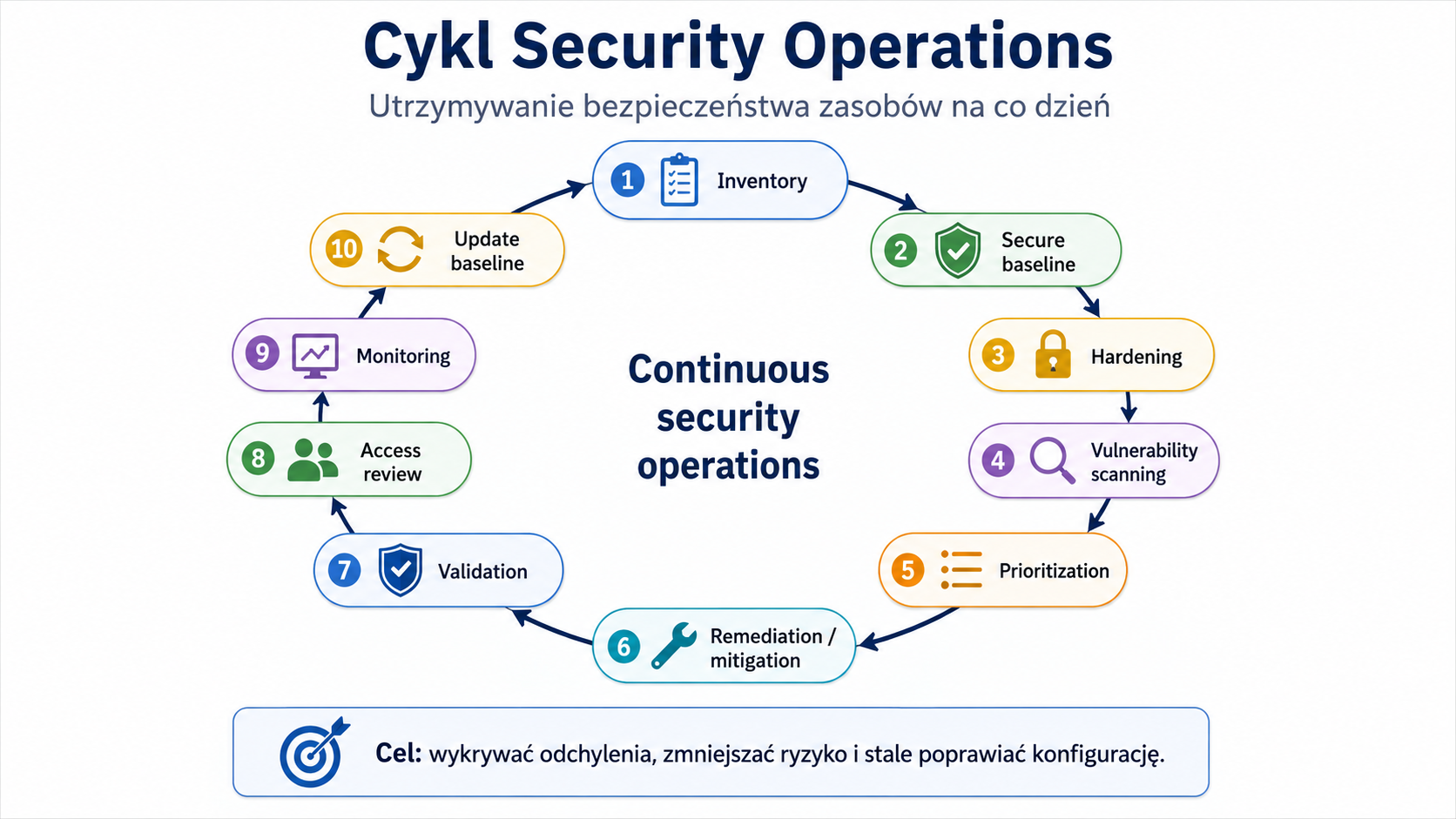
Security Operations is the practical side of cybersecurity. It is not enough to design good architecture. You still need to keep the systems in good condition: update them, configure them, monitor them, remove excessive permissions, respond to vulnerabilities, monitor the account lifecycle and check whether the implemented security measures still work.
The Security+ exam often describes an operational situation: a scanner found a vulnerability, an employee has changed positions, the former vendor's account is still working, the server is deviating from baseline, the application cannot be patched, and administrators are using a shared account. Your job is to choose the best action, not just recognize the definition.
1. Secure baseline
Problem
Without a point of reference, the organization does not know whether the system is configured securely. Two servers may look similar, but one has unnecessary services disabled, proper logging, encryption, and limited permissions, and the other runs on default settings.
Explanation from scratch
Secure baseline is an approved secure configuration pattern for a given type of resource. It may involve a workstation, server, mobile device, router, switch, container, virtual machine, cloud system or application.
Baseline answers the question: How should this resource be configured to meet the organization's security requirements?
May contain, among others:
- required password settings
- event logging enabled
- local firewall configuration
- disabled unused services
- encryption required
- update configuration
- list of allowed applications
- antimalware or Endpoint Detection and Response (EDR) settings
- protocol and port configuration
- audit settings.
How it works step by step
The organization defines security requirements.
Creates a configuration pattern for a given resource type.
Tests baseline.
Implements baseline on resources.
Monitors deviations from baseline.
Updates the baseline as requirements, technologies or risks change.
Enforces configuration compliance with management tools.
Practical example
The company creates a baseline for employee laptops. Each laptop must have disk encryption, an active local firewall, EDR installed, automatic updates, blocked unauthorized applications and a user account without local administrator rights.
If the laptop does not meet these conditions, the configuration management system marks it as non-compliant.
Exam example
Scenario
The organization wants to ensure that all new servers are deployed with identical, approved security settings. What should she create?
Best answer
Secure baseline.
Not to be confused with this
Don't confuse baseline with one-time hardening. Baseline is a pattern and a reference point. Hardening is the process of reducing the attack surface and adapting the configuration to a secure pattern.
Common mistakes
The most common mistake is creating a baseline and not subsequently checking compliance. The second error is one baseline for all resources. A database server, a laptop, a domain controller, and a mobile device have different requirements.
A definition to remember
Secure baseline is an approved secure configuration benchmark against which asset compliance is measured and maintained.
2. Hardening
Problem
Default system settings are often convenient, but not always safe. The system may have unnecessary services enabled, default accounts, poor login settings, redundant ports, excessive permissions, or no enforced encryption.
Explanation from scratch
Hardening is the process of reducing the attack surface by safely configuring a resource. The goal is to remove what is unnecessary, reduce what is risky, and incorporate the security measures required for a given system.
Hardening may refer to:
- workstations
- servers
- mobile devices
- routers and switches
- cloud systems
- containers
- Internet of Things (IoT)
- Industrial Control Systems (ICS)
- application.
How it works step by step
You identify the resource.
You check his business role.
You disable unnecessary services.
You close unused ports.
You remove unnecessary software.
You change default passwords and accounts.
You enable logging and monitoring.
You enforce encryption and secure protocols.
You limit permissions.
You test whether the system still works properly.
You document the change and monitor compliance.
Practical example
The web server should serve the application via HTTPS. It should not have an unused FTP server enabled, default accounts, open administrative ports from the Internet, or local accounts with simple passwords. Hardening involves removing unnecessary elements and leaving only what is needed.
Exam example
Scenario
A newly deployed server has unused services, default accounts, and open ports enabled. What action will best reduce the attack surface?
Best answer
Hardening.
Not to be confused with this
Hardening is not the same as patching. Patching removes known bugs or vulnerabilities through updates. Hardening changes his configuration to limit attacking possibilities.
Common mistakes
A common mistake is too aggressive hardening without testing. Disabling a service can improve security, but it can also interrupt the operation of a business application. Therefore, hardening should be tested and documented.
A definition to remember
Hardening means reducing the attack surface through secure configuration, removing unnecessary features and limiting permissions.
3. Asset management - resource management
Problem
You can't protect what the organization doesn't know. If a company doesn't know what devices, applications, accounts, data, and system owners it has, it can't effectively update, monitor, or remediate risk.
Explanation from scratch
Asset management is the process of managing resources throughout their life cycle. A resource can be a laptop, server, virtual machine, application, license, account, database, media, mobile device, IoT device, or dataset.
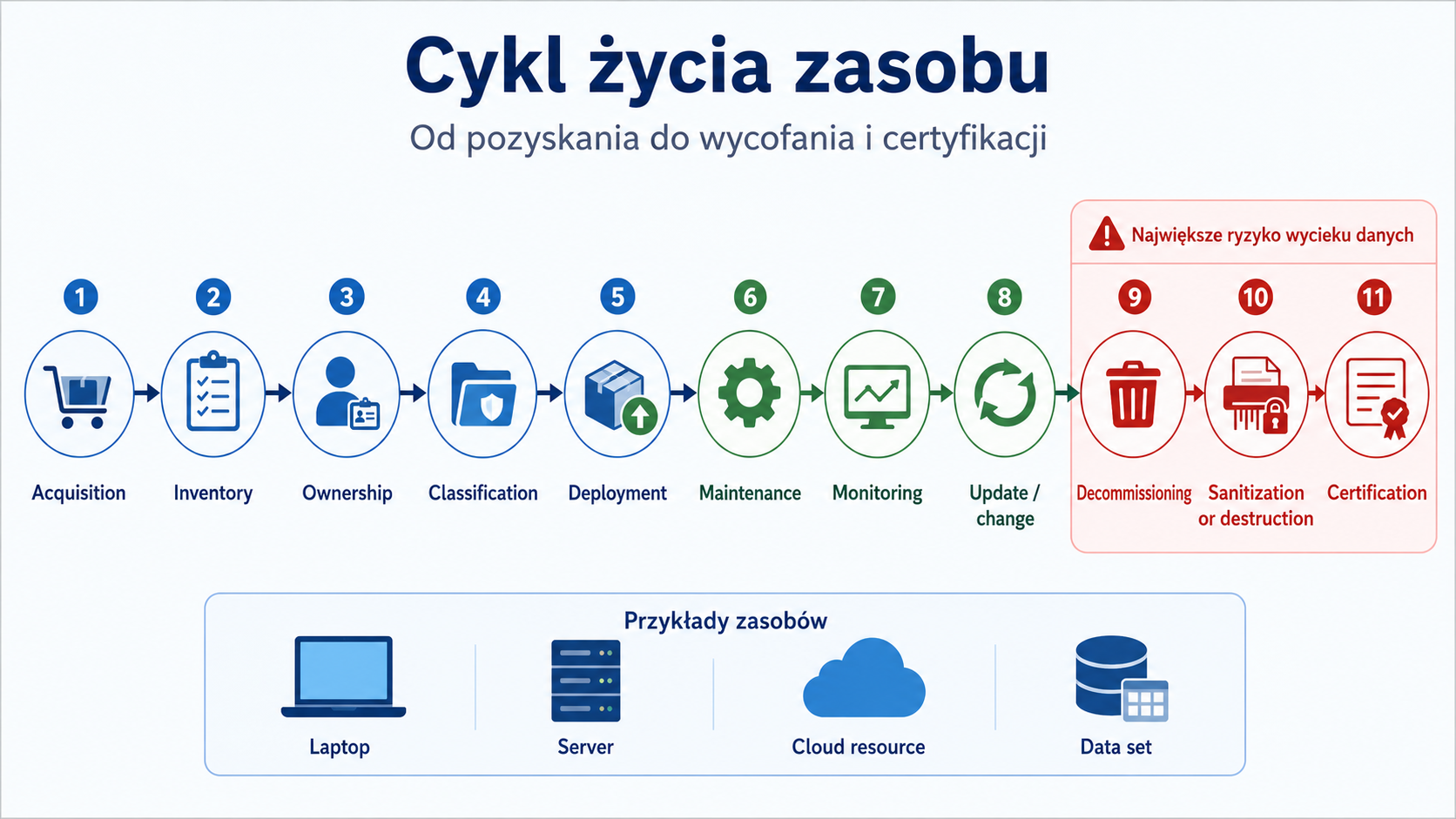
The life cycle of a resource includes:
- purchase or acquisition
- registration in the inventory
- owner assignment
- classification
- implementation
- maintenance
- monitoring
- updates
- change of owner or purpose
- withdrawal
- data retention
- sanitization, destruction or certification.
How it works step by step
The resource is purchased or created.
It goes into inventory.
Gets a business and technical owner.
It is classified by criticality and data type.
Receives baseline and required controls.
It is monitored and updated.
When it is no longer needed, it goes through decommissioning.
Data is deleted, archived or destroyed in accordance with the retention policy.
The organization documents the end of the life cycle.
Practical example
The employee's laptop should be assigned to a specific person, have a serial number in the inventory, encryption, EDR and information about the owner. After the employee leaves, the laptop should be collected, the data secured or deleted in accordance with the procedure, and the device should be reprocessed or disposed of.
Exam example
Scenario
The company discovered a server running on the network that no one had in their inventory and no one was updating. What process failed?
Best answer
Asset management.
Not to be confused with this
Don't confuse asset management with vulnerability management. Asset management answers the question: "what do we have, where is it and who is responsible for it?" Vulnerability management answers: "what vulnerabilities do these resources have and what do we do with them?"
Common mistakes
A common mistake is keeping inventory only for equipment. In a modern environment, you also need to include cloud resources, containers, applications, privileged accounts, data and integrations.
A definition to remember
Asset management is the management of assets from acquisition to retirement so that the organization knows what it has, who is responsible for it and how it is to be protected.
4. Disposal, decommissioning, sanitization and destruction
Problem
A retired resource may still contain data. A sold laptop, a thrown disk, an old phone, a forgotten virtual machine or a test account can become the source of a leak.
Explanation from scratch
Disposal is getting rid of a resource.
Decommissioning is the controlled withdrawal of a resource from use.
Sanitization is the removal of data so that it cannot be recovered in a practically acceptable way.
Destruction is the physical destruction of a medium or device.
Certification means confirmation that the sanitization or destruction process has been carried out in accordance with the requirements.
Data retention determines how long data is to be retained before deletion or archiving.
How it works step by step
The asset is marked for retirement.
The owner confirms that it is no longer needed.
The data is classified.
The organization reviews retention requirements.
The data is archived, deleted or destroyed.
The media is sanitized or destroyed.
Accesses and integrations are removed.
Inventory is updated.
A document is created confirming the completion of the process.
Practical example
The company replaces disks in servers. The drives contained customer data. Simply deleting files is not enough. The organization should use an approved sanitization or physical destruction method and obtain confirmation of completion.
Exam example
Scenario
The organization disposes of old drives containing regulated data. He wants to have proof that the data has been irreversibly deleted. What is most important?
Best answer
Sanitization or destruction process with certification.
Not to be confused with this
Don't confuse file deletion with sanitization. Deleting a file often only removes the reference in the file system, and the data may be recoverable.
Common mistakes
A common mistake is forgetting about data copies in backups, test environments and snapshots. The second error is rolling back the system without removing service accounts and access rules.
A definition to remember
Decommissioning is the controlled withdrawal of a resource, while sanitization or destruction ensures that data is not recovered once the resource is no longer used.
5. Vulnerability management
Problem
Vulnerability scanning alone does not improve security. The scanner can detect thousands of problems, but the organization needs to know which are important, what to do about them, who is responsible for them, and how to confirm repairs.
Explanation from scratch
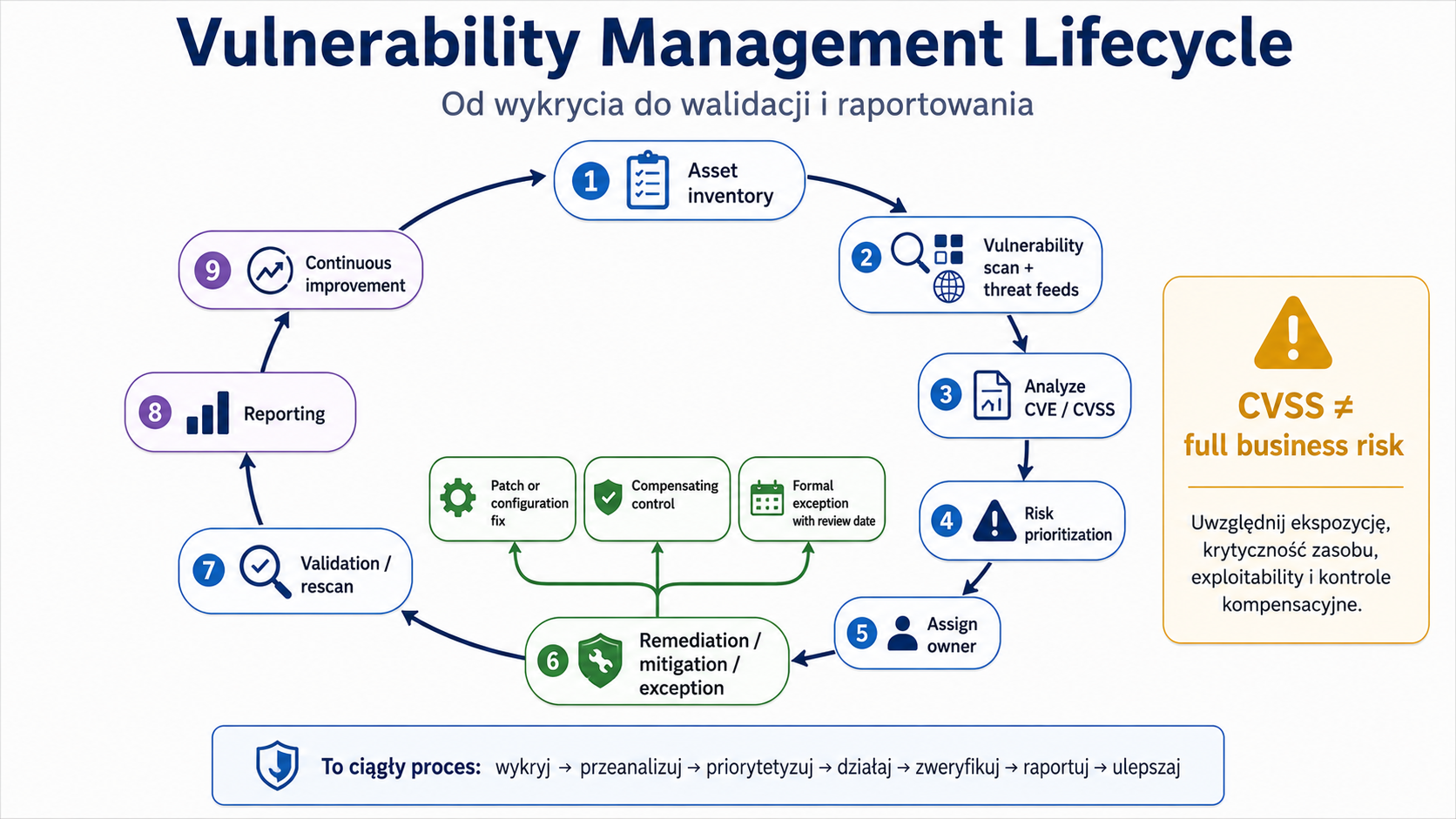
Vulnerability management is a continuous process of identifying, assessing, prioritizing, remediating and verifying vulnerabilities.
Includes:
- vulnerability scanning
- threat feeds
- penetration testing
- bug bounty
- CVE
- CVSS
- exposure assessment
- resource criticality assessment
- risk tolerance
- patching
- segmentation
- compensatory controls
- exceptions and exemptions
- rescanning
- audit
- reporting.
How it works step by step
The organization updates its resource inventory.
Runs vulnerability scans.
Collects data from threat intelligence and vendor advisories.
Analyzes vulnerabilities.
Prioritizes by risk.
Assigns activity owners.
Implements remediation.
If remediation is not possible, it applies a compensatory control or exception.
Verifies the repair by rescanning, audit or manual verification.
Reports results and trends.
Practical example
The scanner detected a critical vulnerability on the public web server and a medium vulnerability on the internal printer. Scoring alone is not enough. Public exposure, available exploit, and data criticality can make a web server an immediate priority.
Exam example
Scenario
The scanner detected a critical vulnerability. The team has implemented a fix. What should he do as the next step?
Best answer
Verify remediation, e.g. by rescanning or other form of confirmation.
Not to be confused with this
Don't confuse vulnerability scan with penetration test. Vulnerability scan automatically identifies known issues. A penetration test is a controlled attempt to assess the possibility of exploiting weaknesses and the impact on the environment. In Security+, practical testing activities should be conducted legally and with the consent of the system owner.
Common mistakes
A common mistake is to prioritize only after CVSS. CVSS is important, but you need to consider exposure, asset value, exploit availability, compensating controls, and business risk.
A definition to remember
Vulnerability management is a continuous process of detecting, prioritizing, repairing and validating vulnerabilities in the context of risk.
6. CVE and CVSS
Problem
The abbreviations CVE and CVSS often appear in vulnerability reports. Beginners confuse the vulnerability identifier with its severity assessment. This leads to incorrect prioritization.
Explanation from scratch
Common Vulnerabilities and Exposures (CVE) is the public identifier for a specific known vulnerability. CVE answers the question: which vulnerability is this?
Common Vulnerability Scoring System (CVSS) is a vulnerability scoring system. CVSS answers the question: How serious is a vulnerability according to a specific assessment model?
CVE is like a case number. CVSS is like a severity score.
How it works step by step
Vulnerability is discovered.
Receives a CVE ID.
Vulnerabilities are described by manufacturers, vulnerability databases and tools.
Receives CVSS result.
The organization uses CVSS as one of the prioritization factors.
The final decision also takes into account the organization's environment.
Practical example
CVSS 9.8 is vulnerable, but it affects a system that is not exposed to the Internet and has additional controls. It is still important, but priority may depend on exposure. Another vulnerability with a lower rating may be more urgent if it is actively exploited on a public system.
Exam example
Scenario
The analyst wants to clearly identify a known vulnerability in the report and documentation. What will he use?
Best answer
CVE.
Scenario
The analyst wants to use a standard score to assess the severity of a vulnerability. What will he use?
Best answer
CVSS.
Not to be confused with this
CVE does not in itself tell you how urgently you need to respond. CVSS does not replace risk analysis. CVSS connects to the organizational context.
Common mistakes
A common error is to automatically fix everything from the highest CVSS without taking into account whether the system is exposed, critical, vulnerable in a given configuration or whether an exploit exists.
A definition to remember
CVE identifies a vulnerability and CVSS helps assess its severity; remediation priority also depends on the organizational context.
7. Remediation, mitigation, exception and exemption
Problem
Not every vulnerability can be removed immediately. The system may be critical, older, vendor dependent, or require a service window. The organization must distinguish between remediation, risk mitigation and formal acceptance of a deviation.
Explanation from scratch
Remediation means removing the problem, such as installing a patch or changing the configuration.
Mitigation means reducing risk even if the problem has not been completely resolved. Example: segmenting a system that cannot be immediately updated.
Compensating control is a substitute or supplementary control when the target control cannot be implemented.
An exception is a formally approved departure from a requirement, usually temporary.
Exemption is a release from a requirement, often of a more permanent nature or resulting from specific conditions.
How it works step by step
The team identifies the vulnerability.
Checks the possibility of remediation.
If it can be repaired, I plan on patching or reconfiguring it.
If this is not possible, it implements mitigation or compensatory control.
If the risk remains, the risk owner approves the exception or exemption.
The organization documents the deadline, responsibilities and conditions.
The risk is monitored.
After some time, the exception should be re-evaluated.
Practical example
The production system cannot be updated for a month. The company restricts access to only a specific segment, adds WAF rules, increases monitoring, and documents a temporary exception with a re-evaluation date.
Exam example
Scenario
A critical legacy system cannot be patched, but must function. The company restricts access, adds monitoring and formally accepts the waiver until migration occurs. What was used?
Best answer
Compensation checks and exceptions.
Not to be confused with this
Don't confuse exception with ignoring vulnerabilities. A valid exception has an owner, justification, duration, and risk approval.
Common mistakes
A common mistake is leaving exceptions without an end date. The temporary exception then becomes a permanent security vulnerability.
A definition to remember
Remediation removes the problem, mitigation reduces the risk, compensating control replaces the missing control, and exception formally documents the approved deviation.
8. Identity and Access Management (IAM)
Problem
Most modern environments base security on identity. Users work remotely, applications are in the cloud, administrators have broad privileges, and suppliers need temporary access. If identities are mismanaged, an attacker may use a legitimate-looking account.
Explanation from scratch
Identity and Access Management (IAM) is a set of processes and technologies that manage identities and access to resources.
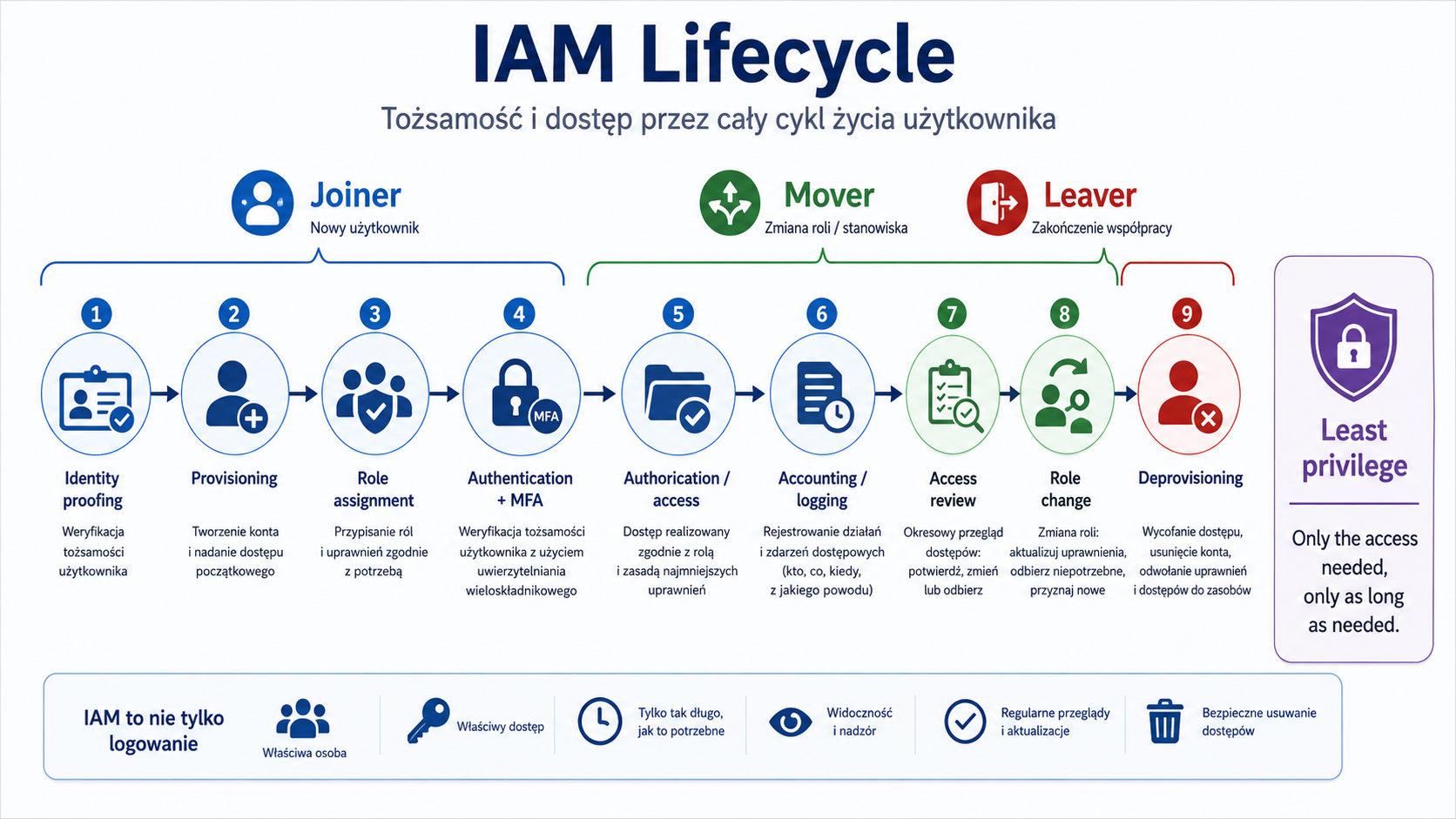
IAM includes:
- creating accounts
- identity proofing
- provisioning
- role changes
- conditional access
- M.F.A.
- SSO
- federation
- access reviews
- deprovisioning
- management of privileged accounts
- logging and auditing activities.
How it works step by step
A person joins an organization.
Her identity is confirmed.
The account is created.
The account receives roles and permissions.
The user logs in with the required checks, e.g. MFA.
Activities are logged.
When the position changes, access is updated.
When you leave, your account is disabled or deleted.
Eligibility is reviewed periodically.
Practical example
A new employee of the finance department gets access to the accounting system through the "Finance User" role. He does not get local administrator rights or access to IT systems. When it moves to sales, financial access should be taken away. When he leaves the company, the account should be deactivated quickly.
Exam example
Scenario
The former employee can still log in to the VPN system. What process failed?
Best answer
Deprovisioning.
Not to be confused with this
Don't confuse IAM with just logging in. IAM covers the entire identity lifecycle, permissions, auditing, roles, federation, and privileged accounts.
Common mistakes
A common mistake is granting access without an end date. The second error is the lack of access reviews. The third mistake is leaving accounts active after employees or vendors leave.
A definition to remember
IAM manages identities and access throughout the lifecycle of a user, account, role, and permission.
9. Access control models
Problem
Not all systems grant access in the same way. The exam may describe a scenario and require you to recognize an access control model or choose the best model for your organization.
Explanation from scratch
The most important access control models:
- Model Mechanism
- Mandatory Access Control (MAC) Access is imposed centrally based on security labels. The user does not decide about sharing.
- Discretionary Access Control (DAC) The resource owner can decide who to grant access to.
- Role-Based Access Control (RBAC) Access is based on the user's role, e.g. HR, accounting, administrator.
- Rule-Based Access Control Access results from rules, e.g. block logins outside working hours.
- Attribute-Based Access Control (ABAC) Access depends on user, device, location, risk, resource, and context attributes.
- Time-of-day restrictions Access limited to specific hours.
- Least privilege The user or process has only the minimum privileges needed for the task.
How it works step by step
User requests access.
The system checks the access control model.
Retrieves roles, labels, rules, or attributes.
Compares the request with the policy.
Allows, blocks or restricts access.
Saves the decision in the logs.
Practical example
In an HR system, access may be based on roles. The HR employee sees employee data, the manager sees his team's data, and the employee sees his own profile. In a more advanced ABAC model, the system can additionally check the location, device status and session risk level.
Exam example
Scenario
The organization wants to assign access based on job position, e.g. "accounting", "HR", "administrator". Which model fits best?
Best answer
RBAC.
Not to be confused with this
Don't confuse rule-based with role-based. Role-based uses user roles. Rule-based uses rules, e.g. time, IP address or condition.
Common mistakes
A common mistake is creating too many roles in RBAC. If each person has a unique role, the model loses simplicity. The second mistake is not deleting roles after changing positions.
A definition to remember
The access control model determines on what basis the system decides whether a user, process or device can access a resource.
10. MFA, passwordless and password managers
Problem
Passwords are often stolen, guessed, reused or phished. The password itself is a weak point, especially when working remotely and with cloud services.
Explanation from scratch
Multi-Factor Authentication (MFA) requires at least two different authentication factors.
MFA Factors:
- Factor Example
- Something you know Password, PIN.
- Something you have Token, phone, card, security key.
- Something you are Biometria.
- Somewhere you are Location or geographic context.
Passwordless is an approach that limits or eliminates classic passwords, e.g. through security keys, certificates, passkeys or device-supported biometrics.
Password manager helps you create and store unique, long passwords.
How it works step by step
The user tries to log in.
The system checks the first factor.
The system requires a second factor.
It can evaluate context, such as location or device.
Access is granted, denied or requires additional verification.
The event is logged.
Practical example
The employee logs in to e-mail. Provides the password and confirms login with the hardware key. Even if the password is leaked, the attacker will not log in without the physical key.
Exam example
Scenario
The company wants to limit the effects of phishing and password hijacking. Which control is best?
Best answer
MFA, especially phishing-resistant methods, e.g. security keys, if the scenario indicates them.
Not to be confused with this
Two slogans are not two factors. Password and PIN are still "something you know". MFA requires different categories of factors.
Common mistakes
A common mistake is to implement MFA only for administrators but not for remote user access. The second mistake is the lack of protection against MFA fatigue, i.e. overuse of push notifications.
A definition to remember
MFA increases login security by requiring at least two different categories of ID.
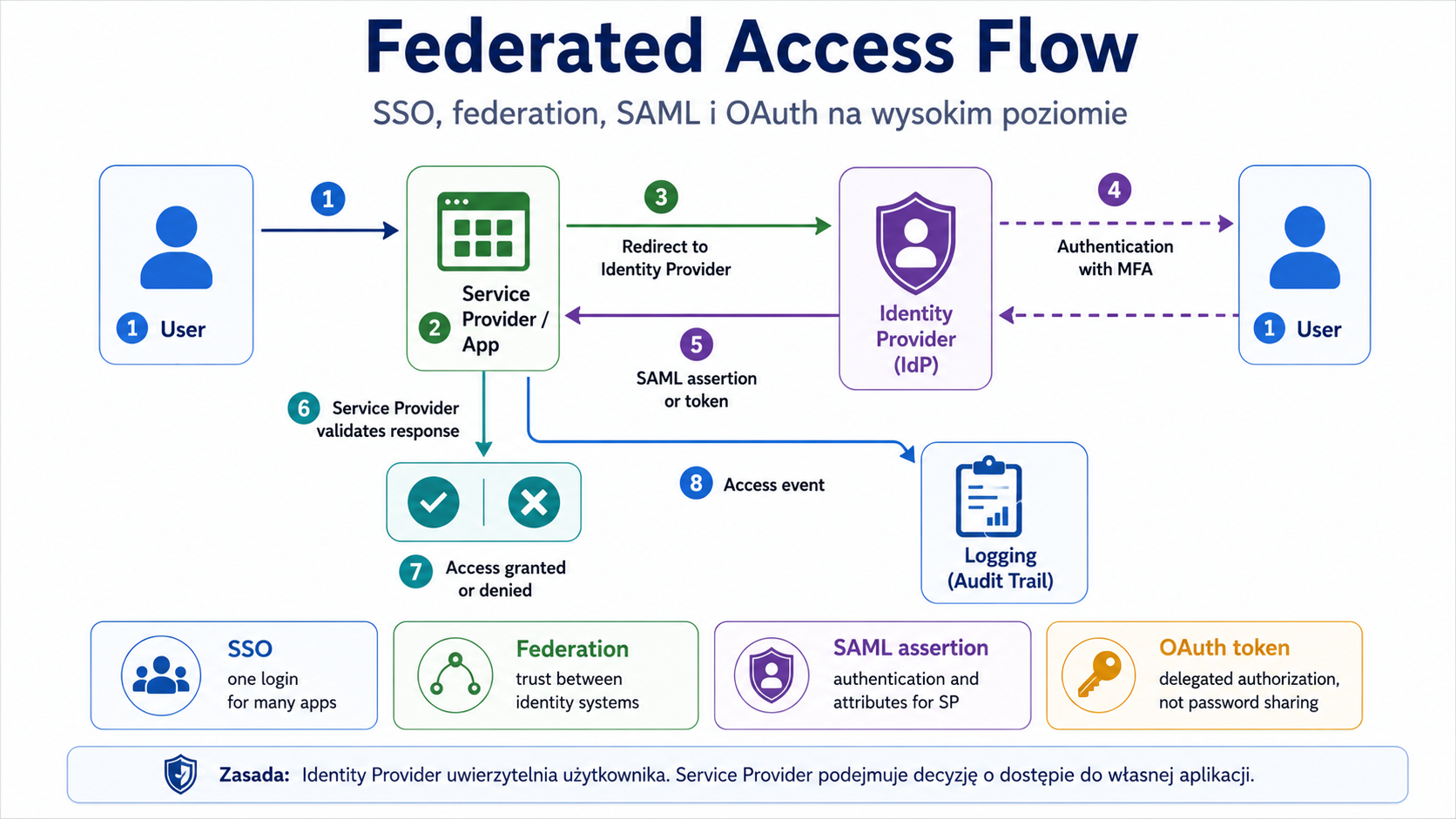
11. SSO, federation, SAML and OAuth
Problem
Users use many applications. Without central login management, a company has multiple passwords, inconsistent policies, and difficult offboarding. You need to allow convenient access but still maintain control.
Explanation from scratch
Single Sign-On (SSO) allows a user to log in once and access multiple applications without re-entering the password for each application.
Federation means trust between different domains, organizations or identity providers. Thanks to federation, the application can trust an external Identity Provider.
Security Assertion Markup Language (SAML) is a standard often used to pass authentication and user attribute information between an Identity Provider and a Service Provider.
Open Authorization (OAuth) is a delegated authorization standard. Allows an application to gain limited access to a resource without passing the user's password. OAuth is not the same as classic login.
How it works step by step
The user tries to enter the application.
The application redirects it to the Identity Provider.
Identity Provider authenticates the user.
The Identity Provider provides the application with a confirmation or token.
The application grants access according to permissions.
Events are logged centrally.
Practical example
The company uses one identity provider for email, HR system and ticketing tool. When an employee leaves, deactivating the Identity Provider account removes their access to many applications at once.
Exam example
Scenario
The company wants users to log into multiple applications with one set of credentials, and access to be centrally managed. What suits best?
Best answer
SSO.
Scenario
The application wants to gain limited access to the user's resource without knowing the user's password. What suits best?
Best answer
OAuth.
Not to be confused with this
Don't confuse SAML with OAuth. SAML is often used for federated SSO. OAuth is about delegated authorization. In practice, the standards may work with other mechanisms, but on the exam it is important to understand the basic purpose.
Common mistakes
A common mistake is implementing SSO without MFA. SSO increases convenience and centralization, but if a central account is compromised, the impact can be greater. Therefore, SSO should be combined with MFA, monitoring and access policies.
A definition to remember
SSO simplifies logging into multiple applications, federation enables trust between identity systems, SAML often supports federated SSO, and OAuth is used for delegated authorization.
12. Privileged Access Management (PAM)
Problem
Privileged accounts have the greatest potential for harm. The administrator can change configuration, create accounts, read data, delete logs or disable security. If such an account is compromised, the consequences are serious.
Explanation from scratch
Privileged Access Management (PAM) are processes and tools that control privileged access.
PAM includes:
- separate administrative accounts
- password vaulting
- just-in-time permissions
- ephemeral credentials
- approval of access
- session recording
- monitoring administrators' activities
- limiting access time
- removing permanent excessive privileges.
Just-in-time permissions mean that permissions are only granted for the short time they are needed.
Password vaulting means storing privileged passwords in a controlled vault.
Ephemeral credentials are temporary credentials that expire after use or a short period of time.
How it works step by step
Administrator needs access.
Submits a request or goes through the approval process.
PAM grants temporary access.
The session is monitored or recorded.
Once completed, access expires.
The password or credential may be rotated.
Activities are recorded for audit.
Practical example
The administrator does not know the permanent password for the root account on the server. They log in to the PAM tool, gain approved access for 30 minutes, complete the task, and the session is recorded. Once completed, the credentials expire.
Exam example
Scenario
The company wants to limit the risk of permanent administrator privileges and grant them only for the duration of the task. What suits best?
Best answer
Just-in-time permissions within PAM.
Not to be confused with this
PAM is not the same as a regular password manager. A password manager can help the user store passwords. PAM manages privileged access, auditing, sessions, credential rotation, and temporary access.
Common mistakes
A common error is a shared administrator account used by multiple people. This makes accounting and non-repudiation difficult. The second error is permanent administrator privileges for daily work.
A definition to remember
PAM controls, limits, monitors and audits privileged access to reduce the risk of administrative account hijacking or abuse.
Key concepts
Concept Meaning
Secure baseline An approved secure configuration pattern.
Hardening Reducing the attack surface through secure configuration.
Asset management Asset management throughout the entire life cycle.
Inventory A register of the organization's resources.
Decommissioning Controlled decommissioning of a resource.
Sanitization Deleting data in a way that makes recovery difficult or impossible.
Destruction The physical destruction of a medium or device.
Vulnerability management The process of detecting, assessing, repairing and validating vulnerabilities.
CVE Known vulnerability identifier.
CVSS Susceptibility Severity Scoring System.
Remediation Removing the problem.
Mitigation Reducing risk.
Exception A formally approved exception to a requirement.
IAM Identity and access management.
Provisioning Creating and granting access.
Deprovisioning Revoke access and disable accounts.
MFA Multi-factor authentication.
SSO Single login to multiple applications.
Federation Trust between identity systems or organizations.
SAML A standard often used for federated SSO.
OAuth Standard for delegated authorization.
RBAC Role-based access.
ABAC Attribute-based and context-based access.
PAM Privileged access management.
Just-in-time permissions Temporarily grants permissions only when needed.
Password vaulting Controlled storage of privileged passwords.
Ephemeral credentials Temporary credentials that expire.
Examples
Example 1: New workstation
The employee's new laptop should be registered in the inventory, assigned to the owner, implemented with a secure baseline, encrypted, covered by EDR, deprived of local administrator rights and connected to the update system. It combines asset management, baseline, hardening and IAM.
Example 2: Critical vulnerability on the server
The scanner detected a high CVSS vulnerability on a server exposed to the Internet. The team should check exposure, exploit availability, resource criticality, and patchability. After the correction, it should perform rescanning. If patching is not immediately possible, a compensatory control must be implemented and the exception formally documented.
Example 3: An employee changes position
The employee moves from the finance department to sales. IAM should take away the old permissions and grant new ones. If he retains access to financial data, the principle of least privilege is violated.
Example 4: Administrator access to production
The administrator needs access to the production server. Instead of a permanent account with full privileges, it uses PAM. Access is granted for a short period of time, the session is logged in, and the credentials expire.
Practical applications
Implementing secure configurations of stations and servers.
Maintaining inventory of hardware, software, data and accounts.
Prioritizing vulnerabilities by risk.
Document exceptions and compensatory controls.
Lifecycle control of user and supplier accounts.
Limiting administrative privileges.
Implementation of SSO, MFA, federation and PAM in a controlled manner.
Common mistakes
Wrong Why is it wrong Correct understanding
| “Baseline and hardening are the same thing.” | Baseline is a pattern, hardening is an adjustment process. | Baseline tells you how it should be; hardening helps achieve this. |
|---|---|---|
| “Vulnerability scan solves the problem.” | The scan only detects. | Remediation and validation are needed. |
| “CVE is a severity rating.” | CVE identifies the vulnerability. | CVSS assesses severity. |
| “The highest CVSS always comes first.” | Priority also depends on the exposure and criticality of the resource. | CVSS is an important, but not the only, factor. |
| “An exception means you can ignore the risk.” | The exception must be approved and monitored. | Exception is a formal risk decision. |
| “SSO itself increases security.” | SSO centralizes access, but account takeover can have greater impact. | Combine SSO with MFA and monitoring. |
| “OAuth is the same as SAML.” | OAuth is about delegated authorization, SAML often federated SSO. | They have different main uses. |
| “MFA is two words.” | Two slogans are the same factor. | MFA requires different categories of factors. |
| “PAM is just a regular password manager.” | PAM controls privileged access, sessions, auditing and temporary permissions. | Password vaulting is only part of PAM. |
Common mistakes
No inventory
An organization cannot effectively patch and monitor resources it does not know.
No validation after remediation
The team installs the patch, but does not check whether the vulnerability actually disappears.
Permanent administrator rights
Users or administrators have extensive rights at all times, even though they only need them occasionally.
No deprovisioning
Former employees, vendors, and app accounts are still active.
Exceptions without an end date
Temporary acceptance of risk becomes a permanent vulnerability.
Inconsiderate password extinction
Enforcing password changes too frequently can lead to poorer practices if not combined with long passwords, MFA, and risk monitoring.
What you need to know for the exam
In this part of the 4.0 domain you need to be able to:
- recognize when a secure baseline is needed
- indicate hardening activities
- understand the life cycle of resources
- select sanitization, destruction or certification for the recalled medium
- describe the vulnerability management process
- distinguish CVE from CVSS
- select remediation, mitigation, compensatory control or exception
- indicate the need for rescanning after repair
- recognize errors in provisioning and deprovisioning
- choose an access control model
- distinguish SSO, federation, SAML and OAuth
- select MFA and recognize authentication factors
- indicate when to use PAM, JIT permissions, password vaulting and ephemeral credentials.
Checklist
User should be able to:
- Explain secure baseline.
- Distinguish baseline from hardening.
- Provide examples of hardening of a workstation, server and mobile device.
- Describe the life cycle of a resource.
- Explain disposal, decommissioning, sanitization and destruction.
- Describe the vulnerability management process.
- Distinguish CVE from CVSS.
- Explain remediation, mitigation, compensating control, exception and exemption.
- Explain provisioning and deprovisioning.
- Distinguish between MAC, DAC, RBAC, rule-based and ABAC.
- Explain MFA and authentication factors.
- Distinguish between SSO, federation, SAML and OAuth.
- Explain PAM, JIT permissions, password vaulting and ephemeral credentials.
- Resolve an excessive permissions scenario.
- Resolve a scenario involving a vulnerability that cannot be patched immediately.
- Review questions
- What is secure baseline?
- What is the difference between baseline and hardening?
- Give three examples of server hardening.
- Why is asset inventory a condition for effective security?
- What is the difference between decommissioning and disposal?
- Why is simply deleting a file not sanitization?
- What are the main stages of vulnerability management?
- How is CVE different from CVSS?
- Why shouldn't CVSS be the only priority criterion?
- What is the difference between remediation and mitigation?
- What is an exception?
- What is the difference between provisioning and deprovisioning?
- How is RBAC different from ABAC?
- Why aren't two passwords MFA?
- What is the difference between SSO and federation?
- How is SAML different from OAuth?
- When is PAM used?
- What do just-in-time permissions mean?
- Answers with explanations
- Secure baseline is an approved secure configuration pattern.
- Allows you to assess whether the system is configured as required.
- Baseline is a pattern, hardening is the process of adapting the system to a safe configuration.
- Examples: disabling unused services, closing unnecessary ports, enabling logging, enforcing secure protocols, removing default accounts.
- Without inventory, an organization does not know what to protect, update and monitor.
- Unknown assets often become unmanaged risks.
- Decommissioning is the controlled withdrawal of a resource, disposal is getting rid of a resource.
- Decommissioning also includes data, access, integration and documentation.
- Deleting a file may not physically remove the data from the media.
- Sanitization is intended to make data recovery impossible or virtually impossible.
- Steps: identification, scanning, analysis, prioritization, remediation or mitigation, validation and reporting.
- CVE identifies the vulnerability, CVSS assesses its severity.
- Because priority also depends on exposure, resource criticality, exploit availability and existing controls.
- Remediation removes the problem, mitigation reduces the risk.
- An exception is a formally approved departure from a requirement.
- It should have an owner, a justification and a review date.
- Provisioning creates and grants access, deprovisioning removes access and disables accounts.
- RBAC grants access based on role, ABAC based on attributes and context.
- Two entries belong to the same category: something you know.
- MFA requires different categories of factors.
- SSO allows you to log in once to multiple applications, federation enables trust between identity systems.
- SAML is often used for federated SSO, OAuth for delegated authorization.
- PAM is used to control privileged accounts and activities.
- Just-in-time permissions mean granting permissions only for the short time needed to complete a task.
- Practical tasks
- Lab 1: Secure baseline for an employee's laptop
Purpose:
Build a simple security baseline for your workstation.
Context:
The company is implementing new laptops for office workers. Laptops will be used remotely and in the office.
Steps:
- List at least 10 baseline settings.
- Include encryption, updates, EDR, local firewall, local admin permissions, and logging.
- Indicate which settings are preventive, detective or corrective.
- Describe how to check laptop compatibility with baseline.
- Indicate what to do if the laptop deviates from the baseline.
Expected result:
Table: setting → goal → control type → validation method.
Pass criteria:
- Disk encryption is included.
- No local administrator rights for a regular user are included.
- Updates and EDR are included.
- Event logging included.
- A compliance validation method is included.
Only perform this exercise in a legal, controlled laboratory environment. Don't use it on other people's systems, networks or accounts.
Lab 2: Vulnerability prioritization
Purpose:
Learn to prioritize vulnerabilities by risk, not just by score.
Context:
- Resource CVSS Vulnerability Exposure Criticality
- Public web server Known vulnerability with available exploit 9.8 Internet High
- Internal printer Old firmware 7.5 Office network only Low
- Financial system No patch, access only from the admin segment 8.1 Internal Very high
- Test laptop Outdated application 6.4 No production data Low
Steps:
- Prioritize your priorities.
- Justify your decision.
- For each resource, indicate the remediation or mitigation.
- Indicate where an exception may be needed.
- Indicate how to confirm the repair.
Expected result:
Prioritization with justification.
Pass criteria:
- CVSS was included, but not the only factor.
- Online exposure included.
- The criticality of the financial system was taken into account.
- Post-remediation rescanning or audit included.
- Compensatory control is indicated where patching is not immediately possible.
Only perform this exercise in a legal, controlled laboratory environment. Don't use it on other people's systems, networks or accounts.
Lab 3: IAM lifecycle
Purpose:
Practice provisioning, role change and deprovisioning.
Context:
The employee starts in the HR department, moves to sales after six months, and leaves the company after a year. Uses e-mail, HR system, CRM, VPN and file application.
Steps:
- List the accesses needed at the beginning.
- Indicate which accesses need to be revoked after changing the position.
- Indicate which new accesses need to be granted.
- Describe what happens when an employee leaves.
- Indicate logs or reports that will confirm the correct execution of the process.
Expected result:
IAM lifecycle plan for the employee.
Pass criteria:
- Provisioning included.
- Role change included.
- Deprovisioning is included.
- Old permissions were taken away, not only new ones were added.
- Access review and logs included.
Only perform this exercise in a legal, controlled laboratory environment. Don't use it on other people's systems, networks or accounts.
Mini-test
Question 1
What best describes secure baseline?
A. One-time vulnerability scan
B. Validated Secure Configuration Pattern
C. List of all company users
D. Physical destruction of the disk
Correct answer:
B
Explanation:
Secure baseline defines how a resource should be configured securely.
Why the other answers are worse:
- A: This is vulnerability scanning.
- C: This is part of identity management or directory.
- D: It's destruction.
- Question 2
Which activity is best suited to hardening?
A. Disable unused services
B. Buying a new monitor
C. Increasing the number of users
D. Publication of the password in the documentation
Correct answer:
A
Explanation:
Disabling unused services reduces the attack surface.
Why the other answers are worse:
- B and C: They are not hardening activities.
- D: Increases risk.
- Question 3
The scanner detected a vulnerability, the team implemented a fix. What should he do next?
A. Delete the report
B. Perform rescanning or other validation
C. Give everyone administrator rights
D. Turn off inventory
Correct answer:
B
Explanation:
After remediation, you need to confirm that the problem has been fixed.
Why the other answers are worse:
- A: Deleting a report destroys the documentation.
- C: Increases risk.
- D: Worsens resource management.
- Question 4
CVE is mainly used for:
- A. User Location Assessments
- B. Identification of a known vulnerability
- C. Disk encryption
- D. Backing up
Correct answer:
B
Explanation:
A CVE is an identifier for a specific known vulnerability.
Why the other answers are worse:
- A, C, D: They do not describe CVE.
- Question 5
CVSS is mainly used for:
- A. Scoring of the severity of susceptibility
- B. Creating user accounts
- C. Identity federation
- D. Deleting data from the disk
Correct answer:
A
Explanation:
CVSS helps assess the severity of vulnerabilities according to a standard model.
Why the other answers are worse:
- B: It's provisioning.
- C: It's a federation.
- D: It's sanitization or destruction.
- Question 6
The former employee still has active VPN access. Which process failed?
A. Provisioning
B.Deprovisioning
C. Tokenization
D. Load balancing
Correct answer:
B
Explanation:
Deprovisioning involves removing access and deactivating accounts once the business need has ended.
Why the other answers are worse:
- A: Provisioning grants access.
- C: Concerns data protection.
- D: Concerns traffic separation.
- Question 7
Access assigned based on position, e.g. HR or accounting, is most often:
- A.RBAC
- B.DAC
- C. Data masking
- D.DDoS
Correct answer:
A
Explanation:
Role-Based Access Control assigns access based on the user's role.
Why the other answers are worse:
- B: DAC is based on the decision of the resource owner.
- C: Masks data.
- D: This is an attack on accessibility.
- Question 8
Which set meets the MFA principle?
A. Password and second PIN
B. Password and dongle
C. Two different passwords
D. Password and security question
Correct answer:
B
Explanation:
The password is "something you know" and the hardware key is "something you have".
Why the other answers are worse:
- A, C, D: It's still mostly the same category of factor - knowledge.
- Question 9
The application wants to gain limited access to the user's resource without knowing the user's password. What suits best?
A.OAuth
B. Full disk encryption
C. Sanitization
D. Hot site
Correct answer:
A
Explanation:
OAuth is used for delegated authorization.
Why the other answers are worse:
- B: Concerns disk encryption.
- C: Concerns data deletion.
- D: Applies to disaster recovery.
- Question 10
The company wants to grant administrators permissions only for the duration of the task. What suits best?
A. Just-in-time permissions
B. Public administrator account
C. No logs
D. Password spraying
Correct answer:
A
Explanation:
Just-in-time permissions limit how long you have permissions.
Why the other answers are worse:
- B: Makes accountability difficult.
- C: Makes auditing difficult.
- D: It's a password attack.
- Flashcards
- Front of the index card. Back of the index card
| What is secure baseline? | Approved secure configuration pattern. |
|---|---|
| Baseline vs hardening? | Baseline is a pattern; hardening is the process of adapting to a safe configuration. |
| What does hardening mean? | Reducing the attack surface with safe settings. |
| What is asset management? | Resource management throughout the lifecycle. |
| What is inventory? | Organizational resource register. |
| What does decommissioning mean? | Controlled retirement of an asset. |
| What does sanitization mean? | Deleting data so that it is practically unrecoverable. |
| What does destruction mean? | Physical destruction of the media or device. |
| What is vulnerability management? | The process of detecting, assessing, repairing and validating vulnerabilities. |
| CVE vs CVSS? | CVE identifies a vulnerability; CVSS assesses its severity. |
| Remediation vs mitigation? | Remediation removes the problem; mitigation reduces risk. |
| What is an exception? | A formally approved derogation from a requirement. |
| What is provisioning? | Creating an account and granting access. |
| What is deprovisioning? | Revoke access and deactivate your account. |
| What does IAM mean? | Identity and Access Management, i.e. identity and access management. |
| What does RBAC mean? | Role-based access. |
| What does ABAC mean? | Attribute-based and context-based access. |
| What does MFA mean? | Multi-factor authentication. |
| What does SSO mean? | Single sign-in to multiple applications. |
| What does federation mean? | Trust between identity systems. |
| SAML vs OAuth? | SAML often supports federated SSO; OAuth is used for delegated authorization. |
| What does PAM mean? | Privileged access management. |
| What does just-in-time permissions mean? | Temporary powers granted only when needed. |
| What does password vaulting mean? | Controlled storage of privileged passwords. |
| What does ephemeral credentials mean? | Temporary credentials that expire. |
Images to generate
IMG_M04_S01_SECURITY_OPERATIONS_LIFECYCLE
Place in the material:
"Introduction" section.
Image Purpose:
Show that Security Operations is a cycle of maintaining the security of resources.
Description of the image to generate:
Cyclic diagram: inventory → secure baseline → hardening → vulnerability scanning → prioritization → remediation/mitigation → validation → access review → monitoring → update baseline. In the middle of the cycle, the text: "continuous security operations".
Style:
Operational cycle diagram.
Mandatory elements:
- inventory
- secure baseline
- hardening
- vulnerability scanning
- prioritization
- remediation/mitigation
- validation
- access review
- monitoring
- update baseline.
Elements to avoid:
- exploit code
- offensive instructions
- excess text
- too many icons.
- IMG_M04_S02_ASSET_LIFECYCLE
- Place in the material:
- "Asset management" section.
Image Purpose:
Show the lifecycle of an asset from purchase to retirement.
Description of the image to generate:
Linear or cyclic diagram: acquisition → inventory → ownership → classification → deployment → maintenance → monitoring → update/change → decommissioning → sanitization/destruction → certification. Add a resource example: laptop, server, cloud resource, data set.
Style:
Flowchart/lifecycle.
Mandatory elements:
- acquisition
- inventory
- ownership
- classification
- deployment
- maintenance
- monitoring
- decommissioning
- sanitization
- destruction
- certification.
Elements to avoid:
- realistic company data
- too detailed serial numbers
- excess text.
- IMG_M04_S03_VULNERABILITY_MANAGEMENT_LIFECYCLE
- Place in the material:
- "Vulnerability management" section.
Image Purpose:
Show vulnerability management as a continuous process.
Description of the image to generate:
Cycle diagram: asset inventory → scan/threat feed → analyze CVE/CVSS → risk prioritization → assign owner → remediation/mitigation/exception → validation/rescan → reporting → continuous improvement. Add a small box: "CVSS ≠ full business risk."
Style:
Technical process diagram.
Mandatory elements:
- asset inventory
- vulnerability scan
- threat feeds
- CVE
- CVSS
- risk prioritization
- remediation
- compensating controls
- exceptions
- rescanning
- reporting.
Elements to avoid:
- offensive details
- exploit code
- random hacker symbols.
- IMG_M04_S04_IAM_LIFECYCLE
- Place in the material:
- "Identity and Access Management" section.
Image Purpose:
Show the identity and access lifecycle.
Description of the image to generate:
Diagram: identity proofing → provisioning → role assignment → authentication/MFA → authorization/access → accounting/logging → access review → role change → deprovisioning. Add side control: least privilege.
Style:
IAM process diagram.
Mandatory elements:
- identity proofing
- provisioning
- role assignment
- M.F.A.
- authorization
- accounting/logging
- access review
- role change
- deprovisioning
- least privilege.
Elements to avoid:
- illegible abbreviations
- too many arrows
- personal data.
- IMG_M04_S05_FEDERATED_ACCESS_FLOW
- Place in the material:
- "SSO, federation, SAML and OAuth" section.
Image Purpose:
Explain the general flow of federated access.
Description of the image to generate:
Flow diagram: user → service provider/app → identity provider → authentication with MFA → assertion/token → service provider → access granted/denied. Add separate labels: SSO, federation, SAML assertion, OAuth delegated authorization. Show the difference through short notes, without too much text.
Style:
High level technical diagram.
Mandatory elements:
- user
- service provider
- identity provider
- M.F.A.
- SAML assertion
- OAuth token
- access decision
- logging.
Elements to avoid:
- implementation details
- secrets
- API keys
- vendor-specific names.
- Coverage of exam requirements
- SY0-701 Exam Requirement Where It Is Covered Level of Coverage Notes
- 4.1 Apply common security techniques to computing resources Secure baseline, hardening Full for the scope of this module The module discusses baseline, hardening and securing resources.
- 4.2 Security implications of hardware, software, and data asset management Asset management, disposal/decommissioning Full Includes inventory, ownership, classification, retention, sanitization, destruction and certification.
- 4.3 Activities associated with vulnerability management Vulnerability management, CVE/CVSS, remediation, exceptions Full Includes scanning, threat feeds, prioritization, patching, compensating controls, exceptions, validation and reporting.
- 4.6 Implement and maintain identity and access management IAM, access control models, MFA, SSO, federation, SAML, OAuth, PAM Full Includes provisioning, deprovisioning, access controls, MFA, password concepts and privileged access management.
These areas are part of the official 4.0 Security Operations domain, which carries the most weight in the SY0-701 exam.
Which is worth repeating before moving on
Secure baseline vs hardening.
Asset management vs vulnerability management.
Decommissioning, sanitization, destruction.
Vulnerability scan vs penetration test.
CVE vs. CVSS.
Remediation vs mitigation vs exception.
Provisioning vs deprovisioning.
RBAC vs ABAC.
MFA factors.
SSO vs federation.
SAML vs OAuth.
PAM vs password manager.
Just-in-time permissions, password vaulting, ephemeral credentials.
Module completeness check
Scope from outline covered:
- secure baselines
- hardening
- asset management
- disposal/decommissioning
- vulnerability management
- CVE and CVSS
- remediation, mitigation, exceptions and compensatory controls
- IAM
- access control models
- M.F.A.
- SSO, federation, SAML, OAuth
- PAM
- exercises, mini-test, flashcards, images and check of coverage of requirements.
Scope requiring deepening:
- detailed monitoring tools, SIEM, EDR, DLP, NAC and logs will be in module 5
- incident response will be in module 5
- automation and orchestration will be in module 5
- formal risk management and governance will be in module 6.
Most important things to remember:
- Without inventory, there is no effective security operations.
- Baseline is a pattern, hardening is a process.
- A vulnerability scan does not end the process - remediation and validation are needed.
- CVE identifies vulnerability, CVSS assesses severity.
- Access must be managed throughout the user lifecycle.
- SSO requires MFA and monitoring.
- PAM reduces the risk of privileged accounts.
- An exception to a requirement must be formal, justified and reviewed.
Is the material sufficient to master this part:
Yes, as a complete introduction to operational security of resources, vulnerabilities and identities at the Security+ SY0-701 level.
Potential vulnerabilities:
- It is worth doing an additional set of questions only with IAM later, because SAML/OAuth/SSO/federation are easy to confuse.
- It is worth returning to vulnerability management after the SIEM and incident response module.
- It's worth practicing some scenarios with exceptions and compensating controls.
Recommended replay:
- Work through the flashcards.
- Take the mini-test without looking at the answer.
- Do lab 1 and 2.
- Draw the process: inventory → scan → prioritize → remediate → validate.
- For IAM, save the process: joiner → mover → leaver.
- Explanation depth control
- Important concepts are developed, not just mentioned.
- For each key area, a problem, a mechanism, a practical example, an exam scenario, common mistakes and a definition are shown.
- Added exercises, checklist, control questions, answers, mini-test, flashcards and image descriptions.
- The exercises are defensive and intended only for a legal, controlled environment.
- The structure meets the requirements for generating appropriate training material.