Module 5
Security Operations II
Purpose
After this module, you should be able to move from "something happened" to a structured process of analysis and response. The goal is not just to know the tools, but to understand:
- what data to collect
- which tool fits the problem
- when an alert is just a signal and when an incident
- how to limit the effects of the incident
- how not to destroy evidence
- how to get back to normal
- how to draw conclusions after an incident.
After the module you should be able to:
- distinguish event, alert and incident
- explain the role of Security Information and Event Management (SIEM)
- select tools: Data Loss Prevention (DLP), Endpoint Detection and Response (EDR), Extended Detection and Response (XDR), Network Access Control (NAC), File Integrity Monitoring (FIM), Intrusion Detection System (IDS), Intrusion Prevention System (IPS)
- indicate the appropriate source of logs for investigation
- describe the stages of incident response
- distinguish containment, eradication and recovery
- explain legal hold and chain of custody
- understand threat hunting and root cause analysis
- recognize where automation helps and where it creates risks.
Introduction
Security Operations is the daily work of observing the environment, detecting irregularities, analyzing events and responding to incidents. The previous module talked about how to secure resources, vulnerabilities and identities. Now we focus on how to detect that something is out of the norm, how to confirm it and how to respond.
The Security+ exam often describes an operational situation: SIEM has generated an alert, a user has reported a suspicious message, EDR has detected a process, a firewall has blocked traffic, logs have disappeared, an application has started sending data externally, or an administrator needs to secure evidence. In such questions, not only "what tool" is important, but also the sequence of actions.
1. Event, alert and incident
Problem
Thousands or millions of events occur every day in an organization's environment. Not every event is a problem. Not every alert is an incident. If the analyst doesn't distinguish this, the organization either overreacts or ignores warning signs.
Explanation from scratch
An event is a single fact recorded by the system. Example: user login, process launch, file change, connection blocked by firewall.
An alert is a signal generated by a rule, tool, or correlation of events. An alert means "this may require review."
An incident is a confirmed or sufficiently probable security breach that requires a formal response.
How it works step by step
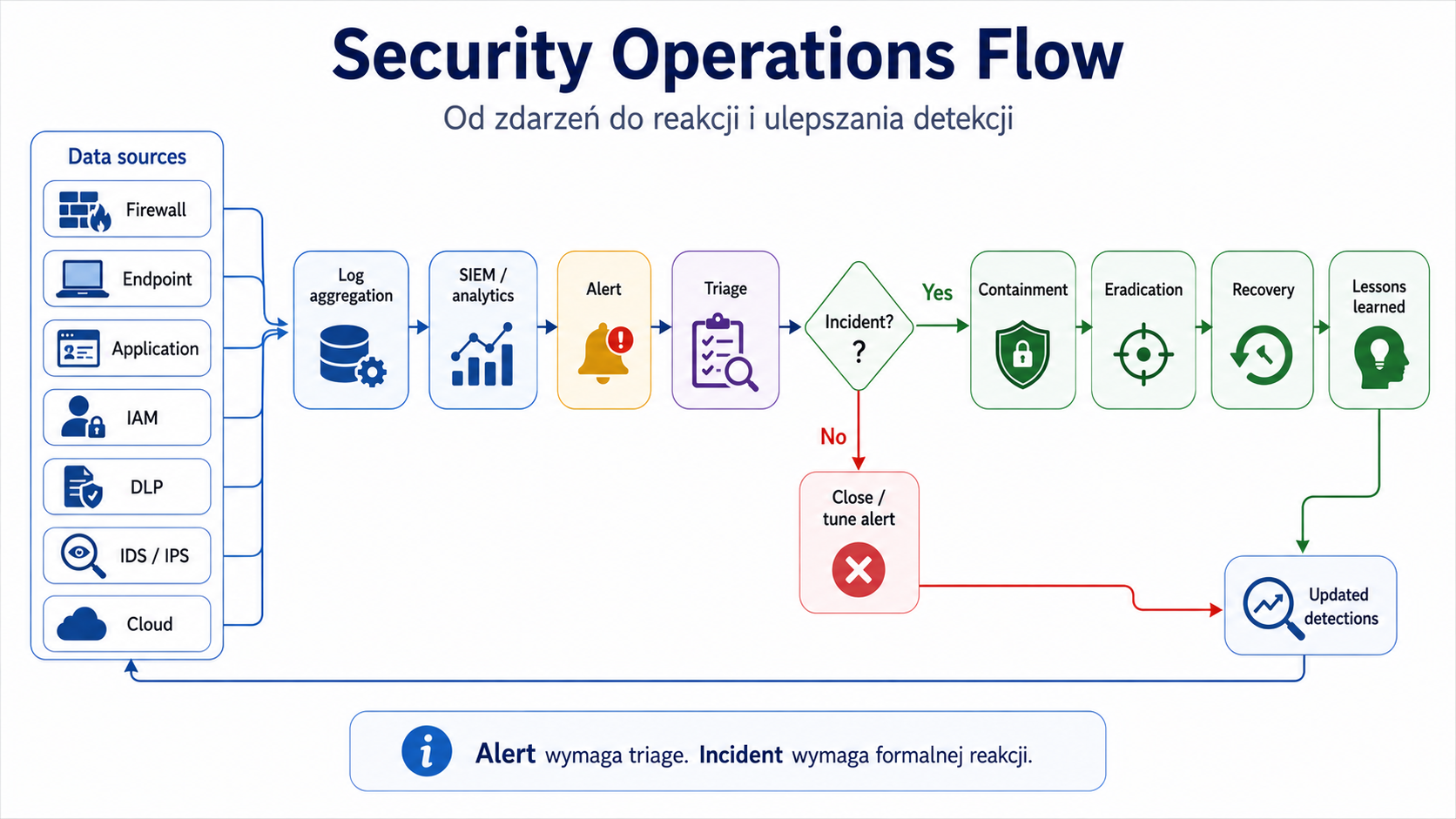
The system records the event.
The monitoring tool analyzes events.
The rule detects a suspicious pattern.
An alert is created.
The analyst checks the context.
If the risk is real, the alert is escalated to an incident.
The team launches the incident response process.
Practical example
One failed user login in the morning is a regular occurrence. Dozens of failed logins from different locations for multiple accounts can generate an alert. If the analysis shows that the attacker has gained access to the account, we have an incident.
Exam example
Scenario
SIEM generated a login alert from an unusual location. The user often uses the company's VPN. What should an analyst do?
Best answer
Verify context before classifying as an incident.
Not to be confused with this
An alert is not evidence in itself. It is the beginning of analysis. An incident requires response, documentation and often escalation.
Common mistakes
The most common error is automatically treating the alert as a confirmed intrusion. The second mistake is ignoring alerts without triage, i.e. initial assessment.
A definition to remember
An event is a fact, an alert is a warning signal, and an incident is a security situation requiring a response.
2. Monitoring and alerting
Problem
Without monitoring, the organization learns about the incident too late: from the user, customer, media or attacker. Monitoring allows you to notice deviations from the norm faster.
Explanation from scratch
Monitoring is observing systems, applications, infrastructure, users and network traffic. The official SY0-701 objectives indicate monitoring computing resources, log aggregation, alerting, scanning, reporting, archiving, and alert response and remediation/validation as elements of security alerting and monitoring.
Alerting is the generation of warnings based on rules, thresholds, correlations or behavior.
Alert tuning is the fine-tuning of alerts to reduce false alarms but not miss important signals.
How it works step by step
Systems generate logs.
Logs go to a central place.
The tool correlates events.
Rules detect patterns.
The alert goes to the analyst or ticketing system.
The analyst performs triage.
The alert is closed as a false positive or escalated.
After analysis, the rules can be fine-tuned.
Practical example
SIEM has a rule: "multiple failed logins, then successful login from an unusual location." This is a stronger signal than just one wrong password. Alert is better because it is based on the correlation of several events.
Exam example
Scenario
The SOC team receives too many alerts, most of which turn out to be harmless. What should he do?
Best answer
Perform alert tuning, improve thresholds, rules and alert context.
Not to be confused with this
Don't confuse alert tuning with disabling monitoring. The goal is not silence, but better signal quality.
Common mistakes
A common mistake is collecting logs without analyzing them. The second mistake is logging everything without retention, prioritization and cost control of storage.
A definition to remember
Monitoring collects and analyzes signals from the environment, alerting indicates events requiring attention, and alert tuning improves the quality of detection.
3. SIEM
Problem
The logs are distributed: the firewall has its own logs, the server has its own logs, the application has its own logs, the endpoint has its own logs, the cloud has its own logs. Without centralization, it is difficult to see the full picture of an incident.
Explanation from scratch
Security Information and Event Management (SIEM) is a system that collects, normalizes, correlates and analyzes logs and events from many sources. SIEM helps detect patterns, generate alerts, conduct investigations and create reports.
SIEM doesn't "resolve incidents on its own." It is a platform that helps analysts notice and understand the problem faster.
How it works step by step
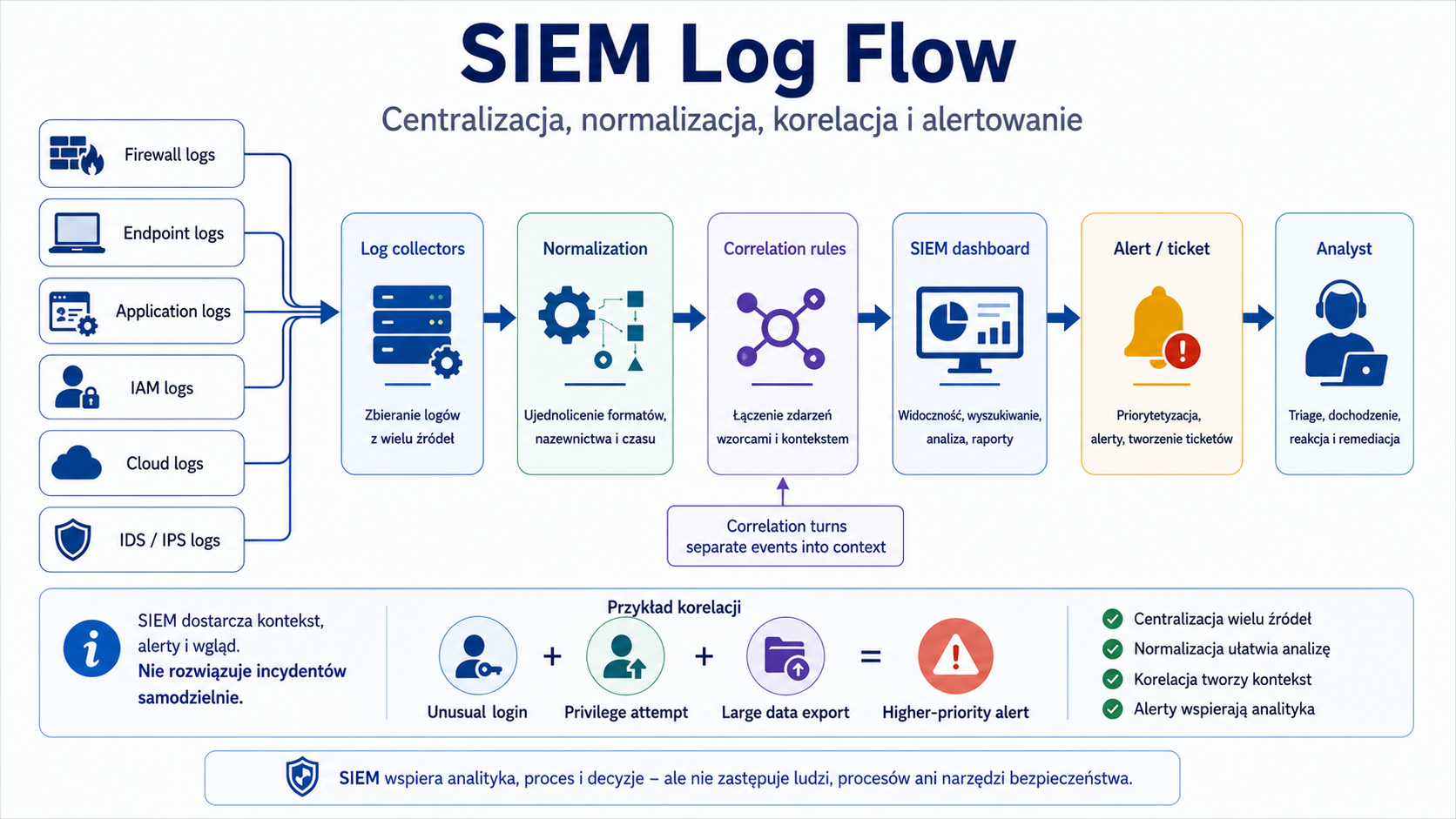
Data sources send logs to the SIEM.
SIEM normalizes formats.
SIEM correlates events.
Rules and analytics detect suspicious patterns.
An alert is created.
The analyst reviews the timeline, hosts, accounts, IP addresses and related events.
The result goes to the incident response process.
Practical example
The attacker logs into the user account, then tries to gain access to the admin panel, and then exports a large amount of data. Individually, these events may look confusing. SIEM can correlate them into one story: suspicious login → escalation → exfiltration.
Exam example
Scenario
The company wants to centrally collect logs from firewalls, servers, applications and endpoints and correlate events. What suits best?
Best answer
SIEM.
Not to be confused with this
SIEM is not the same as EDR. SIEM collects and correlates data from many sources. EDR focuses on endpoints and their behavior.
Common mistakes
A common mistake is implementing SIEM without a data source plan. A SIEM is only as good as the data it receives, the rules it has, and the response process that supports it.
A definition to remember
SIEM centralizes and correlates security events from multiple sources to support detection, analysis, alerting and reporting.
4. Operational tools: DLP, EDR, XDR, NAC, FIM, UBA
Problem
Different problems require different tools. Not every tool is designed to block malware. Not every tool analyzes the network. Not every tool protects data. Security+ often checks whether you know how to choose a tool for a scenario.
Explanation from scratch
Data Loss Prevention (DLP) detects or blocks unauthorized transmission of sensitive data. It can run on endpoints, email, network or in the cloud.
Endpoint Detection and Response (EDR) monitors endpoints, i.e. workstations and servers, detects suspicious processes, file changes, malware behavior and allows you to react, e.g. isolate the host.
Extended Detection and Response (XDR) extends analysis beyond endpoints by combining data from multiple layers, such as email, network, cloud and identity.
Network Access Control (NAC) controls whether a device can access the network. Can check device compliance with policy.
File Integrity Monitoring (FIM) detects changes to important files, such as system, configuration or application files.
User Behavior Analytics (UBA) analyzes user behavior and looks for deviations from the norm, e.g. unusual login hours, mass file downloads or unusual access.
The objectives of SY0-701 include, among others: DLP, NAC, EDR/XDR, user behavior analytics and file integrity monitoring among enterprise security capabilities.
How it works step by step
You identify the problem.
You check whether it concerns data, endpoint, network, files or user behavior.
You choose a tool.
You set policies and alerts.
You monitor the results.
You respond to alerts.
Fine-tuning reduces false positives and false negatives.
Practical example
An employee tries to send a file with PESEL numbers to a private e-mail address. DLP can detect a pattern of personal data and block the message or generate an alert.
Another example: a laptop starts running a suspicious process and connecting to an unknown domain. EDR can show the process tree, file hash, user, network connections and allow host isolation.
Exam example
Scenario
An organization wants to detect unauthorized changes to the configuration files of a critical server. What suits best?
Best answer
File Integrity Monitoring.
Not to be confused with this
Don't confuse DLP with backup. DLP detects or blocks data leakage. Backup helps you restore your data. Don't confuse NAC with VPN - NAC controls whether a device is allowed into the network, VPN creates an access tunnel.
Common mistakes
A common mistake is implementing DLP without data classification. The tool needs to know what is sensitive. The second mistake is ignoring privacy and legality when monitoring users.
A definition to remember
DLP protects data against unauthorized leaks, EDR/XDR detects and supports response to threats, NAC controls device access to the network, FIM detects file changes, and UBA analyzes user behavior.
5. Firewall, IDS/IPS, web filtering, DNS filtering and email security
Problem
Attacks come through various routes: through the network, email, websites, DNS, applications and endpoints. One inspection is not enough. You need to understand where each control works best.
Explanation from scratch
A firewall controls traffic based on rules, addresses, ports, protocols, applications or context.
IDS detects suspicious traffic and alerts. IPS can actively block.
Web filtering controls access to websites through categories, reputation, rules and URL scanning.
DNS filtering blocks queries to known malicious or unwanted domains.
Email security protects email through gateways, filtering, reputation, sandboxing, anti-phishing rules and SPF, DKIM and DMARC mechanisms. For the purposes of SY0-701, email security includes, among others: DMARC, DKIM, SPF and gateway.
How it works step by step
The traffic or message reaches the organization.
The audit examines the source, target, reputation, content or pattern.
The traffic is allowed, blocked, marked or forwarded.
The event is logged.
The alert goes for analysis if it meets the conditions.
Practical example
User clicks on phishing link. Web filter can block the website. DNS filtering can block domain resolution. Email security may have previously marked the message as suspicious. EDR can detect effects on the endpoint if the user downloads the file.
Exam example
Scenario
The company wants to reduce the effectiveness of phishing by verifying that messages actually come from authorized servers in the sender's domain. Which mechanisms are appropriate?
Best answer
SPF, DKIM and DMARC.
Not to be confused with this
Don't confuse DNS filtering with web filtering. DNS filtering works at the level of domain name queries. Web filtering analyzes access to web content, URLs, categories and reputation.
Common mistakes
A common mistake is to treat the email filter as a complete protection against phishing. MFA, training, suspicious message reporting, log analysis and a response procedure are also needed.
A definition to remember
Network, web, DNS and email controls limit different attack paths, so they should work in layers and provide logs for analysis.
6. NetFlow, SNMP traps and packet captures
Problem
Not every problem is visible in the application logs. Sometimes you need to see network traffic patterns: who is talking to whom, how much data is being transmitted, when and using what protocol.
Explanation from scratch
NetFlow provides metadata about network flows: source, destination, ports, protocol, data volume and time. It usually does not show the full contents of packages.
Simple Network Management Protocol (SNMP) traps are notifications sent by network devices, e.g. about an interface failure, state change or threshold crossing.
Packet capture is the interception of network packets for detailed analysis. It is more detailed than NetFlow, but generates more data and may contain sensitive information.
How it works step by step
An administrator or tool notices the problem.
NetFlow shows that the host is sending an unusual amount of data.
SNMP trap may indicate a problem with a network device.
Packet capture can be used for deeper analysis of a specific movement.
The results go to the investigation.
Practical example
The server starts sending a large amount of data to the external IP address at night. NetFlow can quickly show the volume and direction of traffic. Packet capture can help determine transmission details if it is legal and within policy.
Exam example
Scenario
The analyst wants to quickly check which host sent the largest volume of data externally, without analyzing the full content of the packets. What suits best?
Best answer
NetFlow.
Not to be confused with this
NetFlow is not full packet capture. Packet capture is more accurate, but operationally more difficult and more privacy sensitive.
Common mistakes
A common mistake is collecting packet captures without a clearly defined purpose, retention and access control. Such data may contain confidential information.
A definition to remember
NetFlow shows flow metadata, SNMP traps report device events, and packet capture enables detailed packet analysis.
7. Incident response
Problem
When an incident occurs, chaotic actions can make the situation worse: remove evidence, spread malware, extend downtime, or expose the company to legal errors. A process is needed.
Explanation from scratch
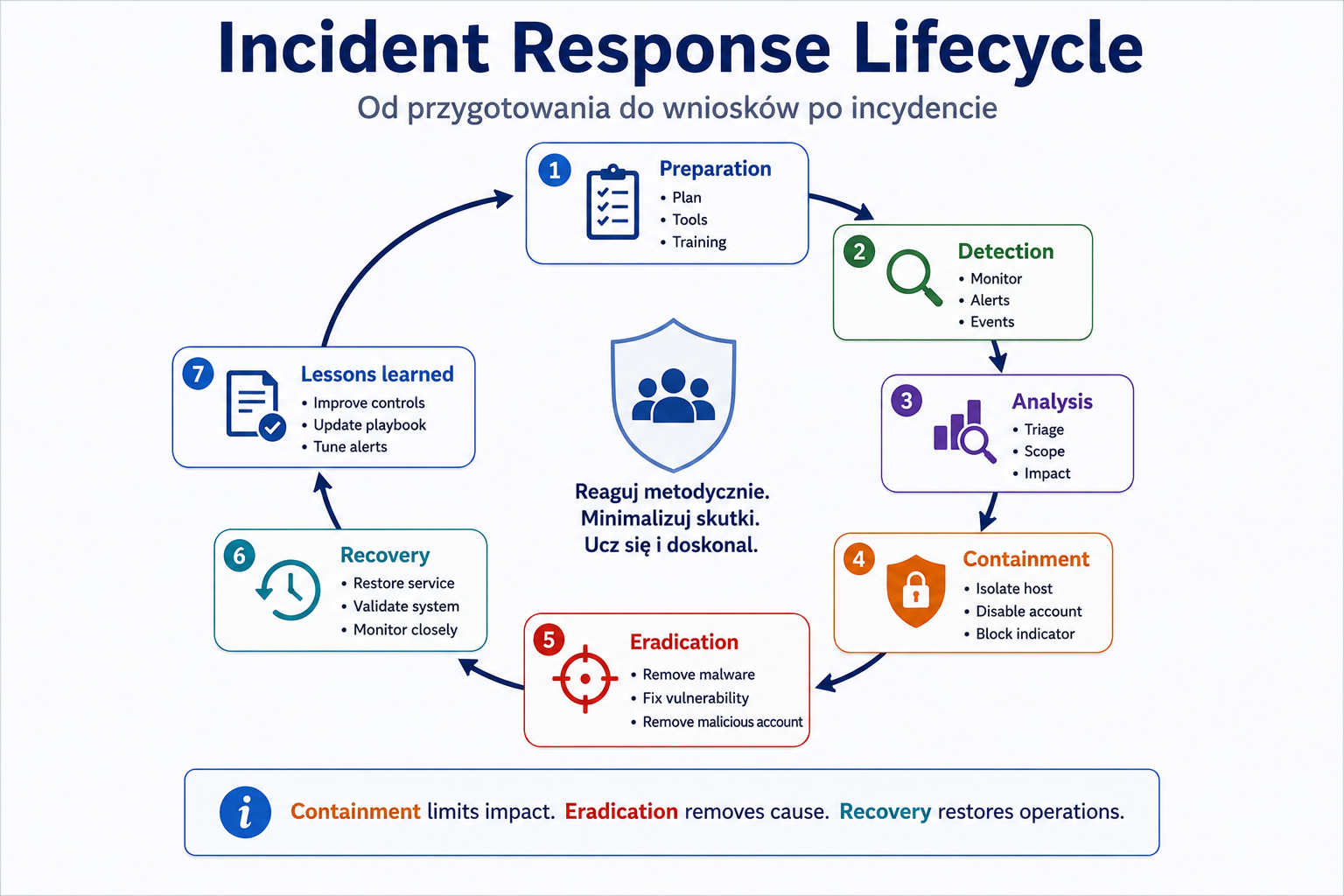
Incident response is a structured process of responding to security incidents. The official goals of SY0-701 indicate the stages: preparation, detection, analysis, containment, eradication, recovery and lessons learned.
How it works step by step
Preparation
The organization prepares people, tools, procedures, contacts, playbooks, backups and permissions.
Detection
The incident is detected by an alert, user, EDR, SIEM, firewall, DLP or other source.
Analysis
The team determines what happened, what resources are affected, the scope and priority.
Containment
The team mitigates the impact, e.g., isolates the host, locks the account, cuts off the segment, stops the leak.
Eradication
The team removes the cause, e.g. malware, vulnerability, misconfiguration, malicious account.
Recovery
Systems return to operation in a controlled manner.
Lessons learned
The organization documents findings and improves security.
Practical example
EDR detects ransomware on a laptop. First, you need to mitigate the effects: isolate the host, check network shares and accounts. Then the malware is removed, the entry vector is closed, the backup data is restored and the conclusions are documented.
Exam example
Scenario
The team detected an infected computer that communicates with the command and control domain. What is the best first operational action?
Best answer
Containment, e.g. isolation of the host from the network.
Not to be confused with this
Containment is not the same as eradication. Containment limits the effects. Eradication removes the cause. Recovery restores operation.
Common mistakes
A common mistake is to immediately delete files or restart the system before securing the evidence. The second mistake is the omission of lessons learned.
A definition to remember
Incident response is a controlled process from preparation, through detection and analysis, to limiting the effects, removing the cause, recovery and final conclusions.
8. Threat hunting and root cause analysis
Problem
Not all threats will be detected by a ready-made rule. Sometimes an organization must actively look for traces of an attacker. After the incident, he or she must also determine the cause so that the problem does not return.
Explanation from scratch
Threat hunting is proactively looking for signs of compromise or unknown threats. Instead of waiting for an alert, the analyst makes a hypothesis and checks the data.
Hypothesis example: "The attacker may have used a legitimate administrative tool for lateral movement."
Root cause analysis (RCA) is the analysis of the root cause. It answers the question: "Why did this really happen?" The cause may be lack of MFA, a vulnerable application, excessive permissions, lack of segmentation, misconfiguration, or a process vulnerability.
How it works step by step
Threat hunting:
- You are formulating a hypothesis.
- You choose data sources.
- You are looking for patterns.
- You verify the results.
- You create detection or improve control.
Root cause analysis:
- You describe the incident.
- You determine the direct cause.
- You're looking for a systemic cause.
- You determine corrective actions.
- You check whether the problem will not return.
Practical example
Incident: User account compromised. Immediate cause: The user entered a password on a fraudulent website. Root cause: no MFA for remote login and no effective phishing protection. RCA indicates that simply resetting your password is not enough.
Exam example
Scenario
Once the malware is removed from the system, the team wants to determine how the malware entered the environment and what controls need to be improved. What should he do?
Best answer
Root cause analysis.
Not to be confused with this
Threat hunting is not the same as simply responding to an alert. Hunting is proactive. RCA is not the same as quick symptom relief.
Common mistakes
A common error is quitting after removing the malware. Without RCA, an organization can be infected again through the same route.
A definition to remember
Threat hunting actively looks for hidden threats, and root cause analysis determines the root cause of the incident to prevent a repeat.
9. Digital forensics, legal hold and chain of custody
Problem
Some incidents require evidence that may be used in legal proceedings, audits or investigations. If evidence is poorly collected, altered or undocumented, it may lose value.
Explanation from scratch
Digital forensics is the process of securing, obtaining, analyzing and reporting digital evidence.
The official objectives of SY0-701 include legal hold, chain of custody, acquisition, reporting, preservation and e-discovery.
Legal hold means an obligation to retain data that may be relevant to a legal matter or investigation.
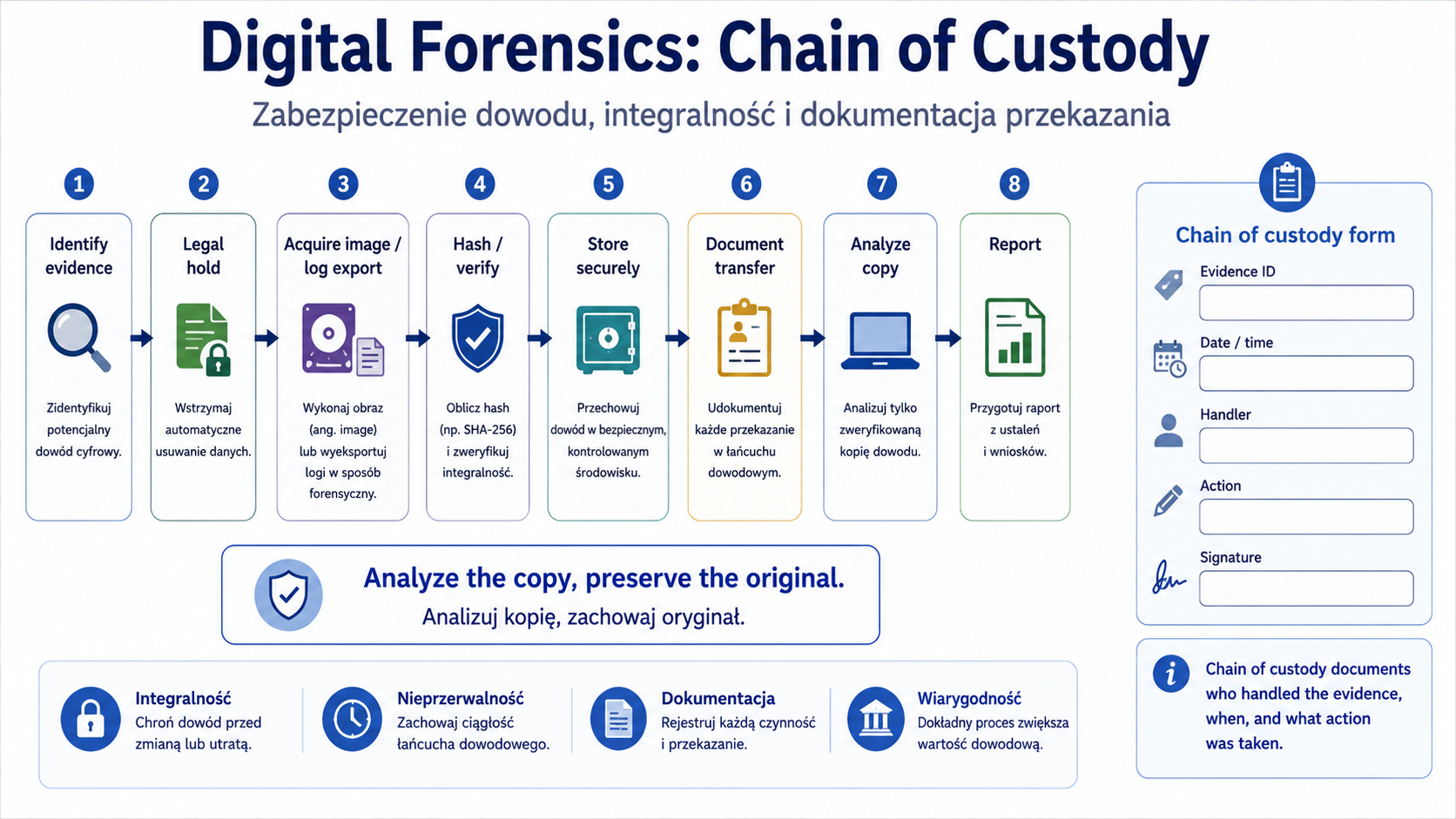
Chain of custody is documentation showing who had access to evidence, when, where, for what purpose and what they did with it.
Acquisition is obtaining evidence, e.g. disk image, memory, logs or data from the system.
Preservation is keeping evidence as unchanged as possible.
E-discovery concerns the identification and transfer of electronic information in a legal context.
How it works step by step
The organization identifies potential evidence.
If necessary, activates legal hold.
The evidence is secured.
A copy or image is created according to the procedure.
Each transfer of evidence is documented.
The analysis is performed on the copy, not the original, if possible.
The results are reported.
Practical example
It is suspected that the employee stole data before leaving. The organization secures the laptop, email logs, file access logs and transfer history. Each piece of evidence is described, sealed or logically secured, and access to it is documented.
Exam example
Scenario
The analyst secures the laptop as evidence. Must document each person who had access to the device. What is this requirement called?
Best answer
Chain of custody.
Not to be confused with this
Don't confuse forensics with regular troubleshooting. Troubleshooting is intended to quickly fix a problem. Forensics is to preserve evidentiary value and establish facts.
Common mistakes
A common mistake is to analyze directly on the original medium. The second error is the lack of documentation of who had access to the evidence and when.
A definition to remember
Digital forensics secures and analyzes digital evidence, legal hold orders its preservation, and chain of custody documents its control and transfer.
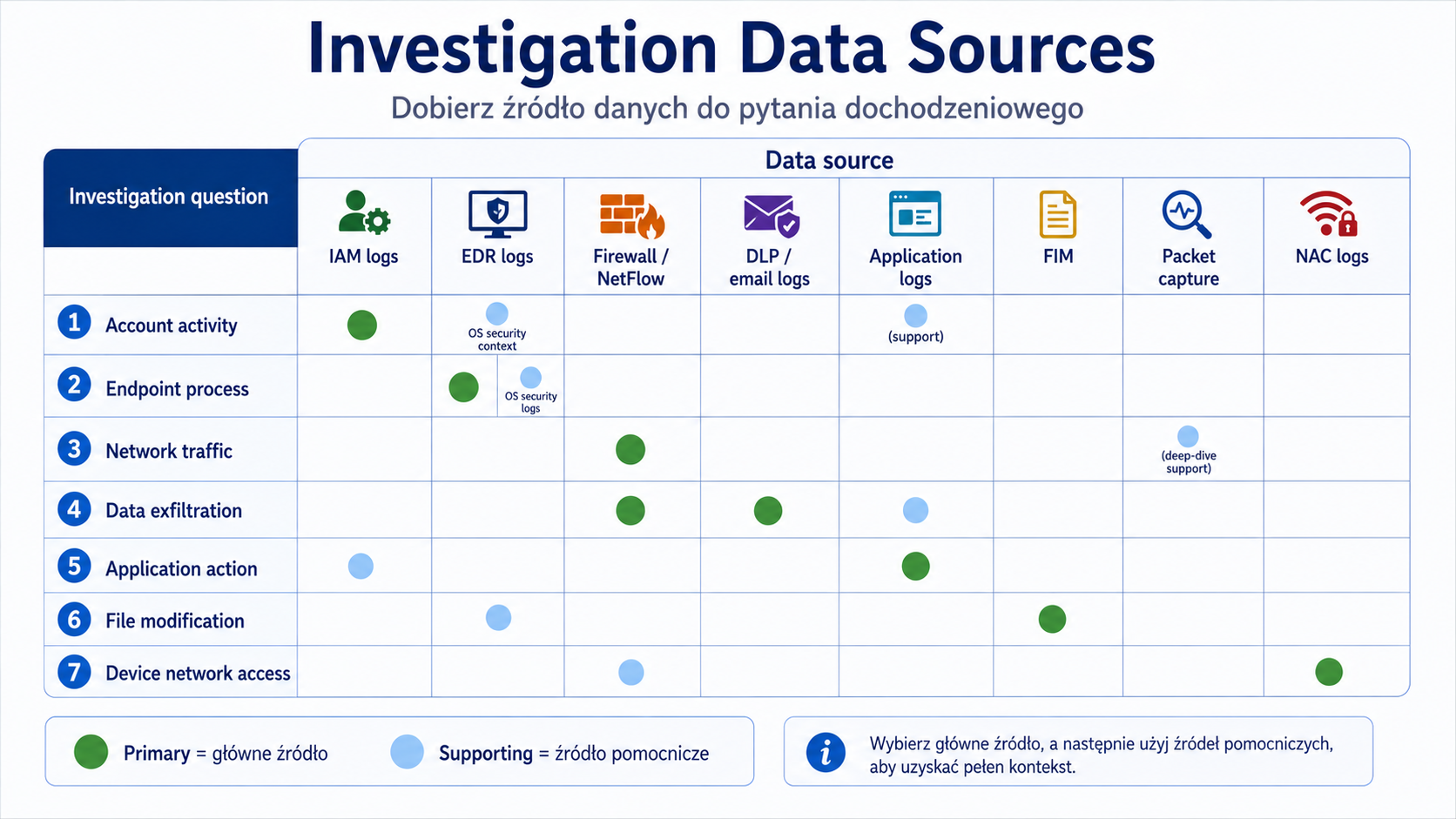
10. Sources of data in the investigation
Problem
During an incident, you need to know where to look for evidence. Another source will show network traffic, another a process on the endpoint, another an application error, and another a change in permissions.
Explanation from scratch
The official goals of SY0-701 list log data and data sources, among others: firewall logs, application logs, endpoint logs, OS-specific security logs, IPS/IDS logs, network logs, metadata, vulnerability scans, automated reports, dashboards and packet captures.
Top sources:
- Source What is it for?
- Firewall logs Check allowed and blocked traffic.
- Application logs Analysis of application errors, logins, queries and business operations.
- Endpoint logs Processes, files, user activities, malware.
- OS security logs Logins, account changes, permissions, system events.
- IDS/IPS logs Detection of suspicious traffic patterns.
- Network logs Connectivity, flows, network activity.
- Metadata Data about the data, e.g. time, author, size, source.
- Vulnerability scans Information about known vulnerabilities.
- Packet captures Detailed packet analysis.
- Dashboards A quick view of trends and the state of the environment.
How it works step by step
You define the investigative question.
You choose data sources.
You set a time range.
You correlate users, hosts, IP addresses and processes.
You create a timeline.
You confirm or reject the hypothesis.
You document the result.
Practical example
Question: "Was the data taken out of the organization?"
Sources: DLP, proxy logs, firewall logs, NetFlow, endpoint logs, application logs, cloud audit logs.
Question: "Was the administrator account used incorrectly?"
Sources: IAM logs, OS security logs, PAM logs, SIEM, jump server logs.
Exam example
Scenario
An analyst wants to determine whether a user has performed a mass export of data from an application. Which source will be the most relevant?
Best answer
Application logs, possibly supplemented with DLP, firewall/proxy and endpoint logs.
Not to be confused with this
Not every investigation starts with packet capture. Application, IAM, endpoint or firewall logs are often faster and more accurate.
Common mistakes
A common mistake is to only look at one data source. Incidents usually require correlation of multiple sources.
A definition to remember
The data source is selected according to the investigative question: who, what, when, where, by what system and with what effect.
11. Automation and orchestration
Problem
Handling each alert manually is slow and error-prone. Automation can reduce response times, enforce standard actions, and reduce team workload. At the same time, poorly designed automation can repeat the error en masse.
Explanation from scratch
Automation is the automatic execution of a task, e.g. creating a ticket, adding an IP address to the block list or disabling an account.
Orchestration is the combination of many automatic steps into a process between systems. Example: an alert from SIEM creates a ticket, EDR isolates the host, IAM blocks the account, and the team gets a notification.
SY0-701 objectives list automation use cases such as user provisioning, resource provisioning, guard rails, security groups, ticket creation, escalation, enabling/disabling services and access, continuous integration and testing, and integration via Application Programming Interfaces (APIs). They also point out the benefits, including: saving time, enforcing baselines, standardization and faster response, but also risks: complexity, cost, single point of failure, technical debt and supportability.
How it works step by step
The organization identifies a repeatable process.
Defines the launch conditions.
Specifies automatic steps.
Adds security controls, such as approval for risky activities.
Tests automation.
It is implementing it gradually.
Monitors results and errors.
Practical example
SIEM detects suspicious administrator logins from an unusual country. Automation can create a ticket, notify the SOC, force a session reset and request additional verification. In more risky cases, it may temporarily block your account, but this action should be well-tested.
Exam example
Scenario
The company wants to speed up response to repetitive alerts and automatically create tickets and escalate them to the right team. What suits best?
Best answer
Automation/orchestration.
Not to be confused with this
Don't confuse automation with completely replacing analysts. Automation handles repetitive steps well, but difficult decisions still require a human.
Common mistakes
A common error is automatic blocking without tests or exceptions. A false alert can then block a critical account or service.
A definition to remember
Automation performs single tasks, while orchestration combines multiple steps and systems into a coherent response process.
Key concepts
Concept Meaning
Event A single event recorded by the system.
Alert A warning generated by a rule, tool, or correlation.
Incident A security situation requiring response.
Log aggregation Central collection of logs.
Alert tuning Tuning alert rules and thresholds.
SIEM System for centralization, correlation and analysis of security events.
DLP Control that detects or blocks unauthorized data flow.
EDR Endpoint detection and response tool.
XDR Extended detection and response from multiple sources.
NAC Control device access to the network.
FIM File integrity monitoring.
UBA User behavior analysis.
NetFlow Metadata of network flows.
SNMP traps Notifications of network devices about events.
Packet capture Capture of packets for detailed analysis.
Incident response The process of responding to security incidents.
Containment Limiting the effects of the incident.
Eradication Removal of the cause of the incident.
Recovery Restoring normal operation.
Lessons learned Conclusions and corrections after the incident.
Threat hunting Proactively looking for traces of threats.
Root cause analysis Root cause analysis.
Legal hold Obligation to retain data as potential evidence.
Chain of custody Documenting control over evidence.
Acquisition Obtaining digital evidence.
Preservation Preserving evidence unchanged.
E-discovery Identification and transfer of electronic data in a legal context.
Automation Automatic execution of a task.
Orchestration Combining multiple automatic steps into a process.
Examples
Example 1: Suspicious login
SIEM generates an alert: a user account has logged in from two distant countries within 10 minutes. The analyst should not immediately assume account takeover. It should check VPN, login history, device, MFA, IP addresses, post-login activity, and other alerts. If the account has performed unusual actions, the matter may be escalated to an incident.
Example 2: Ransomware on the endpoint
EDR detects mass file changes, suspicious processes and communication with an unknown domain. First, you need to limit the effects: host isolation, user account checking, network share analysis. The cause is then removed, the data is restored, and an RCA is performed.
Example 3: Possible data exfiltration
DLP detects an attempt to send a file with customer data to a private e-mail address. DLP logs, email gateway logs, endpoint logs, application logs and possibly NetFlow will be useful for analysis. The goal is to determine whether the data actually left the organization and whether the user acted accidentally or maliciously.
Example 4: Investigation with evidence
The organization suspects insider threat. You need to secure your laptop, access logs, email logs and file download history. If the case may have legal consequences, chain of custody and legal hold should be maintained.
Practical applications
Building a basic alert triage process.
Selecting tools for the type of problem.
Log analysis from multiple sources.
Mitigate incident impact through isolation, lockdowns, and segmentation.
Creating an incident timeline.
Documenting evidence.
Automating repetitive SOC activities.
Preparation for performance-based questions about logs and reactions.
Common mistakes
Wrong Why is it wrong Correct understanding
| “Every alert is an incident.” | The alert requires verification. | An incident is a situation that requires a response after analysis. |
|---|---|---|
| “SIEM resolves incidents itself.” | SIEM correlates and alerts, but it requires process and people. | SIEM supports SOC. |
| “EDR and SIEM are the same.” | EDR focuses on endpoints, SIEM correlates many sources. | The tools complement each other. |
| “Containment and eradication are the same thing.” | Containment limits the effects, eradication removes the cause. | The order of actions matters. |
| “Packet capture is always the first source.” | Application, endpoint, IAM or firewall logs are often enough. | The source is matched to the question. |
| "DLP backups data." | DLP detects or blocks data outflow. | Backup is for recovery. |
| “Forensics is simply fixing the system.” | Forensics focuses on evidence and its integrity. | Evidence must not be destroyed. |
| “Automation always reduces risk.” | Poorly designed, it can multiply errors en masse. | Automation needs to be tested and controlled. |
Common mistakes
No triage alerts
The team reacts chaotically or ignores alerts without prior assessment.
Invalid data source
The analyst checks the firewall when application logs are needed, or analyzes the endpoint when the problem is in IAM.
No isolation of active threat
The suspicious host continues to communicate with the network because the team starts with long analysis instead of containment.
Destruction of evidence
Restarting, deleting files or reinstalling the system before securing the information may complicate the investigation.
No lessons learned
The incident is "closed" but the control that failed is not corrected.
Automation without exceptions and tests
A poorly written rule can block accounts, services, or production traffic.
What you need to know for the exam
In this part of the 4.0 domain you need to be able to:
- explain monitoring, log aggregation, alerting, reporting and archiving
- indicate when to use SIEM, DLP, antivirus, SNMP traps, NetFlow and vulnerability scanners
- select firewall rules, access lists, IDS/IPS, web filter, DNS filtering and email security
- understand DMARC, DKIM and SPF as email security mechanisms
- indicate the use of FIM, DLP, NAC, EDR/XDR and UBA
- understand the applications of automation: ticket creation, escalation, disabling access, CI/testing, API integrations
- know the stages of incident response
- distinguish containment, eradication and recovery
- indicate legal hold, chain of custody, acquisition and preservation
- select data sources for investigation.
Checklist
User should be able to:
- Distinguish between event, alert and incident.
- Explain log aggregation.
- Explain tuning alert.
- Describe the role of SIEM.
- Distinguish SIEM from EDR.
- Explain DLP, EDR, XDR, NAC, FIM and UBA.
- Distinguish DNS filtering from web filtering.
- Explain the basic meaning of SPF, DKIM and DMARC.
- Explain NetFlow, SNMP traps and packet capture.
- List the stages of incident response.
- Distinguish between containment, eradication and recovery.
- Explain threat hunting.
- Explain root cause analysis.
- Explain legal hold and chain of custody.
- Select a data source for your investigative question.
- Indicate the benefits and risks of automation.
- Review questions
- What is the difference between an event and an alert?
- When does an alert become an incident?
- What is SIEM used for?
- How does SIEM differ from EDR?
- When to use DLP?
- When to use FIM?
- What is the difference between DNS filtering and web filtering?
- What are SPF, DKIM and DMARC for?
- What is the difference between NetFlow and packet capture?
- What are the main stages of incident response?
- What is the difference between containment and eradication?
- What does recovery mean?
- What is threat hunting?
- What is root cause analysis?
- What does chain of custody mean?
- What is legal hold for?
- Which data source should you choose to analyze a suspicious process on a laptop?
- Which data source should you choose to analyze mass exports from applications?
- When can automation be risky?
- Why is lessons learned important?
- Answers with explanations
- An event is a single fact, an alert is a warning generated based on a rule or analysis.
- An alert becomes an incident when the analysis confirms or makes it sufficiently probable that a security breach requires a response.
- SIEM collects, normalizes, correlates and analyzes logs from many sources.
- SIEM correlates multiple data sources, and EDR focuses on endpoints and their behavior.
- DLP is used when you need to detect or block the unauthorized outflow of sensitive data.
- FIM is used to detect changes in important files, e.g. configuration or system files.
- DNS filtering blocks queries to domains, web filtering controls access to websites, URLs and content categories.
- SPF, DKIM and DMARC help verify email authenticity and reduce domain spoofing.
- NetFlow shows flow metadata, and packet capture captures detailed packets.
- Stages: preparation, detection, analysis, containment, eradication, recovery, lessons learned.
- Containment limits the effects, eradication removes the cause.
- Recovery restores systems to normal operation in a controlled manner.
- Threat hunting is proactively looking for traces of threats without waiting for an alert.
- Root cause analysis determines the root cause of the incident.
- Chain of custody documents who had access to the evidence, when and what they did with it.
- Legal hold requires you to retain data that may be legally or investigatively relevant.
- Endpoint logs or EDR telemetry.
- They can show process, process tree, files, user and connections.
- Application logs, DLP logs, proxy/firewall logs and endpoint logs.
- The application will show the business operation, DLP and network will show the potential outflow.
- Automation is risky when it operates on poorly tuned alerts or can lock down critical accounts and services without control.
- Lessons learned allows you to improve controls and processes so that the incident does not happen again in the same way.
- Practical tasks
- Lab 1: SIEM alert triage
Purpose:
Practice analyzing an alert without hastily classifying it as an incident.
Context:
The SIEM generated an alert: the jan.k account logged in from an unusual location and 10 minutes later downloaded a large number of files from the company application.
Steps:
- List what data needs to be checked.
- Indicate at least five data sources.
- Determine what information would confirm the incident.
- Determine what information would clarify the activity as legitimate.
- Suggest a first containment action if the risk is confirmed.
Expected result:
Triage plan: question → data source → possible interpretation.
Pass criteria:
- IAM/MFA logs included.
- Application logs included.
- Endpoint or EDR logs included.
- Firewall/proxy/DLP logs included.
- The alert was not automatically considered an incident without analysis.
- Containment was proposed, e.g. blocking the session or account if the activity is suspicious.
Only perform this exercise in a legal, controlled laboratory environment. Don't use it on other people's systems, networks or accounts.
Lab 2: Ransomware response plan
Purpose:
Practice the sequence of incident response actions.
Context:
The user reports that files on the laptop have changed extensions. EDR shows a suspicious process and connections to an unknown domain. Some network shares have modified files.
Steps:
- Indicate preparation activities that should have existed before the incident.
- Indicate detection signals.
- Indicate what data to analyze.
- Suggest containment.
- Suggest eradication.
- Suggest recovery.
- List the lessons learned.
Expected result:
Response plan consistent with incident response stages.
Pass criteria:
- Suspect host isolated.
- The scope of the infection was checked.
- They didn't start with deleting evidence.
- Backups and their security are taken into account.
- RCA and control improvement are included.
Only perform this exercise in a legal, controlled laboratory environment. Don't use it on other people's systems, networks or accounts.
Lab 3: Selection of data sources for investigation
Purpose:
Practice selecting the right logs and data sources.
Context:
Investigative question Your data sources
| Was the administrator account used outside of business hours? | ? |
|---|---|
| Was the host sending data to an unknown IP address? | ? |
| Did the application perform a mass data export? | ? |
| Has the user tried to email customer data? | ? |
| Has anyone changed the server configuration file? | ? |
| Has a non-policy device connected to the network? | ? |
Steps:
- For each question, select at least two data sources.
- Justify your choice.
- Indicate which source is primary and which is secondary.
- Indicate how to build a timeline.
Expected result:
Table: question → main source → secondary source → justification.
Pass criteria:
- For admin, IAM/PAM/OS security logs are included.
- NetFlow/firewall/packet capture is included for network traffic.
- Application logs are included for data export.
- DLP/email gateway is included for email.
- FIM is included for file change.
- NAC is included for the device on the network.
Only perform this exercise in a legal, controlled laboratory environment. Don't use it on other people's systems, networks or accounts.
Mini-test
Question 1
What best describes an alert?
A. Any system event
B. A warning generated by a rule, tool, or correlation
C. Always confirmed incident
D. Physical evidence in a court case
Correct answer:
B
Explanation:
An alert is a signal that requires analysis, but does not necessarily mean a confirmed incident.
Why the other answers are worse:
- A: It's an event.
- C: The alert requires verification.
- D: This may concern forensics, but not alert.
- Question 2
The company wants to centrally correlate logs from firewalls, endpoints and applications. What suits best?
A. SIEM
B.UPS
C. Data masking
D. Cold site
Correct answer:
A
Explanation:
SIEM is used to centralize, correlate and analyze security events.
Why the other answers are worse:
- B: Concerns power supply.
- C: Concerns data protection in the presentation.
- D: Applies to disaster recovery.
- Question 3
Which tool will best detect an unauthorized attempt to send customer data outside the organization?
A.DLP
B. Load balancer
C.DHCP
D. Hot site
Correct answer:
A
Explanation:
DLP detects or blocks unauthorized data flow.
Why the other answers are worse:
- B: Splits traffic.
- C: Allocates network configuration.
- D: Concerns disaster recovery.
- Question 4
The suspicious computer is communicating with the command and control domain. What action best corresponds to the containment stage?
A. Host isolation
B. Lessons learned
C. Delete the report
D. Increasing user privileges
Correct answer:
A
Explanation:
Isolation limits further communication and potential spread.
Why the other answers are worse:
- B: This is the final stage.
- C: Destroys documentation.
- D: Increases risk.
- Question 5
What does chain of custody mean?
A. DNS server list
B. Documenting control over evidence
C. Encryption of backup files
D. Firewall rule
Correct answer:
B
Explanation:
Chain of custody shows who had access to the evidence, when and what they did with it.
Why the other answers are worse:
- A, C, D: They do not describe evidentiary control over the material.
- Question 6
- An analyst wants to check which host was sending the most data to an external IP address. What suits best?
A.NetFlow
B. Data masking
C. Password vaulting
D. SAML
Correct answer:
A
Explanation:
NetFlow shows the metadata of flows, including the source, destination and volume of the data.
Why the other answers are worse:
- B: Hides some data.
- C: Concerns PAM.
- D: Refers to federated login.
- Question 7
Which stage of incident response involves removing the cause of the incident?
A.Containment
B. Eradication
C.Detection
D. Preparation
Correct answer:
B
Explanation:
Eradication removes the cause, such as malware, a vulnerability or a malicious account.
Why the other answers are worse:
- A: It limits the effects.
- C: Detects the problem.
- D: Prepares the organization.
- Question 8
Which data source is the most appropriate for checking bulk export of data from applications?
A. Application logs
B. UPS logs
C. Badge access logs as the only source
D. Server room temperature monitor
Correct answer:
A
Explanation:
Application logs best show operations performed in the application, e.g. data export.
Why the other answers are worse:
- B, C, D: They may be important in other contexts, but they are not the main source for application exports.
- Question 9
What is threat hunting?
A. Proactively look for signs of threats
B. Deleting all logs
C. Physical destruction of disks
D. Delegated authorization
Correct answer:
A
Explanation:
Threat hunting involves actively searching for threats, often based on hypotheses.
Why the other answers are worse:
- B: It is harmful.
- C: It's destruction.
- D: It's OAuth.
- Question 10
The company wants to automatically create tickets and escalate repetitive alerts to the appropriate team. What suits best?
A. Automation/orchestration
B. Data sovereignty
C. Cold site
D. Tailgating
Correct answer:
A
Explanation:
Automation and orchestration handle repetitive steps between systems.
Why the other answers are worse:
- B: Concerns location and data law.
- C: Concerns playback.
- D: It's a physical social engineering technique.
- Flashcards
- Front of the index card. Back of the index card
| Event vs alert? | The event is a fact; alert is a warning that requires analysis. |
|---|---|
| Alert vs incident? | An alert is a signal; an incident is a security situation requiring a response. |
| What does SIEM do? | Centralizes, correlates and analyzes events from many sources. |
| SIEM vs EDR? | SIEM correlates multiple sources; EDR focuses on endpoints. |
| What does DLP do? | Detects or blocks unauthorized data outflow. |
| What does EDR do? | Monitors endpoints and supports detection and response. |
| What does XDR do? | It combines detection and response from many layers of the environment. |
| What does NAC do? | Controls device access to the network. |
| What does FIM do? | Detects changes to important files. |
| What does UBA do? | Analyzes user behavior and deviations from the norm. |
| DNS filtering vs web filtering? | DNS blocks domains; web filtering controls URLs, categories and reputation. |
| What does NetFlow do? | Shows metadata of network flows. |
| NetFlow vs packet capture? | NetFlow is metadata; packet capture is detailed packets. |
| What is SNMP trap? | Notification of the network device about the event. |
| Incident response stages? | Preparation, detection, analysis, containment, eradication, recovery, lessons learned. |
| Containment vs eradication? | Containment limits the effects; eradication removes the cause. |
| What is recovery? | Restoring systems to operation. |
| What is lessons learned? | Post-incident analysis and improvement of control. |
| What is threat hunting? | Proactively look for traces of threats. |
| What is RCA? | Root cause analysis, i.e. analysis of the root cause. |
| What is legal hold? | Obligation to retain data as potential evidence. |
| What is chain of custody? | Documentation of control over evidence. |
| What is acquisition? | Obtaining digital evidence. |
| What is preservation? | Keeping the evidence unchanged. |
| Automation vs orchestration? | Automation gets the job done; orchestration combines multiple steps into a process. |
Images to generate
IMG_M05_S01_SECURITY_OPERATIONS_FLOW
Place in the material:
"Introduction" section.
Image Purpose:
Show the overall Security Operations workflow.
Description of the image to generate:
Flow diagram: data sources → log aggregation → SIEM/analytics → alert → triage → incident? → containment → eradication → recovery → lessons learned → updated detections. Add side sources: firewall, endpoint, application, IAM, DLP, IDS/IPS, cloud.
Style:
Technical block diagram.
Mandatory elements:
- data sources
- log aggregation
- SIEM
- alert
- triage
- incident decision
- containment
- eradication
- recovery
- lessons learned
- updated detections.
Elements to avoid:
- exploit code
- offensive instructions
- excess text
- "hacker" symbols with no educational value.
- IMG_M05_S02_SIEM_LOG_FLOW
- Place in the material:
- "SIEM" section.
Image Purpose:
Explain where SIEM gets data and how it creates an alert.
Description of the image to generate:
Diagram: firewall logs, endpoint logs, application logs, IAM logs, cloud logs, IDS/IPS logs → log collectors → normalization → correlation rules → SIEM dashboard → alert/ticket → analyst. Add a small label: "correlation turns separate events into context".
Style:
Monitoring architecture diagram.
Mandatory elements:
- firewall logs
- endpoint logs
- application logs
- IAM logs
- cloud logs
- IDS/IPS logs
- collectors
- normalization
- correlation
- alert
- analyst.
Elements to avoid:
- vendor-specific names
- too small logs
- excess icons.
- IMG_M05_S03_INCIDENT_RESPONSE_LIFECYCLE
- Place in the material:
- "Incident response" section.
Image Purpose:
Show incident response stages and their order.
Description of the image to generate:
Cyclic diagram: preparation → detection → analysis → containment → eradication → recovery → lessons learned → preparation. For containment, add examples: isolate host, disable account, block indicator. For lessons learned, add: improve controls, update playbook, tune alerts.
Style:
Process cycle diagram.
Mandatory elements:
- preparation
- detection
- analysis
- containment
- eradication
- recovery
- lessons learned
- examples of containment activities
- improving playbooks.
Elements to avoid:
- too long descriptions
- offensive details
- visual chaos.
- IMG_M05_S04_INVESTIGATION_DATA_SOURCES
- Place in the material:
- "Data sources in the investigation" section.
Image Purpose:
Help you select a data source for your investigative question.
Description of the image to generate:
Matrix: investigative question vs. data source. Lines: account activity, endpoint process, network traffic, data exfiltration, application action, file modification. Columns: IAM logs, EDR logs, firewall/NetFlow, DLP/email logs, application logs, FIM. Mark the best sources in the cells.
Style:
Visual table/infographic.
Mandatory elements:
- IAM logs
- EDR logs
- firewall logs
- NetFlow
- DLP/email logs
- application logs
- FIM
- packet capture
- investigative questions.
Elements to avoid:
- too many details
- real user data
- code or payloads.
- IMG_M05_S05_FORENSICS_CHAIN_OF_CUSTODY
- Place in the material:
- Section "Digital forensics, legal hold and chain of custody".
Image Purpose:
Explain how digital evidence is documented.
Description of the image to generate:
Process diagram: identify evidence → legal hold → acquire image/log export → hash/verify → store securely → document transfer → analyze copy → report. Add a chain of custody form with the following fields: evidence ID, date/time, handler, action, signature.
Style:
Investigative process diagram/infographic.
Mandatory elements:
- identify evidence
- legal hold
- acquisition
- hash/verify
- secure storage
- transfer documentation
- analyzecopy
- report
- chain of custody form fields.
Elements to avoid:
- realistic personal data
- security bypass instructions
- unreadable text.
- Coverage of exam requirements
- SY0-701 Exam Requirement Where It Is Covered Level of Coverage Notes
- 4.4 Explain security alerting and monitoring concepts and tools Monitoring and alerting; SIEM; operational tools Full Includes log aggregation, alerting, scanning, reporting, archiving, alert tuning, SIEM, DLP, SNMP traps, NetFlow and vulnerability scanners.
- 4.5 Given a scenario, modify enterprise capabilities to enhance security Firewall, IDS/IPS, web filtering, DNS filtering, email security, FIM, DLP, NAC, EDR/XDR, UBA Full The selection of controls for scenarios and differences between tools are taken into account.
- 4.7 Explain the importance of automation and orchestration related to secure operations Automation and orchestration Full Included use cases, benefits and risks of automation.
- 4.8 Explain appropriate incident response activities Incident response; threat hunting; RCA Full Includes the entire IR cycle, tabletop/simulation as testing context, and RCA.
- 4.9 Given a scenario, use data sources to support an investigation forensics Full Includes firewall, application, endpoint, OS security, IDS/IPS, network logs, metadata, vulnerability scans, dashboards and packet captures.
- Which is worth repeating before moving on
- Event vs alert vs incident.
- SIEM vs EDR vs XDR.
- DLP, NAC, FIM, UBA.
- IDS vs. IPS.
- DNS filtering vs web filtering.
- SPF, DKIM, DMARC.
- NetFlow vs packet capture.
- Incident response stages.
- Containment vs eradication vs recovery.
- Threat hunting vs alert response.
- RCA.
- Legal hold and chain of custody.
- Selecting a data source for an investigative question.
- Automation vs orchestration.
- Module completeness check
Scope from outline covered:
- monitoring systems, applications and infrastructure
- log aggregation, alerting, scanning, reporting, archiving, alert response, alert tuning
- SIEM, DLP, antivirus as a tool category, SNMP traps, NetFlow, vulnerability scanners
- firewall, IDS/IPS, web filter, DNS filtering, email security, FIM, DLP, NAC, EDR/XDR, UBA
- automation and orchestration
- incident response
- threat hunting
- root cause analysis
- digital forensics
- legal hold, chain of custody, acquisition, preservation, reporting, e-discovery
- log data and data sources
- exercises, mini-test, flashcards, images and check of coverage of requirements.
Scope requiring deepening:
- formal playbooks, incident response and governance policies will return in module 6.
- risk management and business impact analysis will return in module 6.
- additional training for scenario questions and PBQ will be in module 7.
- Detailed vendor-specific tools are not needed at the Security+ level.
Most important things to remember:
- An alert requires triage, not automatic recognition of an incident.
- SIEM helps correlate data, but requires good sources and process.
- The tool is selected according to the problem: data, endpoint, network, application, user, files.
- Incident response is in the order: preparation, detection, analysis, containment, eradication, recovery, lessons learned.
- Do not destroy evidence before analysis and preservation.
- Chain of custody is crucial when evidence may have legal significance.
- Automation speeds up the response, but must be tested and controlled.
Is the material sufficient to master this part:
Yes, as a complete introduction to monitoring, detection, incident response, forensics and data sources at the Security+ SY0-701 level.
Potential vulnerabilities:
- It is worth doing a separate set of log interpretation exercises later.
- After module 6, it is worth returning to incident response as an element of policies, procedures and governance.
- It is worth practicing PBQ in module 7, which involves matching data sources to the scenario.
Recommended replay:
- Work through the flashcards.
- Take the mini-test without looking at the answer.
- Do lab 1 and 2.
- For each scenario, write down: data sources → hypothesis → analysis → containment → eradication → recovery → lessons learned.
- Draw a simple flow: logs → SIEM → alert → triage → incident response.
- Explanation depth control
- Important concepts are developed, not just mentioned.
- For each key area, a problem, a mechanism, a practical example, an exam scenario, common mistakes and a definition are shown.
- Added exercises, checklist, control questions, answers, mini-test, flashcards and image descriptions.
- The exercises are defensive and intended only for a legal, controlled environment.
- The structure meets the requirements for generating appropriate training material.